Role Tagger

Thanks! Good call. Just ticketed that out here: #10 - Reorder splits and the roles within them - HeMan/role-tagger - Codeberg.org

And pushed an update to make that available in 1.6.3 :grin:

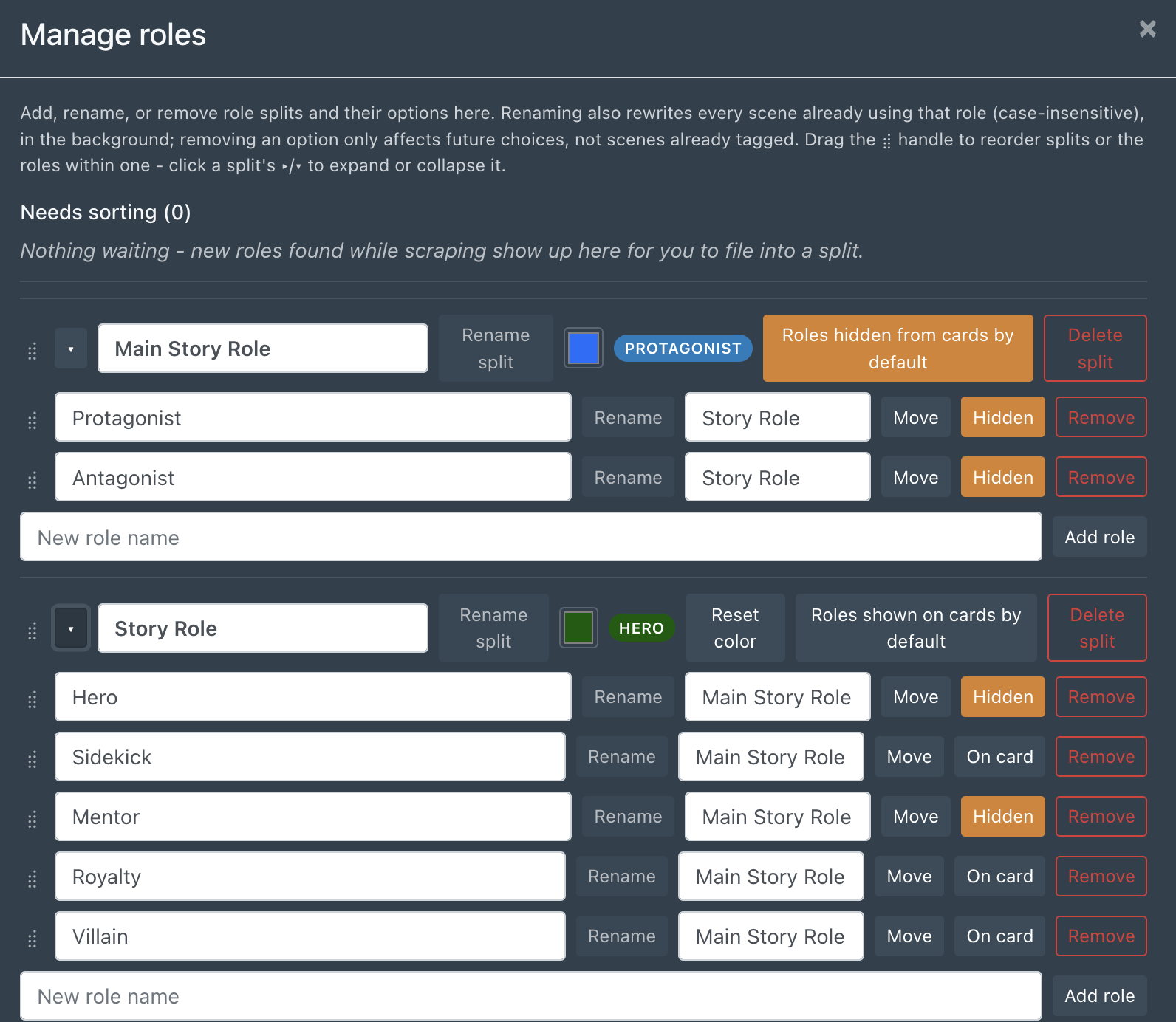
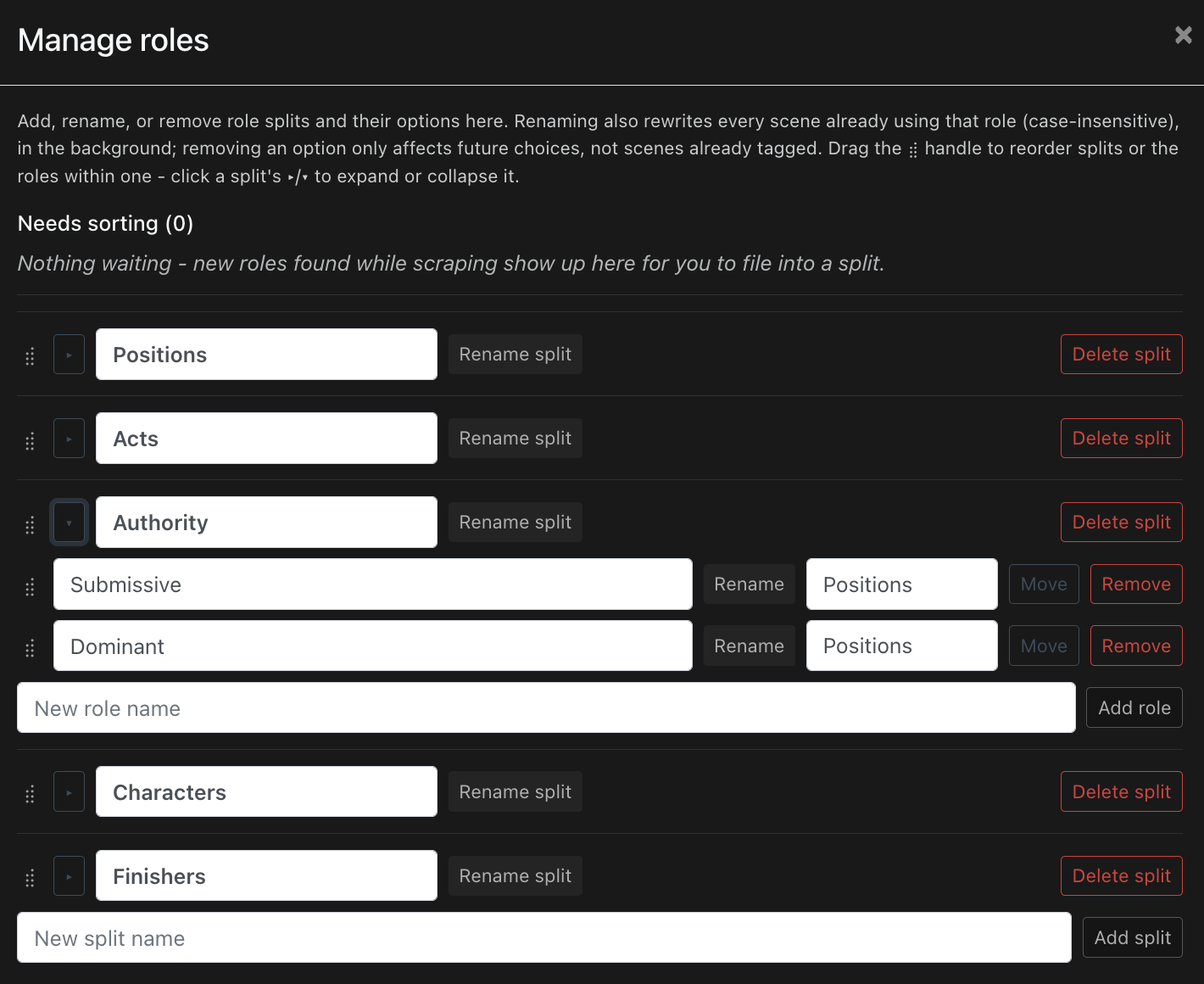
You can also now collapse the split lists to make them easier to drag and drop:

That order also reflects the stats on a performer page’s ordering (e.g. I dragged characters to the top for both examples):

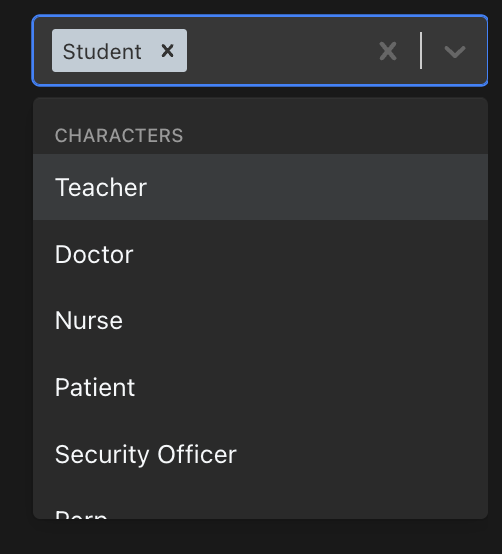
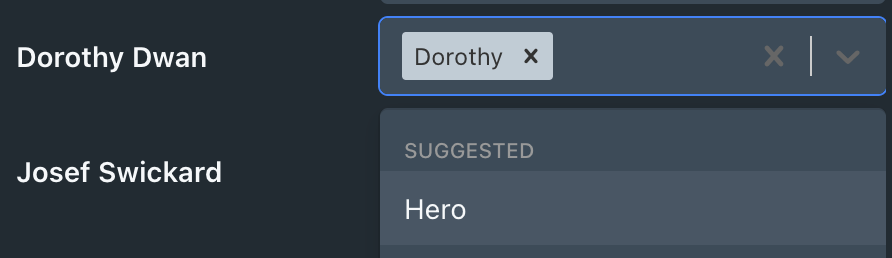
Plus within the dropdown when selecting a role:

And a quick 1.6.4 update on performer profile’s roles tab:

The placement of filters is now left aligned in the same bar as the scrape and bulk tag controls (still on the right). There is a new filter for filtering by splits to make it easier to find scene with a performer who has a lot of role tags. Roles are no longer sorted alphabetically, rather sorted by the order defined in the drag and drop sorting.

Hello @HeMan,
First things first, thanks a lot for making this plugin, it’s really great. I’ve been looking for something like that for ages – not just for Stash, I mean: I’ve been seeking out software that would let you tag precisely who is doing what to who in the context of a given scene, picture, etc. Your solution is the closest I’ve found so far, which confirms Stash was the right horse to bet on given its flexibility with plugins.
I have one compatibility issue to report and a few requests:

Something went wrong.
TypeError: can’t access property 1, component.props.children[1].props.children is undefined
apply@http://localhost:9999/assets/index-P3WhZ6Nb.js:53:78985
Ca@http://localhost:9999/assets/Performers-C_TED0P4.js:1:27156
t@http://localhost:9999/assets/index-P3WhZ6Nb.js:41:9242
t@http://localhost:9999/assets/index-P3WhZ6Nb.js:41:11195
sr@http://localhost:9999/assets/Performers-C_TED0P4.js:1:28612
t@http://localhost:9999/assets/index-P3WhZ6Nb.js:41:9242
t@http://localhost:9999/assets/index-P3WhZ6Nb.js:41:11195
Suspense
$J@http://localhost:9999/assets/index-P3WhZ6Nb.js:53:386938
div
N1e@http://localhost:9999/assets/index-P3WhZ6Nb.js:237:4805
QGt@http://localhost:9999/assets/index-P3WhZ6Nb.js:81:491701
KFt@http://localhost:9999/assets/index-P3WhZ6Nb.js:58:4134
dMt@http://localhost:9999/assets/index-P3WhZ6Nb.js:53:82641
Suspense
WFt@http://localhost:9999/assets/index-P3WhZ6Nb.js:58:3931
apply@http://localhost:9999/assets/index-P3WhZ6Nb.js:53:78985
Ia1@http://localhost:9999/assets/index-P3WhZ6Nb.js:91:36950
cMt@http://localhost:9999/assets/index-P3WhZ6Nb.js:53:80632
t@http://localhost:9999/assets/index-P3WhZ6Nb.js:41:73962
$J@http://localhost:9999/assets/index-P3WhZ6Nb.js:53:386938
k61@http://localhost:9999/assets/index-P3WhZ6Nb.js:237:5127
k3e@http://localhost:9999/assets/index-P3WhZ6Nb.js:20:203316
t@http://localhost:9999/assets/index-P3WhZ6Nb.js:41:5754
t@http://localhost:9999/assets/index-P3WhZ6Nb.js:41:12270

Here are a few requests; I’m aware the second one may be a bit ambitious:

  • Is there any chance you could expand the role tagger to other types of content – not only scenes, but also images, galleries, groups?
  • Would it be possible to use the role tagger to bind performers together?
    Currently, you may say Performer A does action Z (such as giving oral), and that Performer B does action Y (such as receiving oral), but not that Performer A does action Z to Performer B. One may argue that having separately Performer A doing Z and Performer B doing Y already accomplishes that, but it still is ambiguous: for more complex content with more performers, it lacks that kind of precision (e.g. Performer A could be doing action Z… on another performer C!). Binding performers that way may allow to truly narrow the scope and make precise queries. It would also make a good framework for other kinds of data (e.g. favorite partner of A is B).

Here’s some explaining on what I’ve been truly looking for, but is probably even more complex (that’s something I should probably bring up to Stash’s developers, as that would suppose to add another kind of framework parallel to Stash’s performers). I’m thinking about a “ghost” performers logic. Sometimes, you just want to say that “some unidentified person with the following attributes: [tags]” is “doing action A” to “another unidentified person with the following attributes: [tags]” without having to either
A. create a performer in the database – because you don’t know who it is, you just want to have a general description of what’s happening, or
B. create an extremely complex tag just to describe what’s happening without any ambiguities, or
C. leave it ambiguous by adding all relevant tags without them being bound together (I don’t know: let’s tag “freckles”, then who the heck exactly has freckles? is that the same one who has “blond hair”? Without proper binding, tags are just of bunch of indiscriminate attributes).

Thanking you again for the plugin, and in advance for your answer!

Hey @aunawise !

Thanks for the feedback, and glad you’re enjoying it!

I installed skExtra’s Multiple-Performer-Images and got the same error.

I’ll have to investigate how skExtra augments the performer page vs how role-tagger does it. I know I followed the ui/v2.5/src/patch.tsx for ‘after’ patch changes, but I’ll have to see where the collision is happening and make a call whether it’s on role-tagger or skExtra. I’ll follow up here once I’ve dug in.

On the two feature requests:

Images/galleries/groups: logged ticket here. Worth noting upfront that this would likely stay a manual-tagging feature for image/gallery content types rather than an automatic one, since IAFD/GEVI scraping is inherently scene-based and wouldn’t carry over. If there are any metadata sources for images that could provide more info for scraping, let me know :slight_smile: I’ll start with images first, then move onto groups and galleries.

Binding performers together: You’re right relationships between tags get genuinely ambiguous once there are 3+ performers. It’s also a meaningfully bigger change than anything shipped so far. I’ve logged a ticket here and want to sit with the design a bit before committing to an approach.

The “ghost performer” idea is a gap, but I think you’re right that it’s more of a Stash-core feature than something a plugin can bolt on. role-tagger can only really attach data to objects Stash already models (performers, scenes, etc.), and an unidentified participant is a different kind of object entirely. I suppose a workaround would just be creating the performer for that scene, but then disambiguation is a massive pain. Worth raising with the Stash devs directly if you haven’t already, and I’d be interested to see where that conversation goes.

Thanks again for taking the time to write all this up, very useful context!

Update 1.9.0: “Beyond Scenes”

Images now get roles too. Same multi-select, same creatable roles, same split-picker pop-up as scenes. It lives inside the existing Details tab at the bottom, since Stash doesn’t give plugins a way to add a whole new tab there (yet :smirking_face:) like it does for scenes.

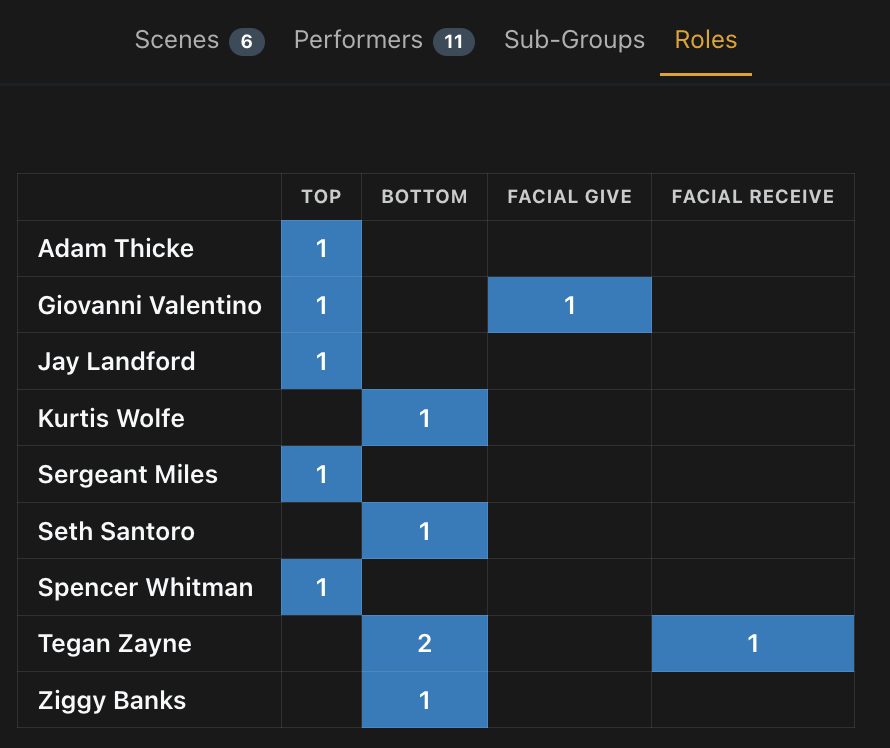
Groups and Galleries get a read-only roles matrix. Neither has its own tagging UI (a Group is a collection of scenes with roles, a Gallery is a collection of images with roles), so instead you get a performer x role table rolled up live from the group’s scenes or the gallery’s images. Rows are performers, columns are roles, cells are how many items match. Click a cell to see the actual scenes/images behind it.

Groups and Galleries Roles are opt-in for now (off by default under Settings) since they’re built on the same DOM-injection trick as the experimental performer tab rather than an officially supported extension point. YMMV, but let me know.

Content type dropdown on performer page. The first filter is now Content type (on Scenes by default), there’s now a toggle between Scenes and Images, alongside the usual role/split filters as before, so you can browse “everyone I’ve tagged as X” across images in addition to scenes.

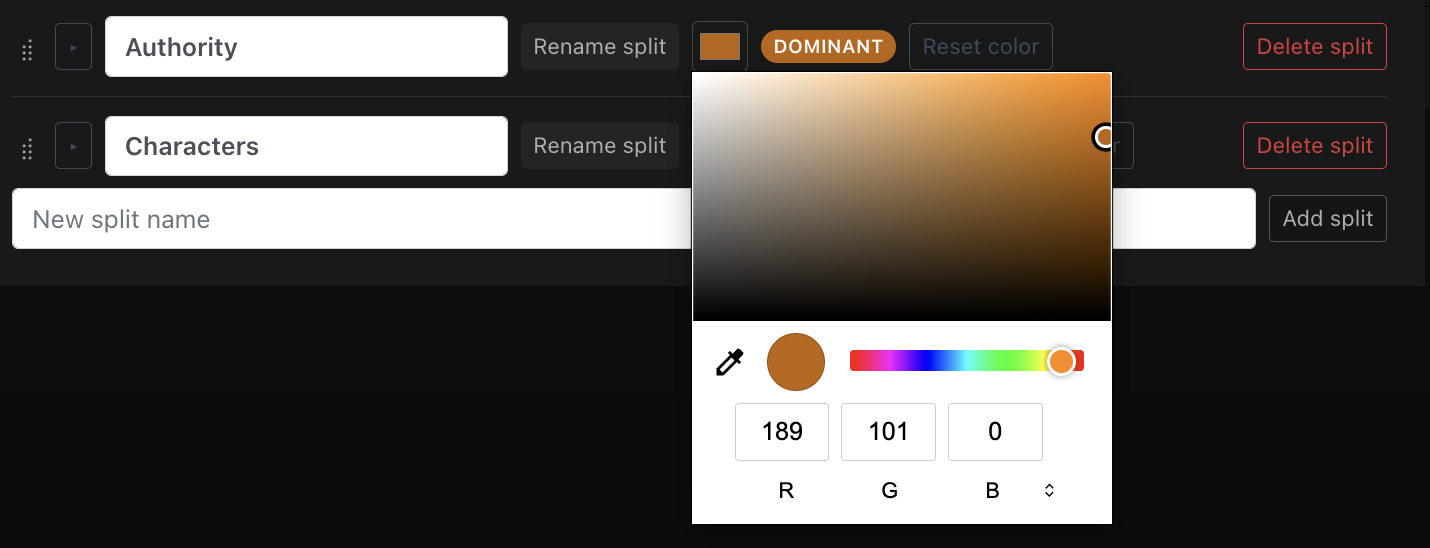
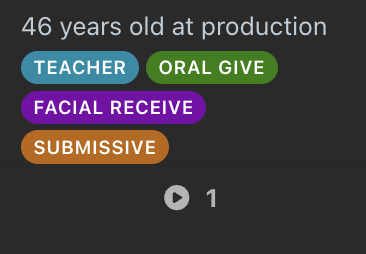
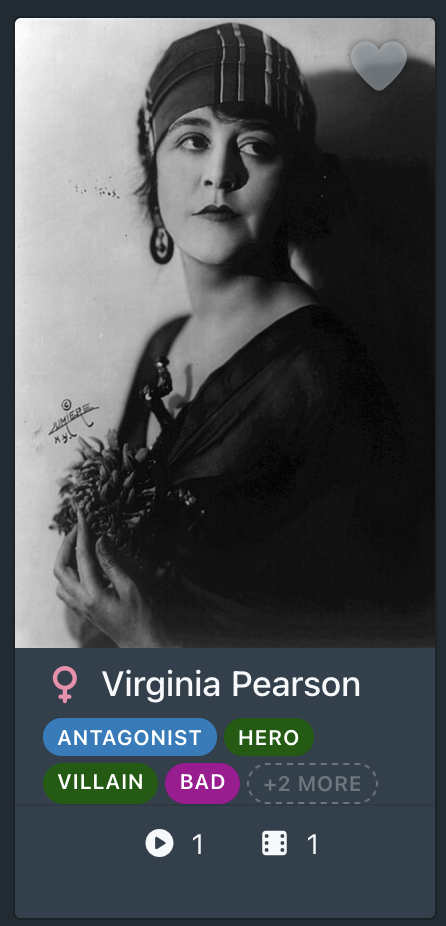
Splits now have colours. Each split you define in Manage Roles can get its own colour via a picker, with a live preview pill right next to it so you can see exactly how it’ll render before you commit to it. Roles in that split show up in that colour as badges on performer cards.

And a performer card will look like this:

As always, nothing about existing tags changes with any of this. Feedback welcome, especially on Images and Group/Gallery matrices since those are the newest part of this release :grin:

1 Like

Minor Update 1.9.1: “Dealing with the IAFD Dictionary”

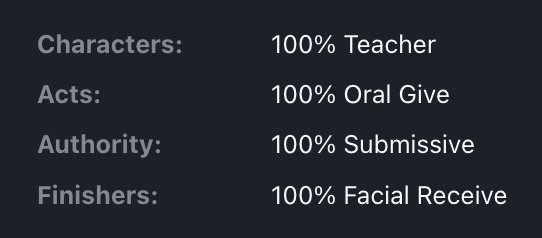
Dictionary (per-word fallback). IAFD sometimes reports something messier than the built-in table covers e.g.

When that happens, each individual word gets looked up on its own instead of the whole string becoming one literal tag. Map Facial to Facial Receive once, and it applies everywhere that word shows up in a compound from then on.

IAFD’s decoding is now user-editable. Under Settings → Tools, there’s a new Role Tagger - IAFD Dictionary button below to Manage Roles.

Compound rollups. The built-in table this plugin already uses to decode strings like “Facial Bottom” → Bottom + Facial Receive is no longer buried in plugin code, it’s shown as an editable starter table. Wrong for your library? Erase the resultant string and it will be dropped from future scrapes. Want a different name? Edit the entry directly.

Feedback welcome, especially if you run into an IAFD string this still doesn’t handle well :grin:

Hello @HeMan,

Thanks a lot for considering my proposals, I really appreciate it. Being able to role tag images is great! Here’s some feedback about the last version of your plugin and a few suggestions. Also, I realize I forgot to mention my Stash is completely offline: I’m not using IAFD or StashDB to curate my collection (hence my keen interest in quality-of-life plugins). So I’m sorry I won’t be able to report anything about online features!

I believe your solution for groups and galleries is quite appropriate. Having roles inherited from the gallery’s images / group’s scenes works perfectly; it’s also pretty flexible, given that one work (say a movie, or a comic) may be comprised of different moments or episodes (implying e.g. role changes, reversals, etc.). The new Role tabs are pretty intuitive too, though I’ll be testing them out further – I’d be curious to know how well these tables handle a vast (:infinity: –no, just kidding) number of roles and sub-roles.

Speaking of which, if one uses the Refract Theme as I do, the experimental performer Role tab may have performance issues when a performer has lots of scenes or images (especially when most of them are still unassigned). For reference, performance was perfectly fine for a performer with about 200 pictures, but not at all for another with about 700 (my browser would warn about the tab slowing it down…); I tested it with Refract in lightweight mode (still laggy), then disabled (no longer very laggy).
Obviously, Refract eats up some performance, but there may be a workaround. When the performer Role tab loads images or scenes, it does seem to load everything at once. In my understanding, Stash’s UI avoids overloading by 1. giving scalability, as one can change how many scenes or pictures are loaded on one page, and 2. by not loading everything at once even on the largest scales (500, 1000, custom; as you scroll, it seems that new content loads and previous content unloads, but I may be wrong). Maybe you could implement some similar scalability as to lighten the load on the tab, but I understand it might not be easy, since it’s already organized around roles and splits.

I’ve also been pondering about bulk role assignation. While it’s currently possible from the Role tab on a performer’s page –and I’m grateful for that, it’s extremely useful!–, doing it from Stash’s native Edit UI would also be quite handy; still, I’m aware it may not be possible with a plugin. The cases I’m thinking about are the same as above: one work may include several moments or episodes, and when you split it into several distinct files –that Stash identifies as different “Scene” or “Image” objects that you’ll then gather into a Group or Gallery–, you may want to select them all and assign the same role from the Edit UI. It’s especially significant when dealing not just with scenes, but images (not thinking about these 10+ picture photo-shoots or CGs… :skull:). I’ve thought of a workaround using custom fields, but they can’t be bulk edited from Stash’s UI, and even if they did, it would be a bit tedious.

I’ve got some other suggestions in mind, but I’ll refine them a bit for now, I’ve already voiced quite a lot in a very short time! Thank you again for considering these ideas.

1 Like

No worries at all about the offline setup. That’s useful context, and it’s great to hear the group/gallery inheritance approach is working well for exactly the kind of multi-part content

Performance issue is now fixed in 1.9.2.: The performer Roles tab was fetching everything for that performer in one go and handing every card to Stash’s native grid component with no pagination, so a performer with 700 images meant 700 fully-mounted, interactive cards simultaneously. Default behaviour for load is now to show the first 40, then a “Load more” for the next 40.

Screenshot 2026-07-10 at 11.57.38

I’m still looking for a way to get these native components working for it, and upcoming releases aim to bring parity to this style:

Bulk role assignment from Stash’s native Edit UI: I looked into this one too early on in the development, and unfortunately it can’t be done (for now). Stash’s multi-select bulk-edit dialog isn’t built with a plugin extension point, so there’s no way around it without a change on Stash’s side. Your workaround intuition was right, and the bulk-apply from the performer rollup, one performer at a time is the ceiling of what’s possible today. I’ll keep an eye out in the upcoming releases, because more plugin points are happening all the time.

Looking forward to the rest of your suggestions. This round was very actionable QoL fixes, thanks!

1 Like

This is an extraordinarily useful plugin. Thanks. I only wish we’d had this earlier :smiley:

1 Like

Update 2.0.0: “Whodunnit”

This update gives a proper answer to the “who did what to whom” in multi-performer scenes.

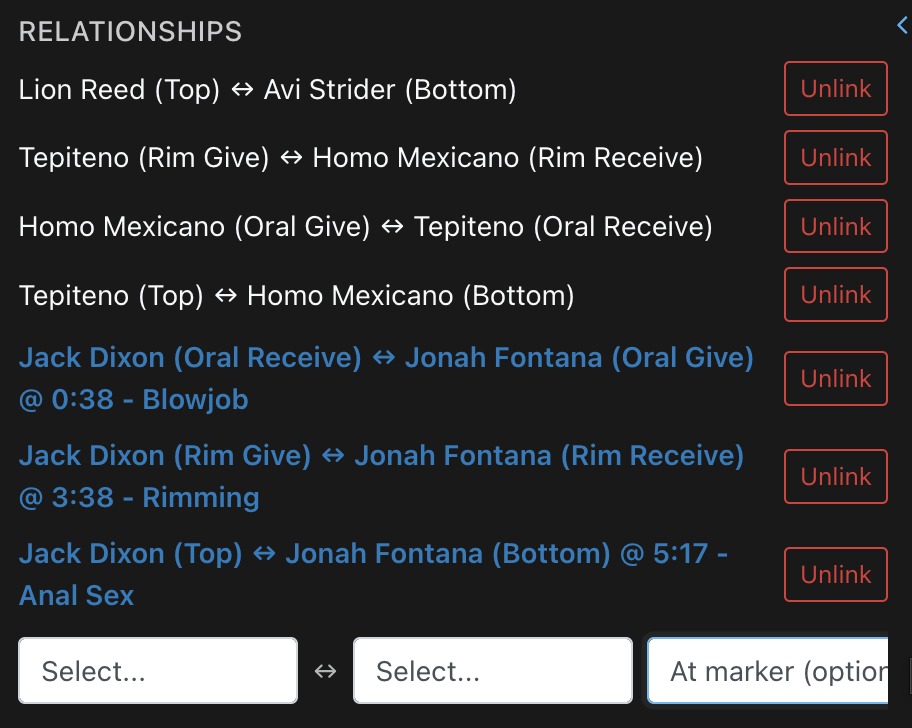
Roles can now be linked between performers. Up to now, a scene with 3+ performers could only say “A is Dominant, B is Submissive, C is Submissive” independently, and no way to say A specifically dominates B and not C. Now, on a scene or image’s Roles panel, there’s a new Relationships section: pick two existing role tags from two dropdowns (e.g. A (Dominant) and B (Submissive)) and hit Link. The direction doesn’t really matter, because one is just saying “these two tags are one act”, and the verbiage of “A dominates B” or “B submits to A” is left for you to decide.

Nothing about existing tagging changes. Relationships are stored as a new, separate field. Your existing role tags are untouched, and nothing is required to keep working exactly as it did before. If you’re not interested in relationships, then no further editing is required.

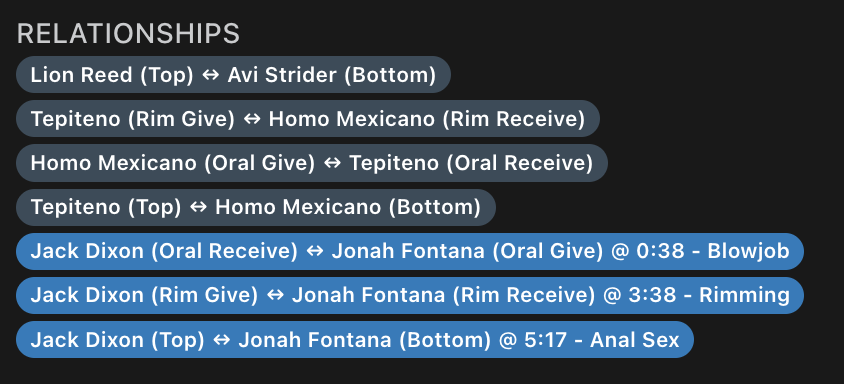
Optionally pin a relationship to a marker. If the scene has markers, a third dropdown lets you attach a relationship to one. A marker-linked relationship shows as a brighter pill and jumps the video straight to that timestamp when clicked.

Shows up in two more places automatically:

  • A read-only summary appears right on the scene’s Details tab, below to the performer cards, so no need to switch to the Roles tab just to see who’s linked to whom.

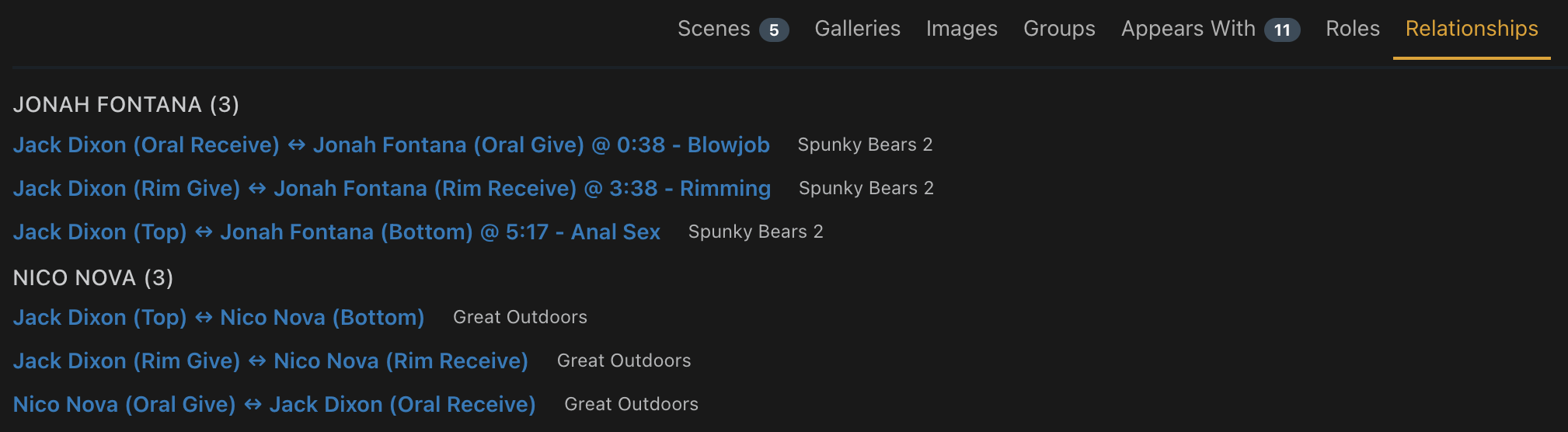
  • A new opt-in Relationships tab on the performer page (Settings, off by default like the group/gallery tabs) lists every relationship that performer’s ever been part of, across all their scenes and images, grouped by co-performer.

Safety net built in. Removing a role that a relationship depends on warns you first (“this will also remove this relationship”) rather than leaving it dangling. Renaming a role from Manage Roles updates any relationship referencing it too, so a rename never orphans a link.

As always, entirely additive and non-destructive. If you never touch Relationships, nothing about your library changes. :grin:

Thank you for the kind words! I was waiting around for someone else to do it first, but the bug bit me when I encountered a scene that I didn’t want to see where a performer was doing the wrong thing :joy:

Minor Update 2.1.0: “Import/Export, and Starter Packs”

Sharing is caring. If you ever want to export your roles and splits for others in the community to use, you can now do that from Manage Roles:

A couple different starter packs are now available too:

  • General: Broad, orientation-neutral acts. A sensible default for any library, or a base to layer a more specific pack on top of.
  • BDSM: Power dynamics and kink-focused acts. Complements the General pack rather than replacing it, since BDSM content needs those too.
  • Lesbian: Splits and tags matching common lesbian-content tagging conventions.
  • Gay: Splits and tags matching common gay-content tagging conventions.

Full table of the new tags available at the wiki here.

1 Like

I really like the idea of this (although it adds another tagging backlog to things). It would be neat if it were more linked to the tag system (for example linking tags to relationships in such a way that existing tags on scene will lead to suggestions of roles that should be mapped).

But the scene role editor seems very broken for me:

  • selecting a role doesn’t update the select box visually, though it mostly seems to be saved and is there on scene reload
  • same thing for the relationship linking, creating a link never updates visually until reload
1 Like

Is Python3 installed and in path? The expected behaviour (if Python is installed and in path) is clicking a role, and it updates visually with a hot reload, similar to clicking Save on the edit page.

And on the backlog, I’ve filled most of my library up with roles from IAFD with the task in Settings → Tasks → “Scan library for IAFD roles”. If you know of any other scrape sources you’d prefer to see, let me know and I’ll add them in as a feature :slight_smile:

Minor Update 2.1.2: Tags for suggested roles

From the great suggestion of @spaceyuck, there are now recommended roles at the top of the dropdown when a tag on the scene is also a role you have. It’ll look something like this, where “Hero” is a tag on this scene, and also a role.

1 Like

Hi @HeMan,

Once again, thank you. I can’t emphasize enough how impressive it is, we have a proper disambiguation framework now! Associating a relationship with a marker is also an excellent idea!

With the current version, I see three implications:

  1. Roles become an alternative way of tagging content in Stash. On one hand, it’s as much satisfying as it is precise, now that attributes can be bound precisely. But on the other, Stash’s native tagging system ends up lagging behind, as it becomes redundant. (See proposal 1 below)
  2. One may create a very complete and complex role-tagging system, that can accommodate precise and unambiguous descriptions. However, a complex system may become more difficult to organize, as well as navigate when in the process of role-tagging content. (See proposal 2 below)
  3. Once a vast amount of content is role-tagged using a complex system, it also gets more difficult to search for exactly what you’re looking for. (See proposal 3 below)

Some proposals:

1. Expanding interactions between the role-relationship system and Stash’s native tagging system.

As things stand, Role Tagger is almost like a parallel tagging framework that, unlike Stash’s native tagging system, actually binds attributes to specific participants. You can basically describe not only what a participant does (actions), but also what they look like (appearance), what they look like doing what they do (emotions related to their actions, the situation) and who does what not only to them, but to specific parts of them.

Currently, Stash’s current tagging system isn’t relational: it allows giving a list of attributes for content without binding it to any of its elements.[1] However, this tagging system may seem redundant to one who has taken time to create a precise relational role-tagging system.

I see two directions this may take:

A. Changes in Stash itself–requesting expansion of the tagging system. However, it probably (and understandably) wouldn’t be high on the devs’ priority list.

B. Expansion of the plugin (or a companion one) to improve the tagging framework and its interactions with roles and relationships.

We have a headstart on option B since you implemented @spaceyuck’s suggestion, but I’ll expand a bit on it:

  • An idea might be to directly use tags as roles. There may be a list of “Tags” objects within Stash that are treated as “Role” objects by the plugin.
  • Another idea might be to do the opposite: make sure roles and relationships are full-fledged objects in Stash’s logic, just like Performers, Images, Scenes, Galleries, etc. (I expand a bit on the idea in proposal 3 below, with flavor C).
    That would allow us to use tags for giving attributes to roles and relationships, just like we can currently use tags to give attributes to performers. A role or relationship could be tagged (and filtered on) depending on the broader category it belongs to. For instance, one (or several) relationship(s) could be tagged as “dominant” or “submissive”. All in all, it would help “naming” and categorizing relationships.

No matter which direction is taken, this would not only add these tags to content, but also help browsing roles and relationships (e.g. through filters). Although splits currently do that, they can’t be filtered on, and have no interaction with the tagging system. Generally speaking, it could also help with proposal 2:

2. Improving organization and UI.

The more precise one gets with their roles and attributes, the more complex one’s role system gets. But in case one starts to have an extensive list of actions and/or attributes, I see two consequences:

  1. Performer cards may end up cluttered when assigned several roles.
  2. Navigation becomes quite complex, because of (i) a potentially quite long drop-down menu and (ii) labels without aliases.

Regarding consequence 1, I see a simple solution: in the Role manager, determine which roles appear on performer cards and which don’t. Another admittedly more difficult possibility would be a pill popup for roles on performer cards, just like for tags.

As for consequence 2, @spaceyuck’s solution only helps as long as you’ve already tagged content before adding roles and relationships, and only as long as the role naming in one’s system is consistent with their tag naming. That’s why I’ve got a few extra possibilities in mind:

  • For 2(ii), allowing splits and roles to have aliases might be useful (or turning tags into roles, as suggested in proposition 1, since tags can already have aliases).
  • As for 2(i)–the drop-down menu–I suggest either (or a mix of both) the following A or B:

A. Several drop-down menus: one per split.

Pros Cons
Each menu would be shorter. Also, having an overview of all splits is useful to consider the most important aspects of a scene or picture. If you have a lot of splits, that makes a lot of drop-down menus.

B. Conditionality for drop-down menus to appear.

We could get inspiration from the Fast Tagger plugin, where menus can be configured to only appear under specific circumstances (e.g. Performer is male / female; performer has tag X or tag Y; performers A and B are related through roles B or T; etc.).

Pros Cons
Very precise. Avoids cluttering in case of complex and extensive splits/roles distribution. Takes a lot of time setting up conditions for each drop-down menu to appear.

3. Improving searches.

Currently, there as a few types of queries one may want to make, but that neither Stash’s native UI nor the plugin’s accommodate (except for type 1, I just suggest improvement). I narrowed them down to four:

Query type Explanations and/or use cases Improvement suggestions (as per flavors A or B or C listed under this table)
1. Any one role, no matter which performer has it Find any performer such as it has role A, or B, or C, etc.; we currently can by clicking the role on the performer’s card from a scene or picture. A. Patching Performer cards so that, no matter where they appear, there always is a clickable “Role” pill menu with all their roles. It would let you access each role just like you currently do from a scene or picture. // B. Clicking on the role in other places, such as the Role and / or Relationships tabs. // C. Creating a dedicated page, from which each individual role could be accessed.
2. Any set of roles / relationship for a specific set of performers Finding any performers X and Y (and Z, etc.) such as X has role A, Y has role B, Z has role C, etc. Optionally, specify which is linked with which. A. Patching Stash’s UI in the “Appears With” section of a Performer page, adding a menu that would let you specify which role or relationship your Performer must have with another performer they appear with. // B. Fuse the Role and Relationships tabs so that, for one of a performer’s roles, you may specify which other performer it must be linked to, and what is this other performer’s role. // C. Creating a dedicated page with its own search engine: define each Performer’s roles and whether they are linked.
3. Any set of roles / relationship for one specific performer, no matter with whom If performer X has role A, find cases where his role is linked to any performer who has e.g. role B. For instance, if Performer A “Gives oral” to Performer B, it would indeed make sense for Performer B to have a “Receiving oral” role, and thus link A and B based on that; but not to link them based on some other unrelated role of B’s (such as “Protagonist” or “Antagonist”). However, one may want to find Performer A giving oral and any case when it’s with another performer doing / being something unrelated to “Receiving oral” (such as an “Antagonist” or “Protagonist” role). B. Fuse the Role and Relationships tabs so that, for any of a performer’s role, you may specify which other role it must be linked to. // C. Creating a dedicated page with its own search engine: define the Performer’s role and which other role it must go with (whether linked or not).
4. Any set of roles / relationship no matter which performers are involved. Find any content where, no matter who are the performers, there is a link between role A and role B. A. Filtering from Performers using Custom fields. // C. Creating a dedicated page with its own search engine: define two roles that must be linked.

UI-wise, I reckon it may be implemented through one of at least three flavors–either:

A. Patching Stash’s native UI.

I know depending on which part of the UI, it may currently be a no-go. For the Edit UI, as you mentioned, there are no plugin patch points in the Edit UI and Filter UI. I’m suggesting other parts of the UI, but I don’t know whether they’re patchable.

B. Using the plugin’s Role tabs.

The Relationship section in a performer’s page Role tab could be even more precise by adding two (e.g. dropdown) menus: (A) a “Filter by relationship” and / or (B) “Filter by partner”. In which case we may even consider fusing the Role and Relationship tabs. Filtering by relationship would imply defining the two roles that are supposed to be linked.

C. Creating a whole new “Pairing” page dedicated to roles and relationships.

That may be a stretch, but it might be worth it; many other plugins create their own dedicated page (AudioTab, Ascension, Stashgifs, etc.). That’s where treating Relationships and Roles as their own kind of object (as mentioned earlier, at the end of proposal 1) might be interesting. It would also be more ergonomic to migrate the Role manager in this page.

End note: suggesting a ghost performers framework to Stash’s devs

We mentioned the idea of ghosts performers in previous replies. Using your plugin urges me once more to bring it up to Stash’s devs. We’ve got a great headstart on relational tagging, but as soon as one or two unidentified participants are in the picture, if you want to link them through roles, you have to associate them to a Performer object in the database anyway.

An option is to create “Unknown” performers to act as placeholders that may be linked through the plugin’s Relationship framework. However, this disambiguation is still much too complicated and not precise enough. It’s roughly the equivalent of using a Performer object as a tag (too general, lots of wildly different things listed under it). Moreover, it takes creating several numbered “Unknown Male” and “Unknown Female” performers–as much as needed to accommodate all possible parameters (threesomes, foursomes, orgies and so on).

  1. I realize I should have disclaimed this earlier: this isn’t because of Stash. Stash developers implemented a classical tagging system, and its drawbacks lie within the classical philosophy behind classical tagging and how it needs to be improved. ↩︎

Thanks @aunawise :folded_hands:

I’m going to phase these out over the next few days because there’s a high risk of breaking changes. I’ll work through one by one and test it out first. Here’s the order I’ll take:

  1. Card-clutter controls: show/hide toggle (role + split) and overflow-pill
  2. Aliases for splits and roles
  3. Dedicated “Pairing search” page over Relationships data
1 Like

Update 2.1.3: Card visibility controls

A smaller one, aimed at anyone whose role vocabulary has grown enough that performer cards are starting to feel crowded (and I’m happy y’all are using it to this extent!)

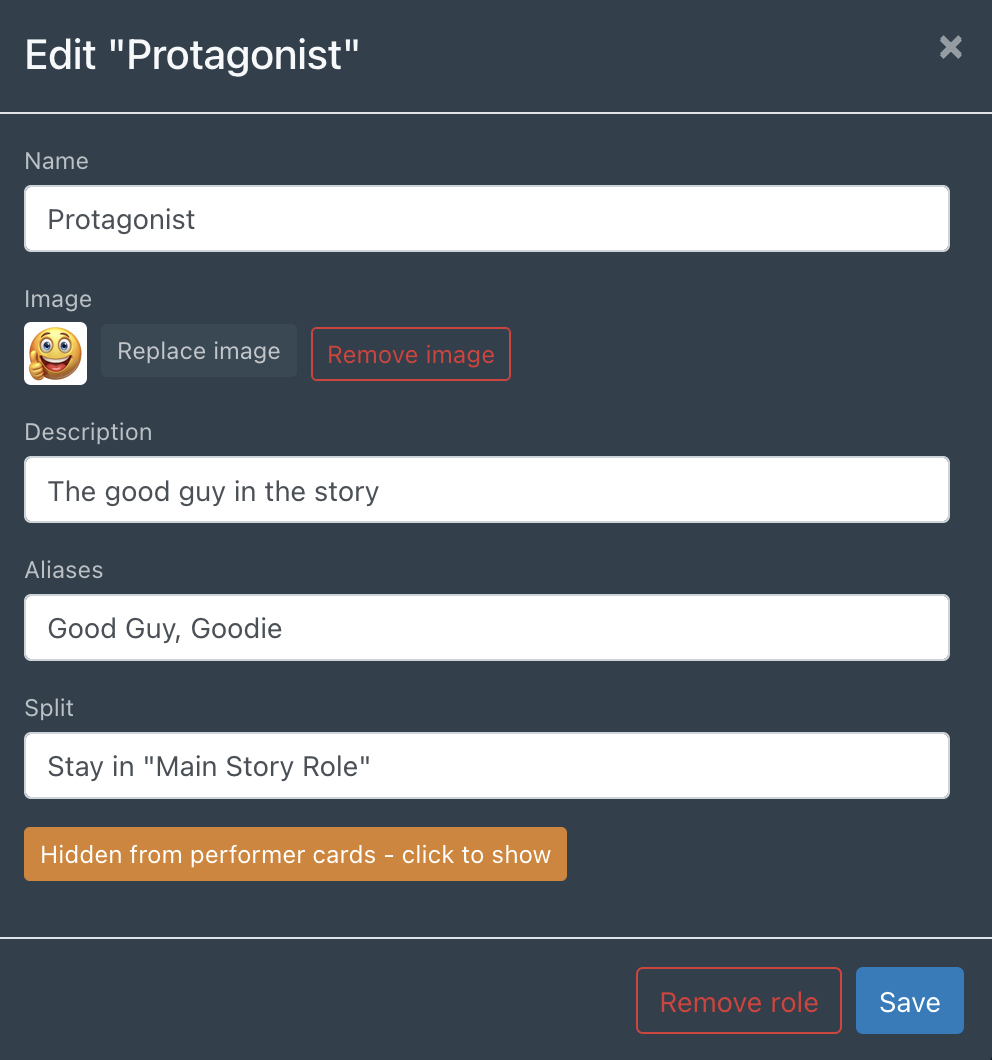
Choose which roles show up on performer cards. In Manage Roles, each split now has a “shown/hidden on cards by default” toggle, and each individual role can override that default in either direction. A role you hide this way is only hidden from the card badge, and it’s still fully taggable, searchable, and shows normally in the Roles panel, Relationships, and the role-badge popup. This is purely a display-density control, where you want the metadata, but not the role on the performer card.

Cards cap at 4 badges, with a “+N more” popup for the rest. Once a performer has more than 4 visible roles, the extra ones collapse into an overflow pill, so click it to see the rest without leaving the card. This is on by default; there’s a new setting, “Limit role badges shown on performer cards” (Settings → Plugins), if you’d rather always show every badge with no cap.

Both features are additive and back-compatible. Nothing about your existing splits or role assignments changes.

As always, feedback welcome.

2 Likes

Update 2.2.0: Roles as a first-class citizen

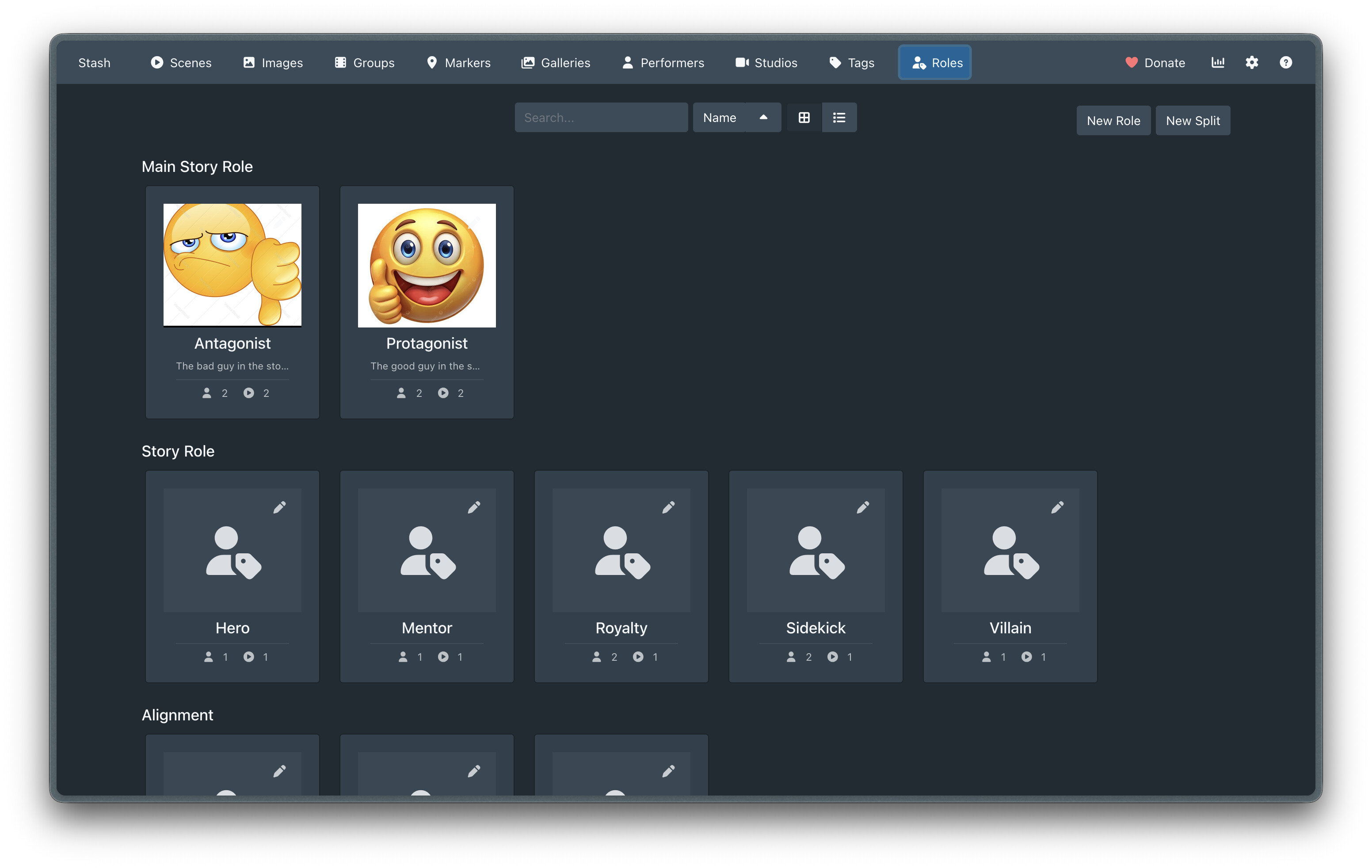
This release brings a dedicated Roles management page (/role-tagger/roles) that mirrors the native Stash Tags experience. Includes search, sorting, and grid/list views.

The tools section was getting cramped, so a lot more can now happen on the new Roles navbar screen.

Role & Split Management:

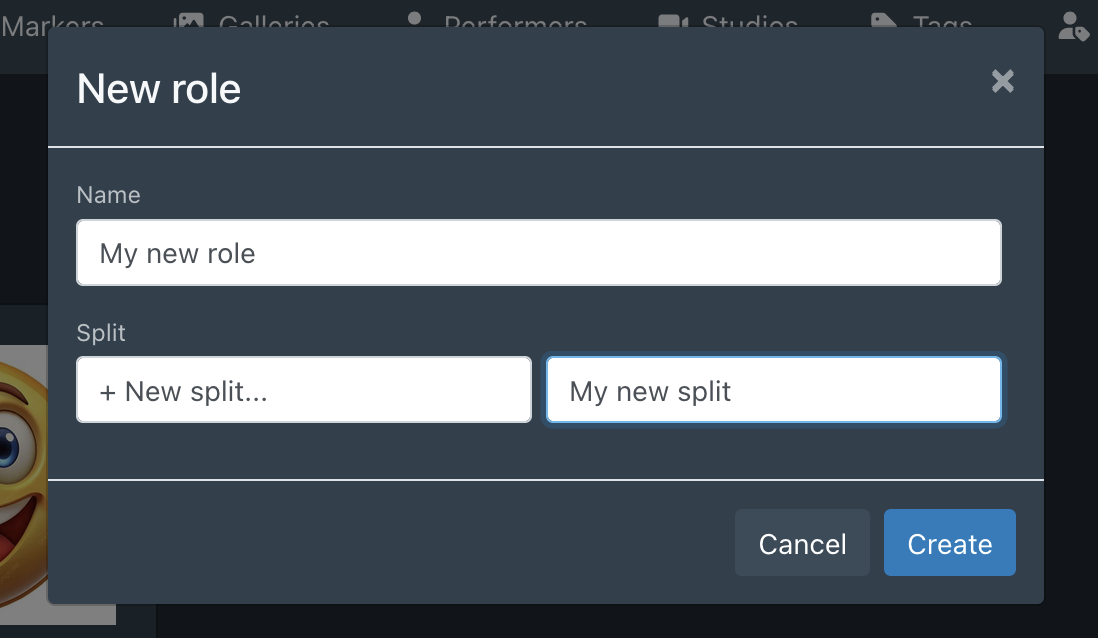
  • New “New Role” and “New Split” creation modals.

  • Enhanced role cards now display performer/scene counts and custom role images.
  • Added support for role and split descriptions.
  • Deep-Dive Popups:
    • Clicking the scene icon count opens a dedicated gallery of all scenes associated with that role.
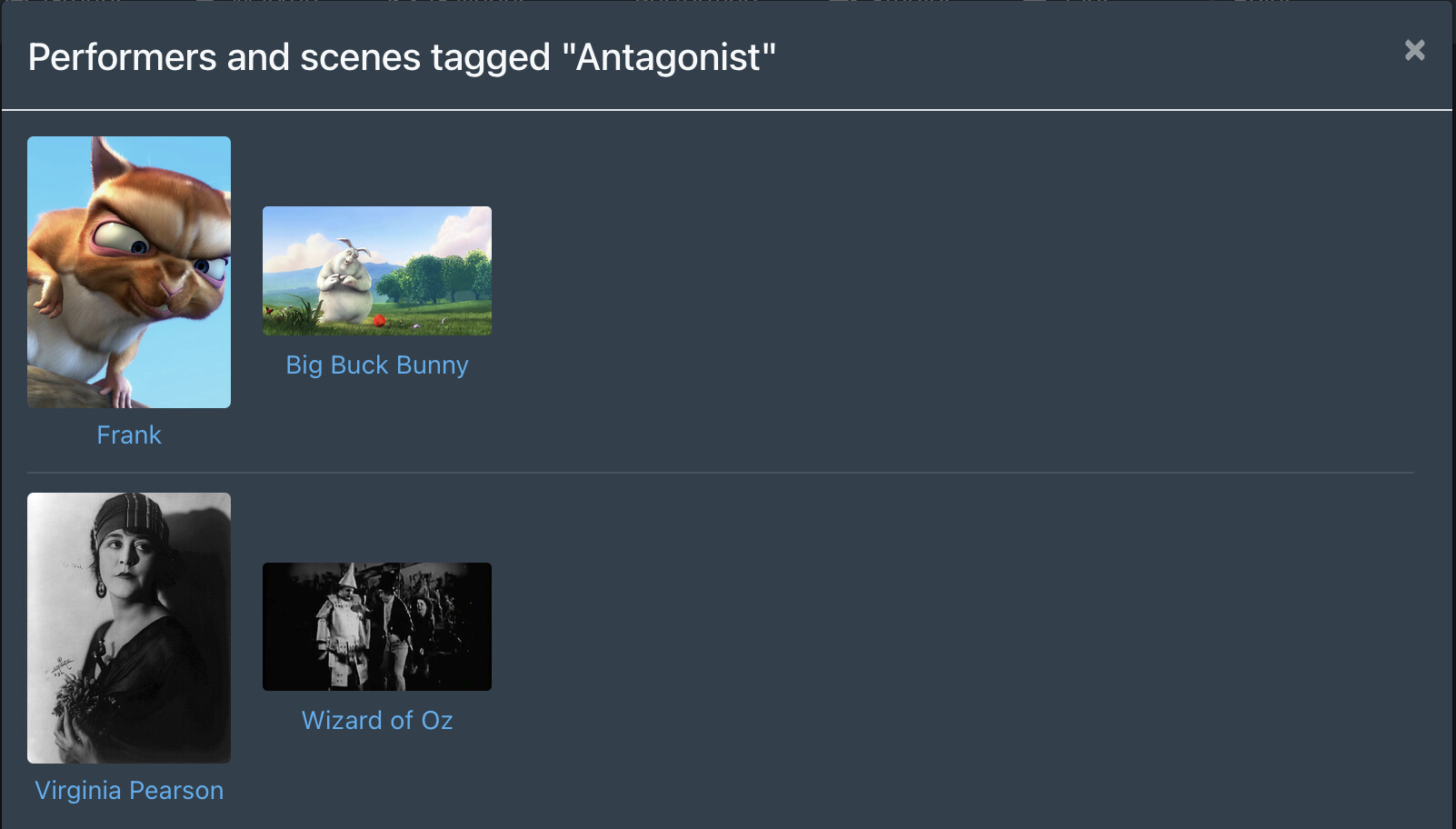
    • Clicking a role’s shows a detailed list of performers and the specific scenes that earned them that role.

  • Added Alias Support (thank you @aunawise!) : Expanded alias functionality so autocomplete and badge-clicks now recognize both main names and aliases.

The Roles navbar item can be disabled in settings if you don’t want this feature, and Aliases are still accessible via Tools.

As always, feedback welcome.

1 Like

Hi @HeMan,

I like the plugin, and it keeps getting better and better with every update. But I’m still hesitant to use it. That’s partly because of how splits and roles are managed. Synchronizing roles as tags to the scene is an important new feature. But it still means double the maintenance effort during setup— after you’ve maintained the native tags, you have to create them all again as splits and roles. If, for example, the native tag name changes, the synchronization no longer works.

My wish would be an option that allows you to link splits and roles to a single tag. For example, you create the split and add the tag Id; then all sub-tags are automatically added as roles. This would allow you to set up the plugin quickly. I imagine there are events that could be used to update the split & roles whenever the tag name changes. That way, you could keep the roles and tags consistent with each other.

My second point has already been raised by aunawise. If you set up a lot of Splits & Roles, a single drop-down field becomes cluttered. A separate drop-down field for each split would provide a quick overview. Since the plugin isn’t explicitly limited to roles, this would also allow you to describe the performer’s appearance and provide a quick overview of, for example, role, hair color, tattoos, piercings, etc.

I hope this feedback helps you further improve the plugin, and I’m looking forward to the next updates.

Hey @pappellapapp – thanks for the feedback here!

Definitely agreed on tighter integration between tags and roles (and their aliases), I’ll make that the next prio.

On the multiple drop-downs: I can create it as an opt-in feature in plugin settings. Right now, its intention is to be similar to the built-in tag selection functionality i.e. a free-form type-to-search and select (with headings to see which split that role belongs to).

1 Like