A UI plugin for Stash that enables fast tagging without searching for tags.
This plugin heavily inspired by the Quick Edit Plugin by S3L3CT3DLoves, but implemented using the UI Plugin API.
Basic functionality
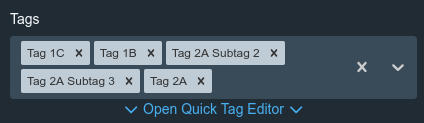
show a small “Open Quick Tag Editor” link under each multi tag select box in the UI
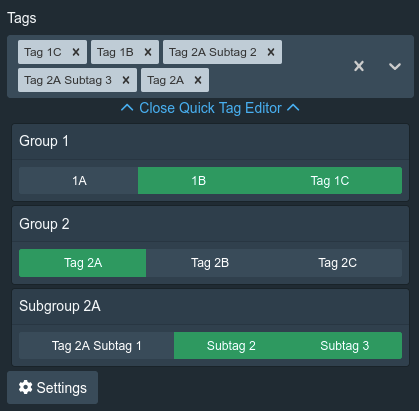
tags to select are show grouped, and can be toggled on and of with a signle click
tags have a hover popup in the spirit of the actual tag hover popup, showing name, desciption and image (it’s not identical, since that UI component is not acessible to UI plugins)
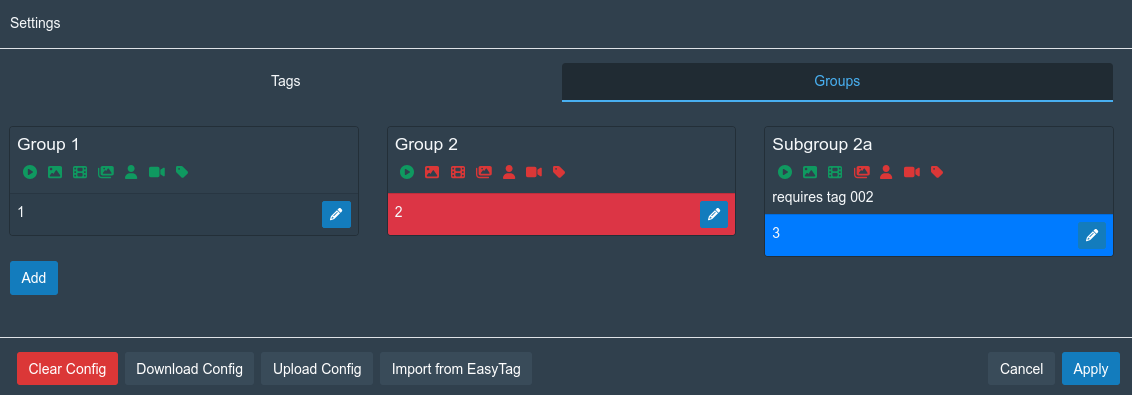
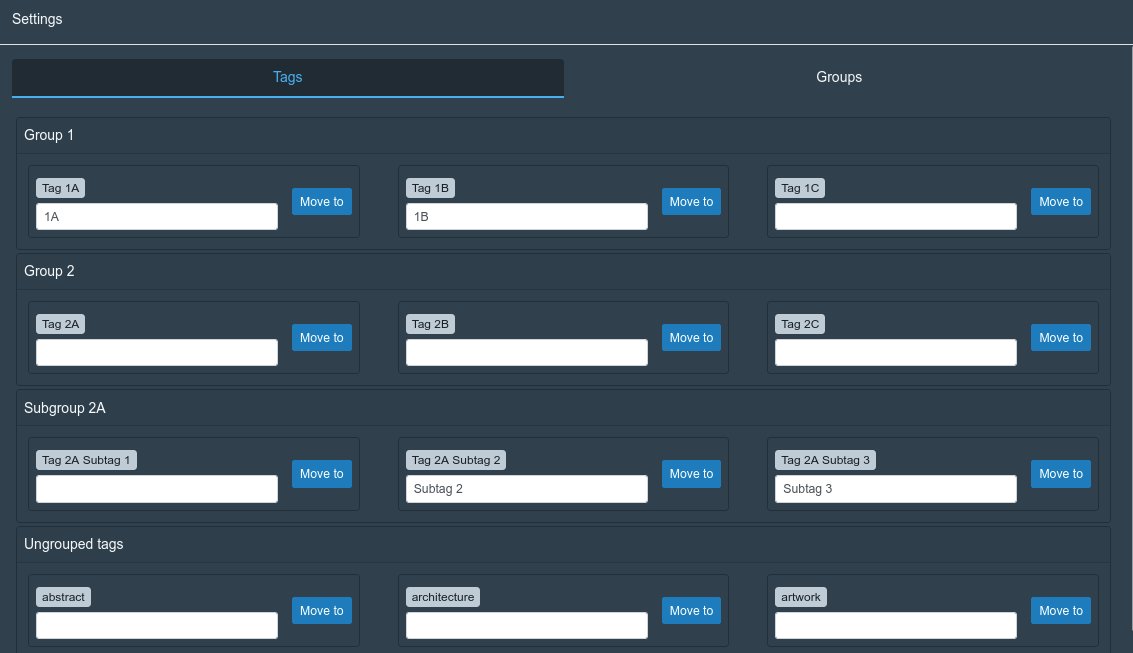
a “Settings” button a the bottom of the Quick Tag Editor will open a settings popup, where the tags and groups can be configured
Features
create many groups to organize tags
groups can be hidden per item type, so that for example a group can be hidden when tagging performers, but shown for scenes and images
groups can be conigured to only be shown when a selected tag is already tagged, allowing a setup where one tag group contains the broad topics to be tagged, and only show the more specific tags for each topic if it is selected
move tags between tag groups, or no tag group (tags can only belong to one group, and tags without a group will not be shown in the Quick Tag Editor)
tags are always sorted based on Tag sort name and name, so special topic-dependent non-alphanumeric tag orders can be relized through the sort name
tags can have an optional shorter display name, enabling very compact tag buttons within the context of a group, even with many tags in a group
configuration is stored within the Stash server itself
download and upload the current configuration to / from a JSON file, as a convient for of backup (it is not recommended to reuse configuration backup between different Stash servers, since they are specific to the tag IDs of the specific server)
a mechanism to import the settings from the Quick Edit / Easy tag plugin by S3L3CT3DLoves, so if you have already configured a complex structure there, it should be only one click to migrate it over
The idea is that you probably have some common aspects you’d like to have tagged in most or all scenes (maybe performer attributes like hair color, age group, what kind of acts are happening, how many are participating, etc).
So you have to initially spend some time once to set up the tags and tag groups to your liking (for a example creating an tag group “Age”, with the common age group tags like “18-22”, “20s”, “30s”, “40s”, …).
But when you have done that, you can very quickly select them for every scene you want to tag, because you just open the editor, press a bunch of buttons quickly, and your basics are tagged for the scene, where you normally have search for each tag on every scene, and hope you don’t forget anything.
I’ve added some screenshots to the post, hopefully this illustrates this a bit more.
Right now this uses the UI Plugin API mechanism to extend the tag select control, so it can only go where there already is a tag selector.
I’ve had a quick look through the UI code, and as far as I can tell there isn’t a way to hook into the slideshow viewer (it’s not a patchable compoment), so it’d likely be somewhere between very complex and impossible right now.
Yesterday was just a bugfix, it turned out that linked / conditional tags in groups were not actually clearable. Couple of days ago was using the tag custom fields of Stash 0.31 as storage for most data (secondary for now).
is there anyway to make moving each tag to a group quicker and easier? For example i have an imported plugin where i have imported hundreds of tags from my preferred database and its a pain in the ssa to find each and then find the group.
Not right now, but I’m currently looking into extending or reworking how tags are managed, that page is messy and a performance nightmare on my setup with many many tags. Not sure on timeline though.
Edit: Well scratch that. I’m not sure what I did but now the “Open Quick Tag editor” keeps loading indefinitely. Been trying to get help on the Discord
I’m having a problem with the fast tagger quick menu loading indefinitely. I wanted to experiment with custom tag manager to edit multiple sort names at once.
I backuped up my Stash then downloaded and enabled it. It did not work as i wanted so i uninstalled it. After that I updated fast tagger to its latest version.
Then I went to go tag a scene and the quick menu would not come up, it just keeps loading.
I even reverted to my backup before I downloaded custom tag manager or updated fast tagger. Yet the quick menu for fast tagger still keeps loading indefinitely.
Yes I do. I had that installed and it was working fine before all this. Could me updating fast tagger cause this? Does it require a specific stash version?
The recent changes query custom fields of tags, those are pretty new (I think 0.31?). If those were not present, it would probably faceplant hard on some GraphQL queries.
I’ll look into making it more graceful to keep working on older versions.