Thanks, HeMan, for the ongoing work on the plugin. A question that applies to Stash in general, but also to your dashboard: How can I hide the counters below the tile (using custom CSS)? They aren’t really necessary, since I can see the performers and scenes when I click on the tile.
It seems to conflict with External Player Launcher as well; I encountered the same problem.
1 Like
Hey @zelpi,
This can be done in Settings, Interface, Custom CSS:
This is for the Stash general interface:
.card-popovers {
  display: none;
}
For this plugin, that’s in a different property but same effect:
.role-tagger-role-card-count {
  display: none;
}Minor Update 2.2.1: Rolling out linking tags to roles/splits, plus conflict fixes
Additions:
- Slow roll out of these linkages: Link a split to a Stash tag: In Manage Roles (or the new edit button on a split heading on the Roles page), pick a tag to link. The split’s roles are then resolved from that tag’s child tags instead of being maintained by hand as a separate copy of your tag hierarchy.
- “Sync now” resolves it on demand; a new background hook also does it automatically whenever the linked tag or its children change, no manual sync needed for day-to-day renames and edits of tags.
- A rename of a tracked sub-tag propagates library-wide to already-tagged scenes/images, the same as a manual role rename.
- An opt-in checkbox can also rename the split itself to match the linked tag when the tag is changed.
- Split editing on the Roles page: Each split heading now has an edit button (rename, description, pill color, card-visibility default, tag link, delete). No need to open Settings for quick split changes.
Fixes:
1 Like
Since I have updated the plugin with the extra Roles tab my Edge is collapsing from time to time with the message “Out of Memory” even though I have 32 GB of RAM (never happened before).
Can you please do some memory usage optimization?
Could I please get a list of all other active plugins installed to replicate this? I spent 10 minutes clicking around all of the busiest features, and I only got a max memory usage of 150MB (with other plugins installed too).
Edit: I am still investigating memory optimizations in the meantime.
Glassy theme
Background Image Slideshow
Content Banners
Detail Tags Overhaul
hide-ocount
Hover Cards
Performer Tag Based Supporting Images
Performer Tags Overhaul
Saved Filter Nav Menus
Add secondary performer Image
SerechopsSceneCard
Sprite Tab
Stash Dashboard
Stash Performer Favicons
Stash Similar Scenes
Stats Enhancer
Studio Top Performer
Tag Sidebar
1 Like
Thanks for these. I’ve installed all of these and used them all (with others installed to) over the past day. I’m unable to reproduce a high memory load on a pretty weak 8GB RAM computer. It may be the number of roles/splits, or it may be the number of plugins.
I’ve still given optimizations some thought. Latest fixes in 2.2.2:
Performance
- Fixed a likely cause of memory spikes on large libraries: the role popups and Roles directory page used to fetch every scene in your library in a single request. They now fetch in smaller batches instead, so a big library no longer produces one huge network response.
Improvements
- The “Performers tagged X” / “Scenes tagged X” popups, and the performer page’s role rollup, now page through results properly instead of rendering everything (or falling back to a bare “next page” link) all at once.
- The performer popup can now be sorted alphabetically or by scene count, with an ascending/descending toggle.
- When a performer has a long list of scenes in the popup, their name and picture now stays in focus while you scroll through their scenes instead of scrolling away.
- Scene thumbnails in that popup are slightly larger to fill the popup more.
- Minor spacing polish around pagination controls in pop-ups.
Known Issues
- Native-looking pagination controls only load when viewing a page with that control. I’m still working on that, but there is a fallback to a more basic pagination control in place. The fix for now is to view a page with a pagination control (Scenes/Tags) first and it will load for Roles.
Fixes
- Useful for those who want to destroy data produced by this plugin: “Clear all role assignments” now also clears relationship pairings, not only the role tags themselves. Previously, it could leave relationships pointing at roles that no longer existed.
Please let me know if this helps! 
Hi,
I checked again and noticed (even with the plugin update), that the memory problem only occurs when I press the performers tab.
Okay, now I know, problem resolved: My performers page started always with 120 performers. When I changed it to 40 it worked again.
Another issue: On the performer page under the profile in the Scenes tab, the roles are displayed how they are assigned to the scenes - but I haven’t activated this in the plugin. I simply want to see the scenes there, as is the default. Can you please fix that?
Hi @zelpi,
Sweet, I’ll ticket both of those up now for fixes. I’m working on my previous laptop that’s extremely slow at the moment after a lube accident with my main laptop  Lesson learned there, and that laptop is in for assessment for repair/replacement.
Silver lining: I’m now able to test memory capabilities more stringently on a computer with 2GB ram and an Intel Atom processor, so issues should be more apparent to me now in testing.
I should hear back on Wednesday about the outcome of my main computer, so I can continue work on the plugin.
I dont know what I am doing wrong but when I srape from GEVI i get the following result:
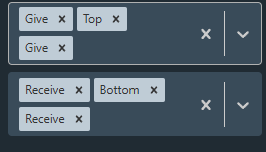
It should be Oral Give and Rimming Give for Model 1 and Oral Recive and Rimming Recive for Model 2
Ha, you’re one step ahead of me @Lord540. I’ve worked on a fix for this today, and I’ve pushed an update in 2.2.3 now to deal with that. GEVI codes like OgrAtbRgr now decode to Oral Versatile, Versatile, Rim Versatile; OgAb decode to Oral give, Bottom; etc.
Lemme know if that solves the issue with the GEVI scraper on the same scene 
Hi @zelpi, I’m working on this ticket today.
May I please get a screenshot of that unwanted behavior please? It can be DM’d to me for library privacy. Just want to make sure I’m zapping out the right thing.
Thanks 
Thanks its now working. But there is a new problem. The GEVI scraper doesnt like diffrent performer names. It requeres the name on gevi and on your performer to be the same and it doesnt look at alias or if the model is conected to te gevi link.
Example: I have the model **Thomas Johnson from stash db (**f2ead787-e4ce-4722-8183-dae00aa93448) with the name Mr. Deep Voice as an alias. The scraper only adds the role when Mr. Deep Voice is his main name because on gevi he is named like this.
I hope this is understandable.
Good to hear. I’ve also been scratching my head with this problem: the GEVI scene scraper is pretty simplistic in the way it’s “what it sees is what it gets” on a scene page. IAFD has been far easier with its “John Smith (Credited: Jon Smith)” right on the scene page.
I’ve been trying a double scrape workaround where the scraper also visits the performer profile attached to a scene to check for aliases, but it’s proving to be really tricky. I’ll keep you posted on the progress though.
It‘s simply the field below the performer profile where the scene tiles of the performer are listed. The plugin displays there additionally the scene tiles separated by the assigned role. So the scene tiles appear twice and I only want to have the possibility to hide this tile separation by role (as it would be without the plugin).
Another issue I observed: Activating and deactivating the options in the settings takes about 30-60 secs.
Found it. Within a performer page, the roles tab was overwriting the scenes tab when the roles tab feature was turned off. Fixed now in 2.2.4
1 Like
Seem like not many if at all of my Performer have IDAF link. Can you add setting so we can just disable that button? Or perhaps only appear if there is URL linked.
Good call, and thank you for the feedback @sashi. I’ve just pushed an update for this in 2.2.5. Changes:
IAFD/GEVI scrape buttons only show up when there are links to scrape.
If a scene has no IAFD or GEVI URL attached, its “Scrape roles” button no longer appears. This behavior also applies to performer’s “Bulk scrape” button when none of their scenes have a URL for that site.
1 Like