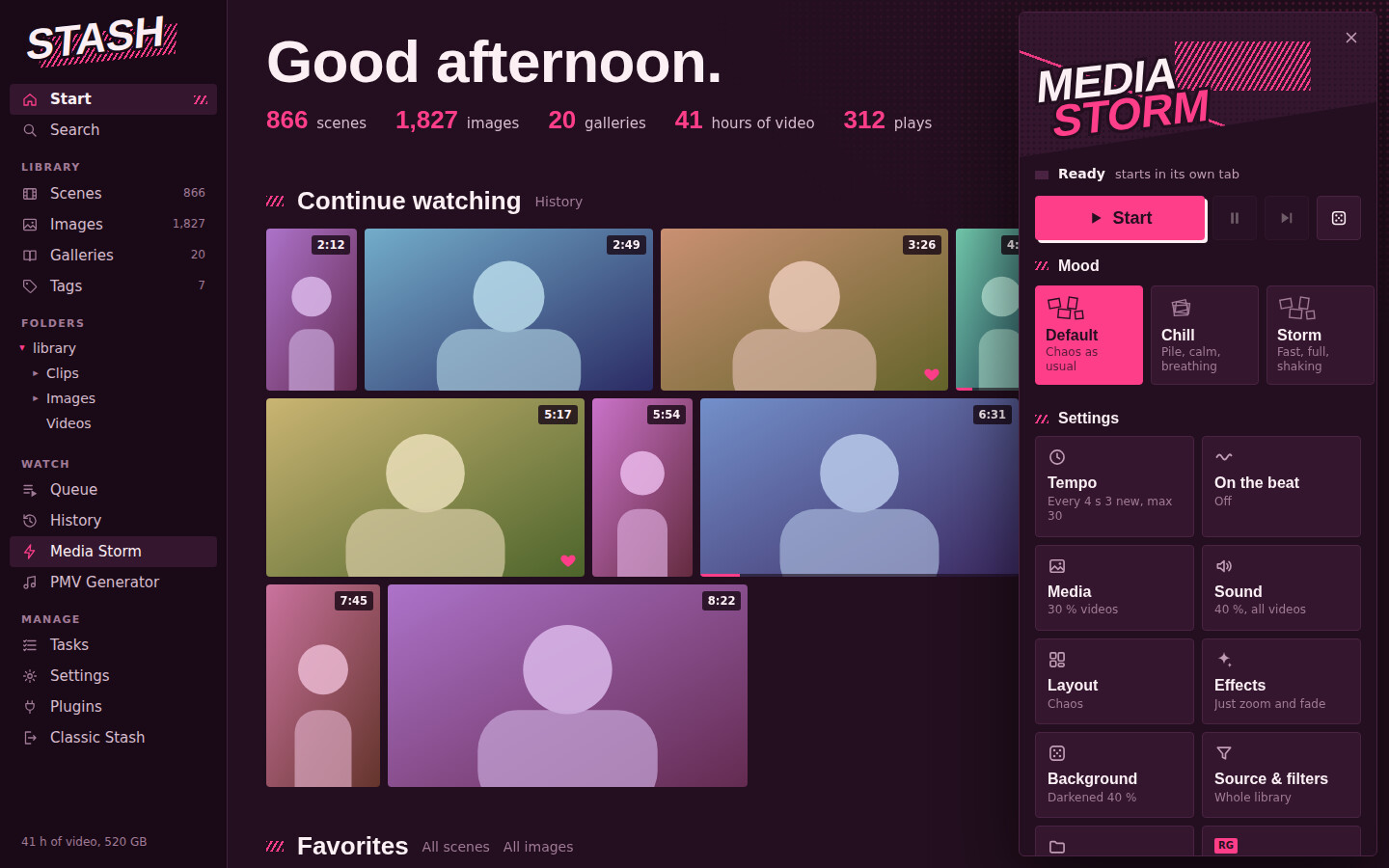
Media Storm opens a new tab where random images and videos from your library keep appearing in waves – a live collage that never repeats. Pick a mood and let it run, or add a song and the waves hit on the beat.
Features
- 8 layouts (scattered, grid, spiral, falling, …) and 10 moods that set everything in one click
- Beat mode: choose a song and new media appears on every beat
- Filters: only certain folders, tags or ratings
- Effects like glitch, pulse, VHS or 3D depth – all optional
Thanks for trying it, and sorry about that! Most likely it’s not you. If some of your videos are in a format the browser can’t play directly (HEVC/H.265, WMV, AVI …), Stash has to convert each one live with ffmpeg. Media Storm plays several clips at once and cuts fast, so that can mean a lot of conversions running at the same time, which is too much for smaller servers.
Quick fix: in Media Storm’s settings inside the Media Tab set Video source to Preview clip (lighter). It then uses Stash’s small preview clips (Tasks → Generate → Previews) and barely puts any load on the server.
Could you tell me what Stash runs on (NAS, Docker, PC …) and roughly what formats your videos are? Then I can make Media Storm handle this better.
Also, which browser do you use? Firefox can’t play some video formats that Chrome can (e.g. HEVC), so Stash has to convert many more clips on the fly, and Firefox is generally slower with many videos at once. Chrome or Edge should run a lot smoother.
I do see similar behavior as @Dining9093 where it almost seems like there is a maximum number of full video streams (or requests in general) that Stash can handle (around 5 for me) after which Stash just stops responding at all (can’t load any page at all) until those stream requests are canceled/stopped. As soon as I stop media storm and those requests are terminated, Stash goes back to responding as normal. If I close an individual video in media storm, another video will be loaded in to replace it but then it will go back to being stuck until another video is closed.
It doesn’t look like it’s any sort of system/network resources limitation - CPU, RAM, network usage are all still relatively low.
The “Stash freezes after ~5 videos” issue came from the browser, not your server. Over plain HTTP a browser only keeps about 6 connections open per server, and every full video Media Storm plays holds one. Once they’re all taken, Stash can’t answer anything else. Media Storm 2.3.1+ handles this itself now: it keeps checking how quickly Stash answers and plays only as many full videos as the connection allows. Extra ones play as preview clips.
Stutter with lots of videos at once (roughly 20–30+) comes down to hardware. Every video has to be decoded frame by frame, and even with hardware acceleration the GPU’s video decoder can only handle so many streams at once. On my RTX 4060 Ti the decoder hits 100% at around 25 full 1080p videos while the rest of the GPU is barely doing anything. No browser setting or extension can get past that. It depends on your graphics card and on your videos: 4K, HEVC or 60 fps files cost a lot more than 1080p H.264. Media Storm already pauses videos that are hidden behind others to save decoding power (2.3.2).
If it stutters for you:
Lower “At most at once” in the Tempo settings
Use Chrome or Edge (Firefox is noticeably slower with many videos)
Make sure your browser runs on your dedicated GPU (Windows Settings → Display → Graphics → your browser → High performance)
Thanks for the idea! Media Storm 2.5.0 adds it: Media → “Marker clips” sets how many of the videos play your markers (only the marked part, looping), and under Source & filters “Only marker clips with tags” picks the marker tags. The other filters apply to the marker’s scene. I could only test it against a mock Stash, so tell me if anything doesn’t work with your setup.
Looks great and works well, thank you! Would it be possible to add a “recursive” toggle to the marker tag filter so you can input a parent tag and it catches all the sub-tags?
Glad it works well! Media Storm 2.6.0 adds a “Including sub-tags (recursive)” switch under “Only marker clips with tags”: enter a parent tag and it also catches the marker clips of all its sub-tags. It’s off by default. I could only test against a mock Stash, so let me know if it doesn’t catch what you expect.
The recursive toggle actually works great for Markers, but this led me to a different issue. If a tag has zero matches it does not show up as a selection possibility, so you can’t pick a parent tag to recurse against unless there is at least one item with that exact tag. Perhaps parent tags should be hidden when recursive is disabled but show up in results when recursive is enabled?
The scene tag filter box will actually already populate tags with zero matches, even though recursive doesn’t work for that. Maybe it might be best to just have the same fields and behavior for both, where you select whether you want it to be apply to Scenes vs Markers more like the PMV Generator plugin? E.g. a slider at the top like the “What” field in PMV Generator, and then you can use a single tag field, a single exclude field, and a recursive toggle that applies either way.


 Storm in the navbar