Cherry Pick

:placard: Summary Finds something to watch in your own library, learned from what you rate and play
:link: Repository https://github.com/CandyBoudoir/candyboudoir.github.io/tree/main/plugins/cherrypick/src
:information_source: Source URL https://candyboudoir.github.io/index.yml
:open_book: Install How to install a plugin?

You’ve got a lot of content and figuring out what to watch is a pain. Cherry Pick finds something for you to watch, and gives you a fun game to play too!

It learns your taste from what you already do in Stash: your ratings, how much of each scene you watch, what you come back to and your O counts. Then it fills the top of your front page with scenes you’re likely to enjoy, each with a line saying why it’s there. The game is Brackets, a knockout between performers or scenes that fills in the ratings you never got around to.

Note: As long as Stash has recorded some plays, it will work right away. You don’t need to rate anything by hand first.

Cherry Pick installs from a plugin source with no Python, no binary to run and no account. It works very well standalone but it can also run alongside Stash Curator and Restash, if you choose. It will also learn from the matches you play in Ascension, Xenith and HotOrNot V3, if you have them installed.
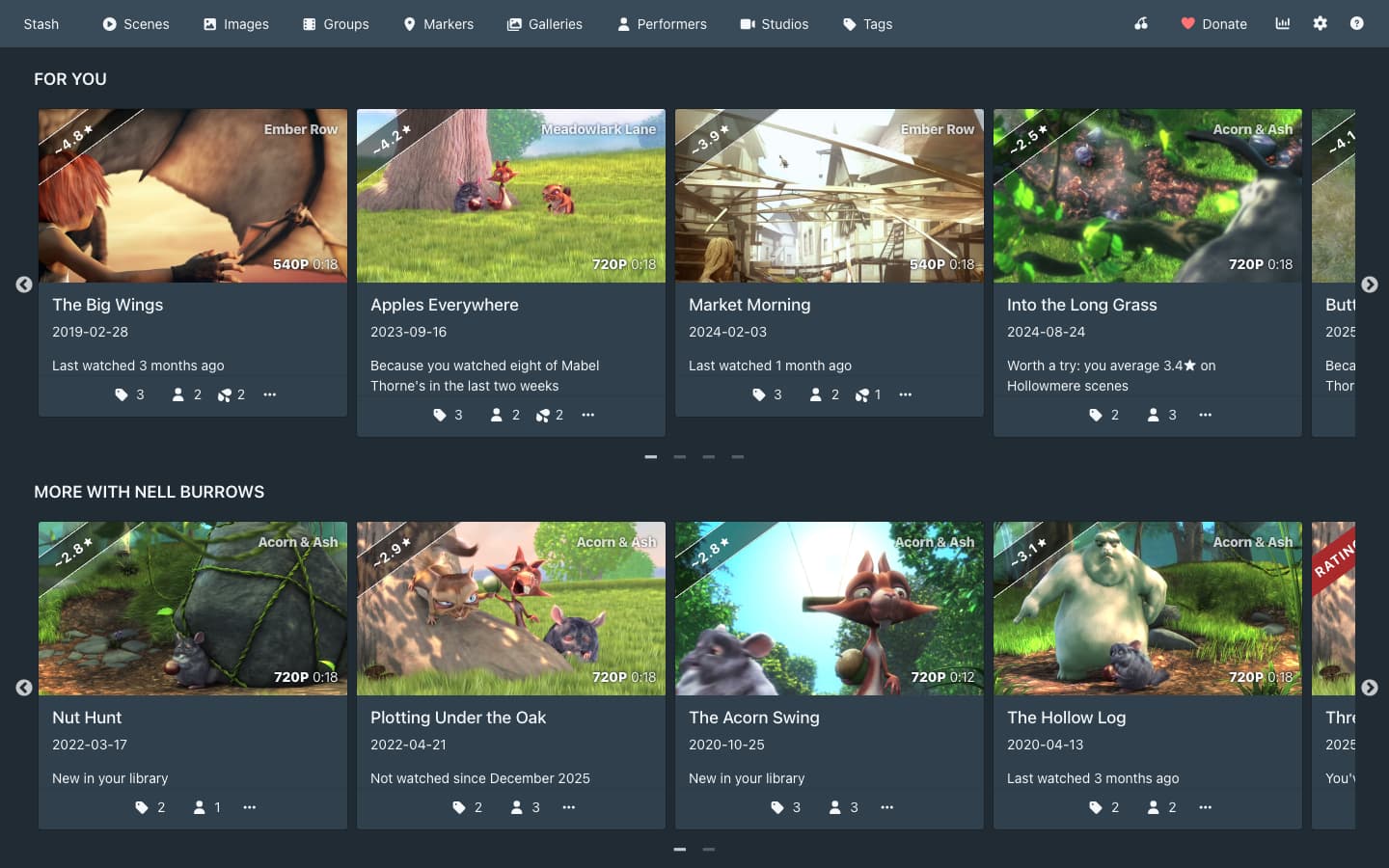
What you get

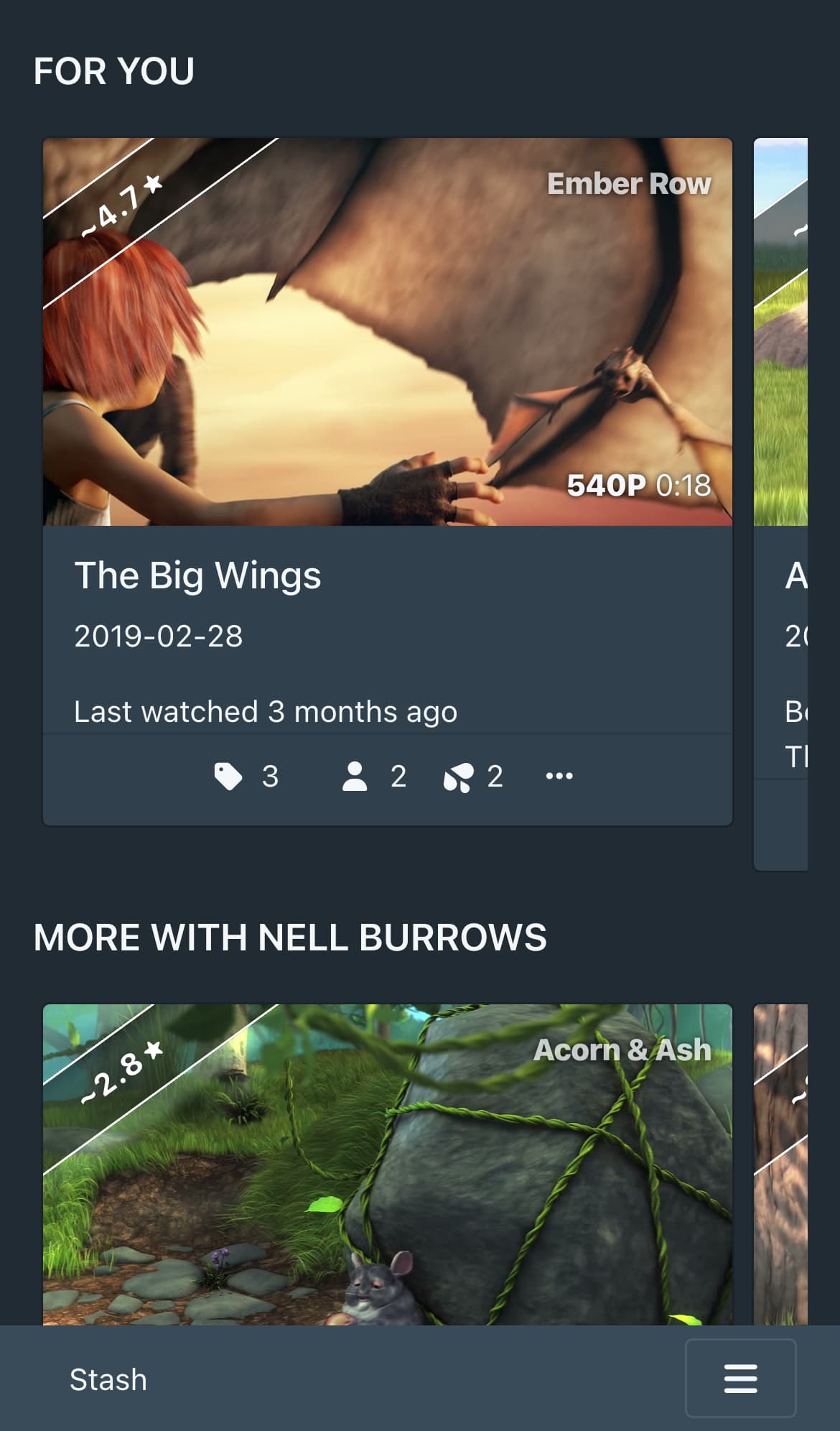
  • For you, the first row on your front page: 12 scenes from your library, picked by your taste, what you’ve watched in the last two weeks and how long it’s been since you played each one.
  • More with
 and Back to
, up to two rows after For you with more of a performer or a tag you’ve been watching lately.
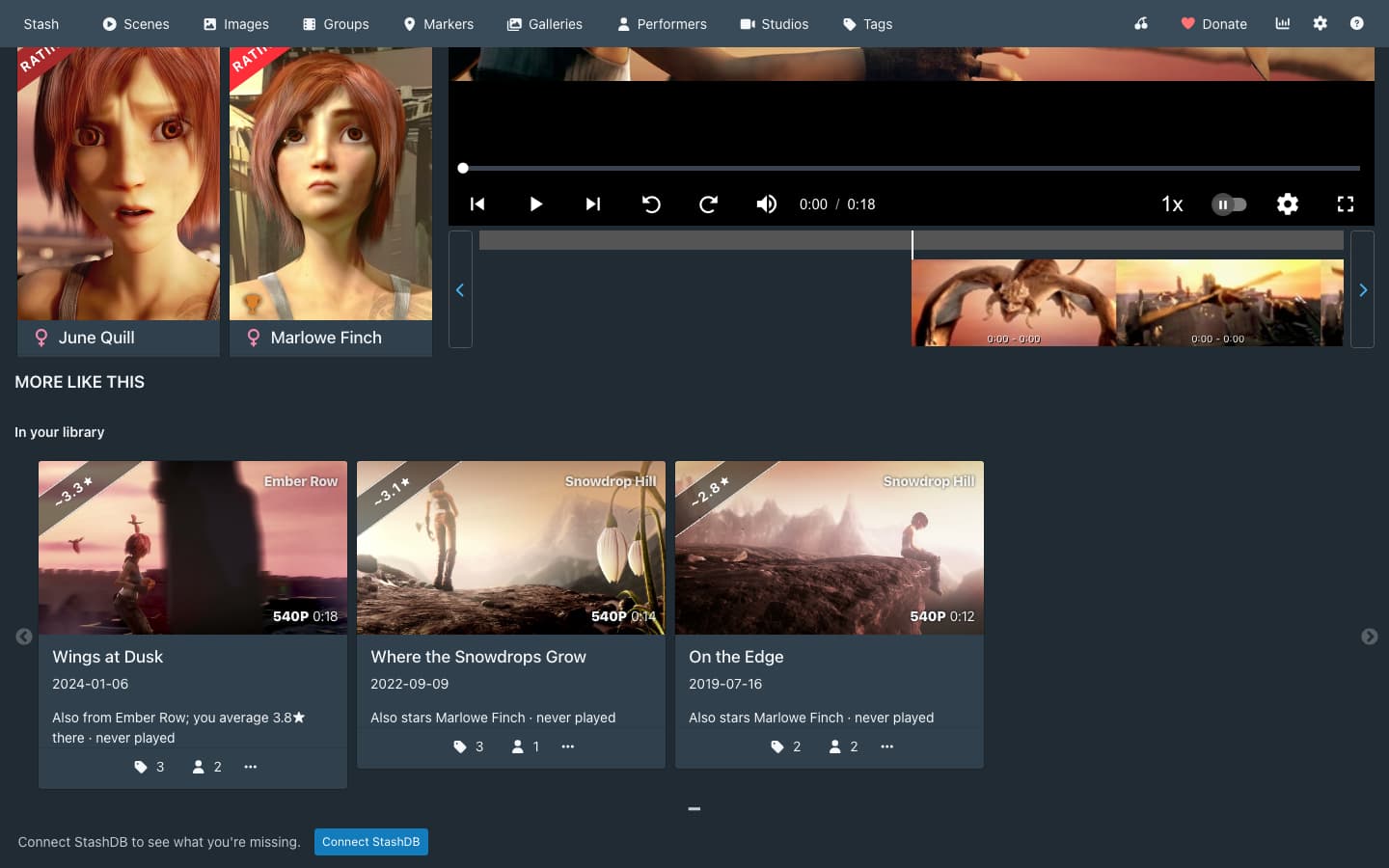
  • Watch This (new in 0.2.0): turn it on to have the front page show one scene in Stash’s own player across the page, in place of Cherry Pick’s rows. It’s the scene Cherry Pick thinks you most want to watch now. Stash’s own rows stay below it, and turning Watch This off brings your Cherry Pick rows back as you had them.
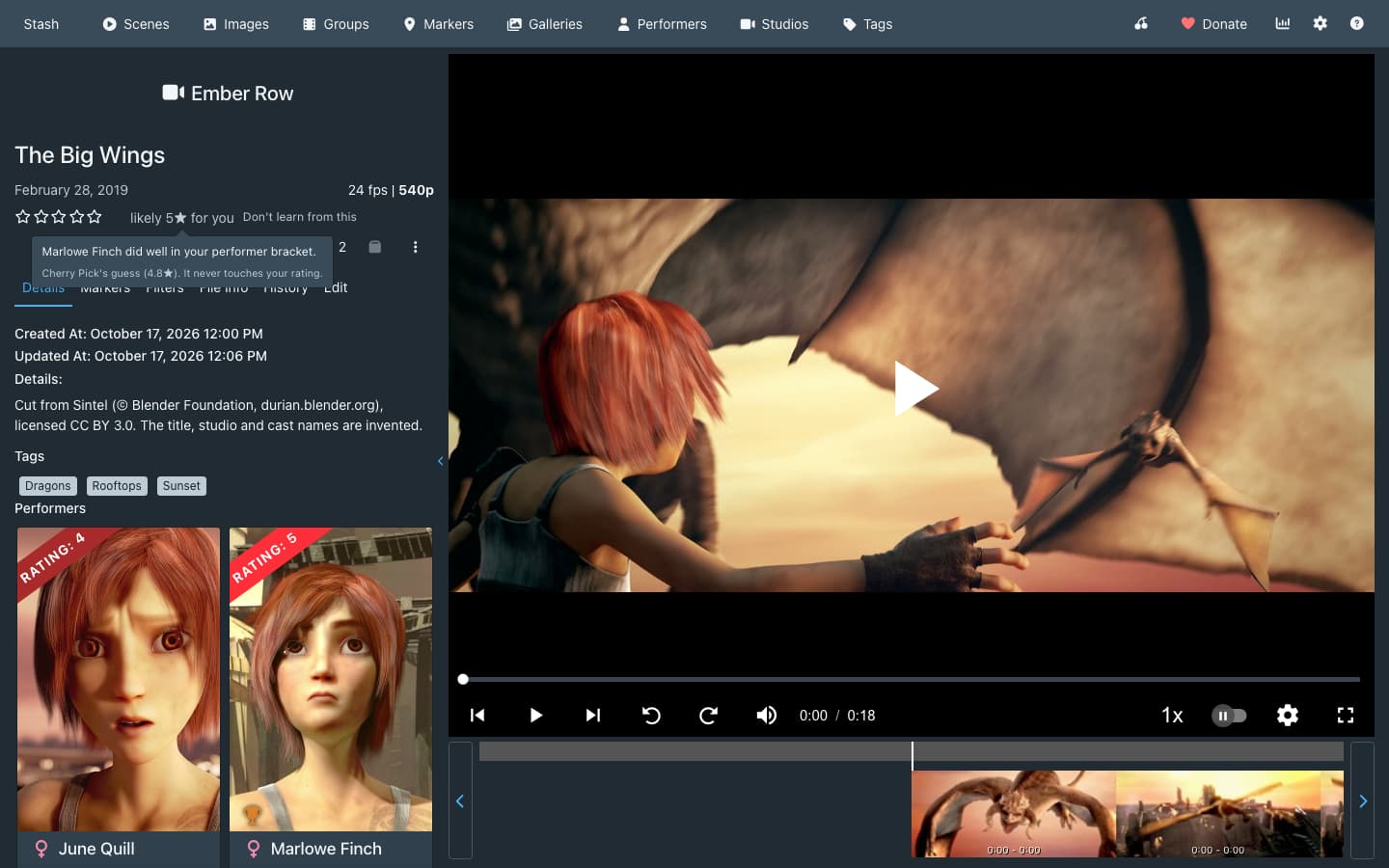
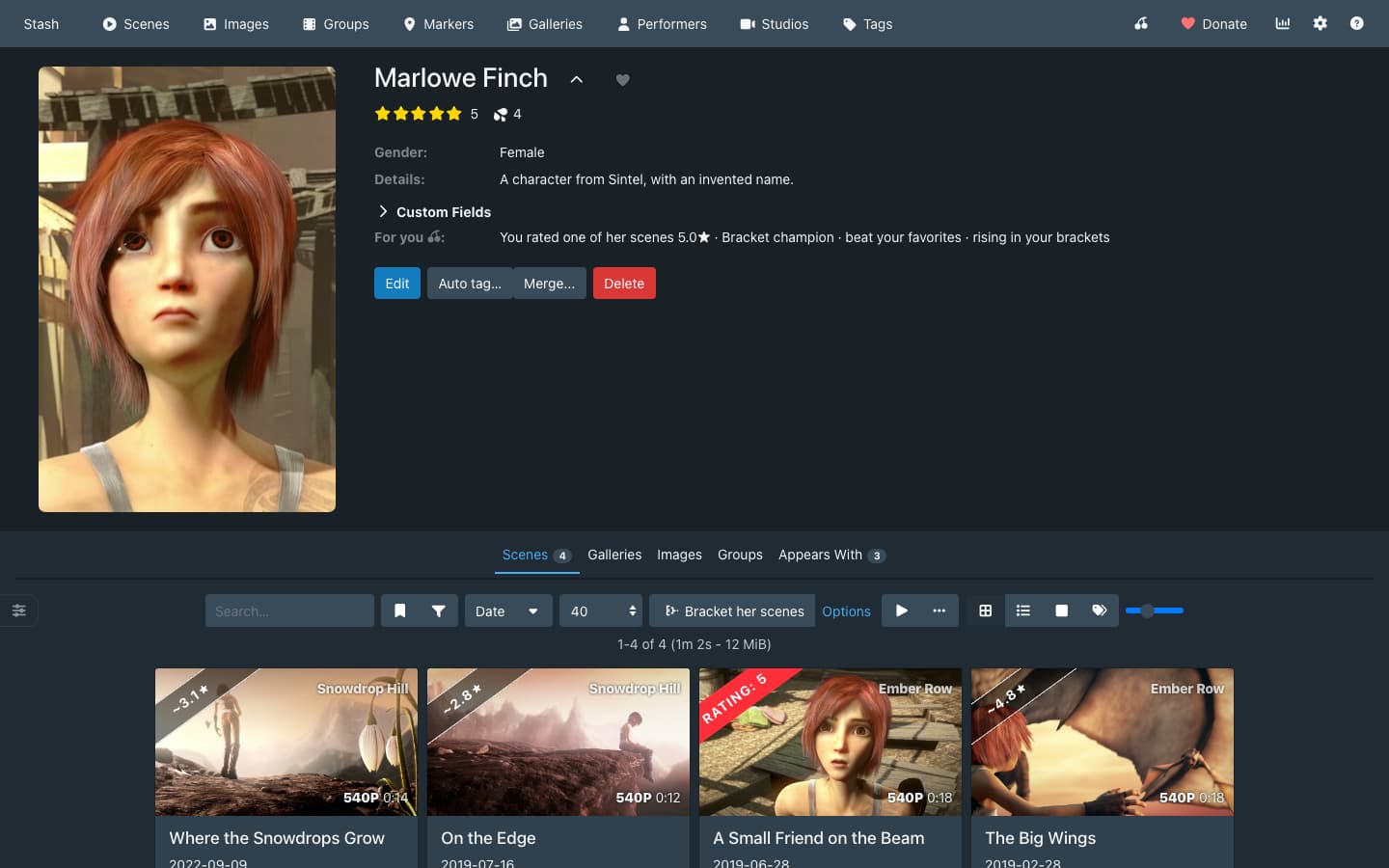
  • Your score, a guess at how you’d rate each scene you haven’t rated, in the corner of its card and beside the stars on its page. It appears once you’ve rated 10 scenes and it predicts your ratings better than using an average rating would. It never changes your actual ratings though; it’s just extra info.
  • More like this under the player, with scenes like the one you’re on that you’ve barely played.
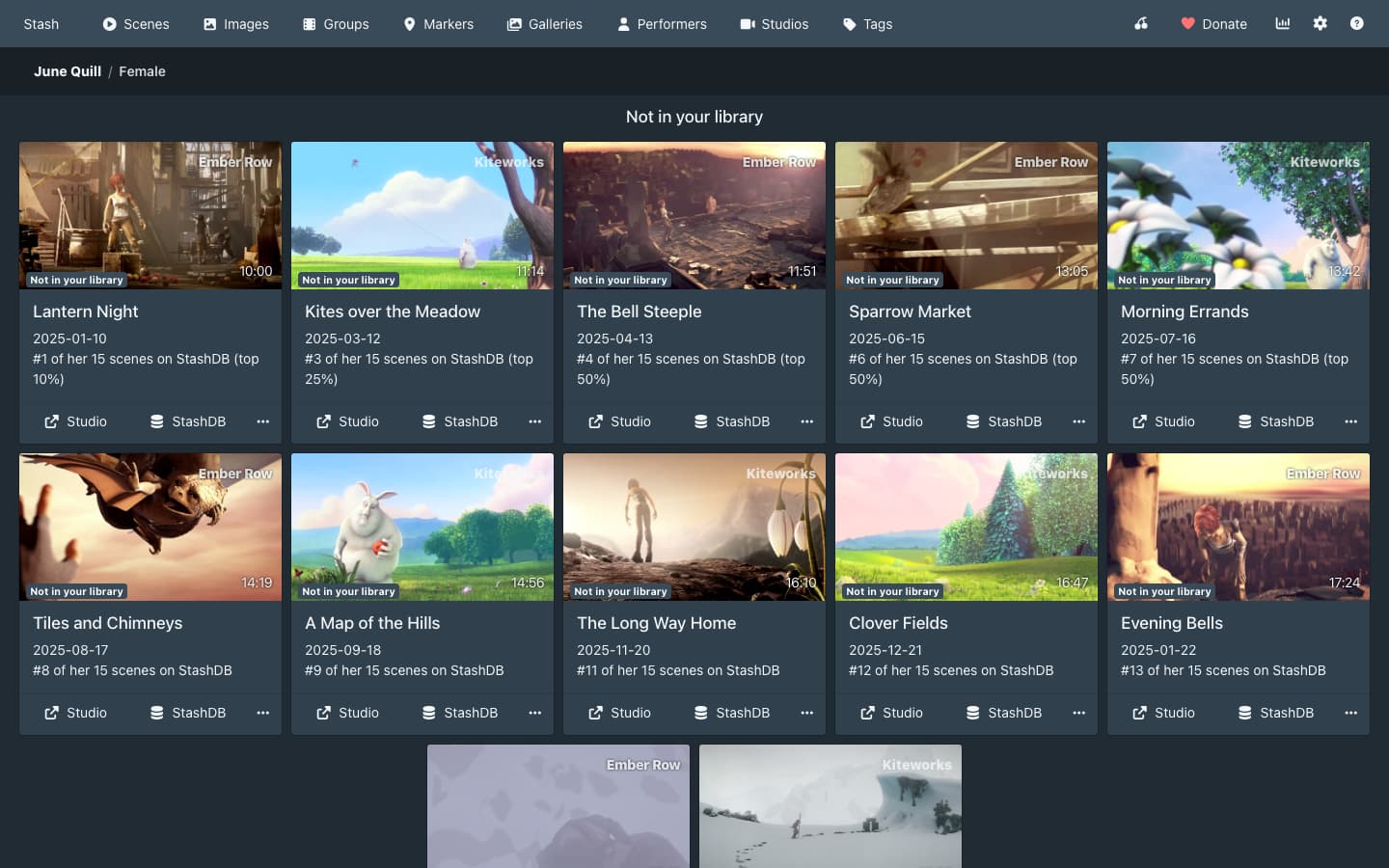
  • With your StashDB key in Stash, performer pages and More like this also list scenes you don’t have so you can shore up your collection.

Nothing appears while a scene plays. Every row, badge and line can be switched off in Settings > Plugins, and Cherry Pick uses Stash’s own cards and rows, so it matches whatever theme you use.

Brackets

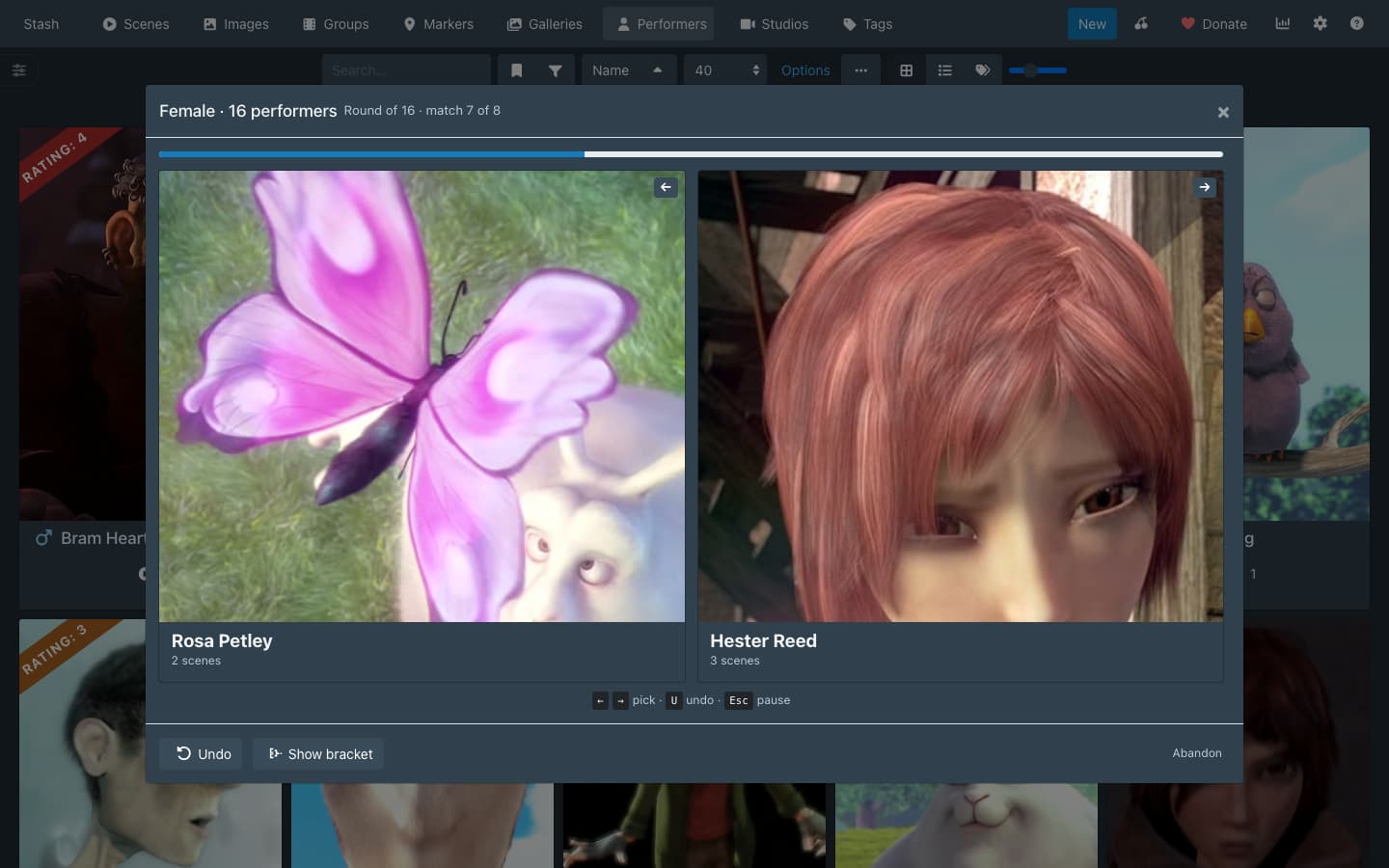
Picking between two performers or two scenes is more satisfying and accurate than rating either one. Click Bracket on the Performers or Scenes page for a 16-entry knockout of ones you haven’t rated, and Options for a bigger one. In a scene bracket you judge each side from eight frames and Stash’s preview clip, so nothing plays and your play counts stay as they are.

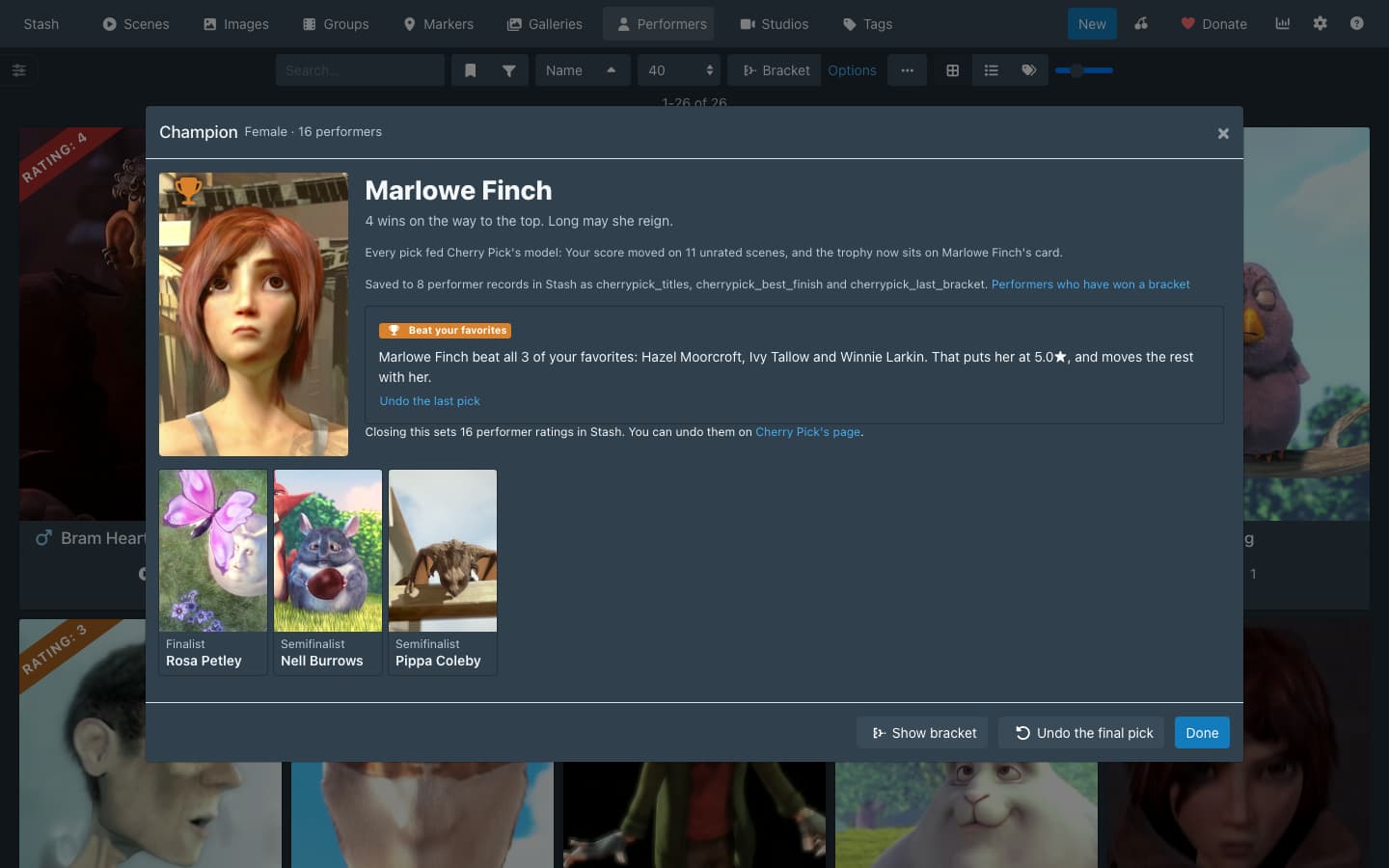
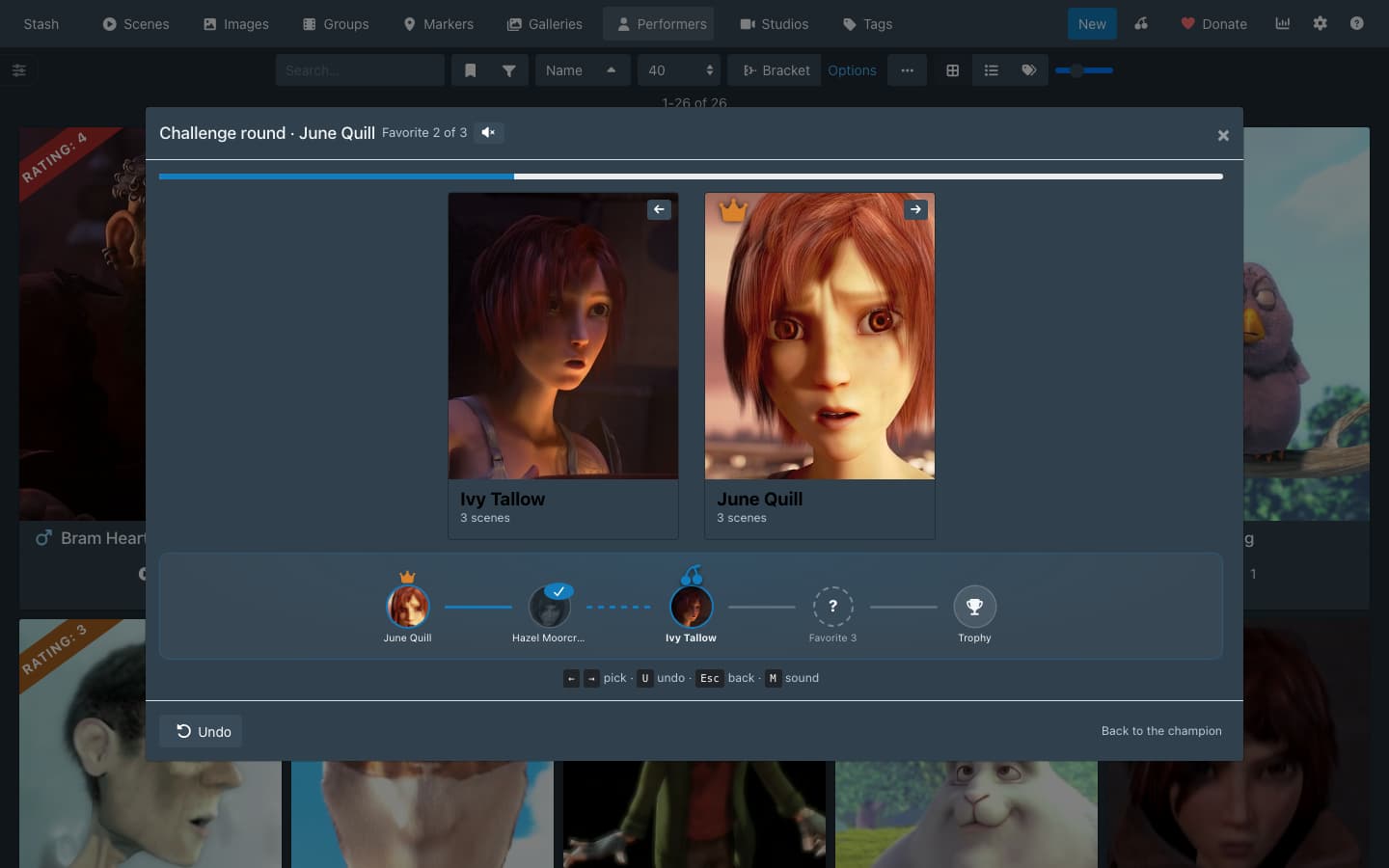
When it ends, everything in it you haven’t rated gets a rating from where it finished, scaled to how you rate the rest of your library. A bracket drawn from your whole library puts its champion near your highest ratings and last place near your lowest. Test the champion then runs an optional Challenge round against up to three performers or scenes you have rated, which measures the champion against your own stars and moves everyone else by the same amount. Performer champions get a crown, or a trophy if they win the Challenge round, and a place in the Hall of Fame row on your front page.

Brackets never change a rating you gave by hand. Closing the champion screen saves the new ratings, and Cherry Pick’s page can undo them. To check them before they’re saved, turn off Apply bracket ratings automatically.
Where to start

Run a bracket from the Scenes page. Its 15 picks rate all 16 scenes, more than the 10 ratings Your score waits for.

With other plugins

Cherry Pick is tested beside Ascension, HotOrNot, Xenith, Restash and Stash Curator, and it never writes over their scores. Beside the ones that manage your ratings, a bracket shows you its ratings before saving them. Curator learns from Stash’s ratings, so your brackets feed it too, and Cherry Pick offers to hide its own score on cards next to Curator’s. The first reply has the details.

Where your data lives

Cherry Pick runs in Stash’s web interface and keeps its settings, the Hall of Fame and a few custom fields in your Stash. It connects only to your Stash and, if Stash has your StashDB key, to StashDB, and it sends nothing to me or anyone else. Remove Cherry Pick data on Cherry Pick’s page clears its data from Stash and from that browser, and the ratings you applied stay as ordinary Stash ratings.

Installation

  1. Settings > Plugins > Available Plugins > Add source: Name CandyBoudoir, Source URL https://candyboudoir.github.io/index.yml, Local path candyboudoir.
  2. Expand the CandyBoudoir source, tick Cherry Pick, click Install and refresh the page.
  3. Its switches are under Settings > Plugins > Cherry Pick.

Cherry Pick 0.1.5 is tested on Stash 0.31.1 in Chromium, Firefox and WebKit and is licensed under the AGPL-3.0, like Stash. The first reply covers how it works: the model, what it writes, every network request and the tests.

Thanks

Thanks to the authors of Stash Battle, HotOrNot, Ascension, Xenith, Restash and Stash Curator, and to everyone posting in their threads. Your hard work and feedback helped influence Cherry Pick, and I’ve done everything I can to make sure those other plugins continue to work alongside this one so that people can enjoy the features they’ve grown to love while trying something new.

AI disclosure. Claude wrote the code under my direction. I designed Cherry Pick on a clickable mockup first and decided what it does, and every release passes the CI tests in the first reply against a real Stash before it ships.

I worked hard on this :sweat_smile: and I would love your feedback. Tell me: whether Your score matches your taste once it appears, and whether a 16-performer bracket holds your attention to the final.

Screenshots

The screenshots show a demo library with invented names, cut from Blender Foundation open movies: Big Buck Bunny (© 2008 Blender Foundation) and Sintel (© Blender Foundation) under CC BY 3.0, and Elephants Dream (© 2006 Blender Foundation and Netherlands Media Art Institute) under CC BY 2.5.
5 Likes

A bit of a deeper dive, for those who want to geek out.

How it works

  • Taste model. Cherry Pick fits an additive model with shrinkage in the browser, over performer, studio and tag effects plus a behavior score from play time, rewatches and O count. Your score shows only when it beats your mean rating on ratings it holds out from fitting.

  • Front-page row. For you ranks owned scenes by taste, by the performers, studios and tags of what you played in the last two weeks, each play decaying with a 7-day half-life, and by time since the scene’s last play, with at most two cards per performer. The bonus for a scene unwatched for months scales with how often the viewer rewatches, so a viewer who never rewatches mostly sees scenes they haven’t played. Two of the 12 slots go to near-misses and forgotten favorites.

  • Rows after For you. Up to two rows follow For you, only when recent watching justifies them, each with up to 12 owned scenes not already in For you. More with a performer needs two or more of their scenes played in the last 14 days, at least 1.2 decayed plays, where a play of a scene with more than two performers counts for less, and four scenes to show; it skips performers the model scores below zero and scenes played in the last two days. Back to a tag takes the one tag with the biggest lift. The tag has to be on three or more scenes played in the last 14 days, and its share of recent plays, after decay, has to beat its share of the library by at least 33 points: a tag on 10% of the library needs 43% of recent plays. The model must not score the tag below zero, the row needs four scenes to show, and it leaves out scenes played in the last 14 days. Rows that follow your watching turns both off.

  • Bracket entrants. Brackets are single elimination. Places go first to entrants without a rating of yours (unrated, primed by Ascension, or carrying a provisional rating from an earlier bracket), spread over the model’s predicted range, then to records another plugin ranks, strongest first. Your rated anchors, spread over your stars, fill only what is left, and a scene bracket holds your rated scenes out while four unrated ones can play. Scene brackets draw from every scene you own, watched or not, leaving out audio-only files and scenes marked Don’t learn from this. Unrated and ranked entrants of your last three brackets of the same kind and gender wait while others can play. A performer you haven’t rated who is in two or more of your rated scenes counts as an anchor at the mean of those ratings, provisional ones left out.

  • First round. Each unrated entrant meets the anchor of matching rank, so its first pick places it on your scale. Byes go to anchors first. The rest meet across the bracket’s halves, the strongest against the strongest of the weaker half (1 v 9 and 2 v 10 of 16), and each match’s sides are drawn at random.

  • Scene matches. Each side shows the cover and eight frames from Stash’s generated sprite sheet, with the studio, year, length, resolution, up to four performers and the tags. Look closer, or 1 and 2 on the keyboard, opens one scene with its frames, a scrub bar and Stash’s preview clip; Enter picks, O switches to the other scene and Esc goes back. Nothing records a play. A pick within 400 ms of the last one is ignored, so a double tap can’t also pick in the next match.

  • Bracket ratings. Each pick, including those in the Challenge round, updates a Bradley-Terry model the way Elo does, by K × (1 - p), where p is the chance the model gave the winner. Apply (Apply to my ratings, or Apply to my performer ratings on a performer bracket) rates every entrant without a rating of yours, first-round losers included. An entrant that beat an anchor goes between the best anchor it beat and the lowest-rated anchor above it, at the midpoint rounded to a quarter star, or half a star over the one it beat when none is above it. Every other entrant is rated from where it finished. Within a round, whoever lost to the entrant that went furthest ranks higher, then the model’s stronger entrant. The entrants’ places in the library, as the model ranked them when the bracket started, are sorted, the k-th finisher takes the k-th highest place, and that place is read off your own ratings of that kind (and gender, for performers). With fewer than ten of those, a scene bracket uses Your score’s spread when it covers at least a star, and otherwise Cherry Pick uses one to five stars. These ratings round to a quarter star and are provisional. A loss to an anchor measures nothing on its own; it caps the entrant’s rating at half a star under the lowest-rated anchor that beat it, directly or through whoever beat it. Apply never writes an anchor.

  • Challenge round. When the champion has no rating of yours, the champion screen offers an optional Challenge round behind Test the champion. The champion meets up to three rated records of its kind (and gender) that didn’t play, each rated above every anchor that did, from the bracket’s own list first and lowest rated first, until one beats it. Where it stops sets the champion’s rating, and every rating taken from the finish moves by the same amount, so the order holds. Rate her myself (him, them or it) skips the round, and the stars you give move the rest the same way. A champion that loses its first challenge keeps its rating from the finish, capped half a star under the one that beat it.

  • Auto-apply. With Apply bracket ratings automatically on, the champion screen has no Apply button and says how many ratings closing will set. Closing it any way other than starting its Challenge round writes them without the preview. The switch’s default depends on the other plugins installed, below.

  • What it writes. Cherry Pick writes its plugin configuration through configurePlugin, a few KB of config.yml to start, growing by a few KB with each finished bracket the Hall of Fame keeps. A finished performer bracket writes cherrypick_titles, cherrypick_best_finish and cherrypick_last_bracket on the performers who reached the last eight. Every rating taken from where an entrant finished carries cherrypick_provisional, on performers and scenes, holding the value written. A later bracket treats that record as unrated and can correct it; once the rating no longer matches the field, it is yours, and a rating measured against an anchor clears the field. It writes rating100 only through Apply, pressed or run when the champion screen closes, and Apply’s Undo, gender only through Set genders and your stash-box list only through Connect StashDB. It never writes play counts or tags.

  • What stays in the browser. IndexedDB holds a copy of the library and the StashDB cache. localStorage holds which For you cards you opened or passed over and a copy of the plugin configuration. The model is refitted from the library copy on each page load. Each load asks Stash for the newest edits, plays and Os, newest first, and compares their times in the browser; the whole library is read again once a day, or when the scene count doesn’t match. A new browser reads the library and the configuration from Stash again, refills the StashDB cache from StashDB and starts the For you history over.

  • Network. Cherry Pick calls Stash’s GraphQL API and, with a StashDB key, https://stashdb.org/graphql, sending your key in the ApiKey header. It sends the StashDB ids of the performers, scenes and studios on the open page, at most six requests per page at one a second, and caches answers for 7 days. Covers of scenes you don’t have load from StashDB’s image server. Scene brackets also load each scene’s sprite sheet and preview clip from Stash, outside GraphQL. The manifest adds stashdb.org to Stash’s connect-src CSP.

  • Build and tests. Cherry Pick ships as one cherrypick.js, which esbuild bundles against Stash’s own React, and one cherrypick.css, with no Python and no binaries. Unit tests cover the model. CI runs contract tests against a real Stash 0.31.1 and the develop build with each CandyBoudoir theme, and on 0.31.1 beside Ascension 1.4.1, HotOrNot 1.0.0, Restash 0.3.0, Stash Curator 0.39.2 and Xenith 3.2.0, one at a time, in Firefox and WebKit, and on a Stash server set to UTC−7. A separate end-to-end walk through every feature, run by hand outside CI, passed on 0.1.0 in Chromium, Firefox and WebKit on an invented library of 25,000 scenes and 10,000 performers.

Beside other plugins

  • How it tells. Cherry Pick reads a rating as yours unless it can tell another plugin set it. Plugins that leave no mark, such as Stash Battle, write ratings that read as yours. A record carrying hotornot_stats, elo_matches, performer_record, scene_record, xenith_stats or xenith_record counts as ranked, and so does a record whose rating100 equals its restash_score. Cherry Pick recognizes the random starting ratings of Ascension’s Prime tasks by their shape: a value from 1 to 9 shared by three or more records, with a value from 25 to 39, or 40, or both, and those values holding more than half of the group’s ratings. Scenes form one group; performers form one group and one per gender. The model reads all of these as unrated. Your score shows on those scenes as on unrated ones, in the card’s rating corner, where Ascension and Xenith already hide Stash’s rating.

  • Ascension, HotOrNot and Xenith. They keep Elo scores in Stash’s rating. Ascension, HotOrNot V3 and Xenith also keep each record’s recent matches in performer_record, scene_record or xenith_record. With Learn from Ascension, HotOrNot and Xenith matches on, which is the default, Cherry Pick replays those matches as Bradley-Terry picks at half the weight of a bracket pick, oldest first and ahead of your own picks. It counts the two sides of a match once and leaves out skips, draws, opponents no longer in the library and scenes marked

Don’t learn from this. HotOrNot 1.0 and V2 keep only totals, so they add nothing. A reason built from matches names the plugin, as in “Won 7 of 11 matches in Ascension”, and Cherry Pick’s page counts the matches it learned from.

  • Restash. Restash keeps its score in its own custom fields, and its Also mirror score to rating100 (destructive) setting writes that score over Stash’s rating too. A rating equal to the record’s restash_score reads as Restash’s, including one you set by hand that happens to match. With the mirror on, every record Restash scores carries its score, yours included, so Cherry Pick finds none of your ratings there until Restash’s Restore Ratings task puts back the ratings it saved before its first mirror run. Ratings set after that, by hand or by Apply, aren’t in its backup.

  • Stash Curator. Curator puts its Appeal score on scene cards. When Curator is installed and enabled, Cherry Pick’s page and its settings ask once whether to hide Your score on cards. Hide on cards turns off Score badges on cards and keeps Your score on scene pages, and Keep both leaves it on; with Score badges on cards already off, nothing is asked. Curator 0.37 and later can hide its own card score instead, with Hide card ratings and confidence in its settings. Curator reads Stash’s ratings, plays and favorites, so ratings a bracket sets reach its model. A bracket on a list filtered by Curator Appeal or affinity leaves that criterion out, since Stash’s schema has no field for it, and says so in the pool’s name. Adding Curator’s prune tag ([Prune] by default) to Tags to keep out of my picks keeps pruned scenes out of Cherry Pick’s rows.

  • Writing ratings. Apply never rates a record another plugin ranks or whose rating is Restash’s score. Its preview lists those that reached the last eight as kept and marks Prime ratings as “primed”, which it treats as unrated and may replace. It reads each record again right before writing and leaves it alone if another plugin started ranking it, or its rating changed, since the bracket offered one, for example a rating you set by hand in another tab. It says how many it left, and Apply bracket ratings automatically does the same. Undo leaves alone any record another plugin took over or whose rating changed after Apply wrote it, and says how many it left. With Ascension, HotOrNot or Xenith installed and enabled, the preview says that plugin will pick up every rating you apply, since its rankings start from Stash’s ratings. Apply bracket ratings automatically defaults to off while Ascension, HotOrNot or Xenith is enabled or Restash’s mirror is on, and to on otherwise. It follows those plugins as they come and go until you set it yourself.

  • On the page. Your score sits beside Ascension’s and Xenith’s badges on scene cards, crowns and medals sit above Xenith’s badge on performer cards, and HotOrNot’s floating button goes under Cherry Pick’s dialogs so it can’t cover their buttons on a phone. Cherry Pick’s custom fields sit beside the other plugins’ fields, and Remove Cherry Pick data removes only its own.

2 Likes

This sounds really good. However, I’ve never actually given a rating to anything in my Stash. So, I was wondering how Cherry Pick would work in that situation? Would I have to rate 10 scenes before I can use it effectively? Or could I just let Brackets suggest a rating for everything and let it do it?

1 Like

As long as Stash has recorded some plays, the For you feature will work right away. You don’t need to rate anything by hand first.

Cherry Pick also learns from how you watch: how much of each scene you play, which ones you come back to and your O counts.

Your score is the part that waits for 10 rated scenes. Click Bracket on the Scenes page, make 15 picks, and when you are done, all 16 scenes get a rating from where they finished. With no ratings of yours to compare against, it spreads them from about 1★ to 5★, or over Cherry Pick’s own guesses once your plays have taught it something.

2 Likes

Thanks very much for the detailed answer. I’m definitely going to try it out.

1 Like

Cherry Pick 0.1.6 is out with these changes:

  • Cards in For you, the rows below it and More like this now all end at the same height, like Stash’s own rows. Before, a card with a one-line reason was shorter than the cards next to it.
  • In a scene bracket, Look closer now opens with Play the preview already in place. Before, the button appeared a moment later and moved the window up, so a quick click could miss.

It’s tested on Stash 0.31.1 alongside the latest releases of Ascension (1.4.1), HotOrNot (1.0.0), Stash Curator (0.40.1), Xenith (3.2.0) and Restash (0.3.0).

To update, open Settings > Plugins, click Check for updates, tick Cherry Pick, click Update and refresh the page.

The release notes are on GitHub.

1 Like

Cherry Pick 0.1.7 is out with these changes:

  • Cards for scenes you don’t have, on performer pages and in More like this, now link to where you can get the scene, including clip stores and video sites such as Clips4Sale, iWantClips, ManyVids and Pornhub. The button shows the site’s name. Before, most clip-store scenes had no store link.
  • Pages you’ve visited in the last month now load their StashDB scenes right away, and Cherry Pick checks StashDB for updates in the background.

It’s tested on Stash 0.31.1 alongside the latest releases of Ascension (1.4.1), HotOrNot (1.0.0), Stash Curator (0.40.4), Xenith (3.2.0) and Restash (0.3.0).

To update, open Settings > Plugins, click Check for updates, tick Cherry Pick, click Update and refresh the page.

The release notes are on GitHub.

Cherry Pick 0.1.8 is out with this change:

  • If you use Advanced Rating or Binge, Cherry Pick now ignores the tags they keep for their own use: Advanced Rating’s score tags, such as “Production Quality ★: 4”, which Binge’s stars also write, and Binge’s collections, such as “Watch Later :file_folder:”. Before, it treated them like any other tag, which skewed Your score and made scenes in the same collection look alike in More like this. Advanced Rating’s “Favourite ★” still counts.
It’s tested on Stash 0.31.1 alongside the latest releases of Ascension (1.4.1), HotOrNot (1.0.0), Stash Curator (0.40.4), Xenith (3.2.0) and Restash (0.3.0).

To update, open Settings > Plugins, click Check for updates, tick Cherry Pick, click Update and refresh the page.

The release notes are on GitHub.

Cherry Pick 0.2.0 is out with a new setting, Watch This, for when you don’t want to pick what to watch:

  • Watch This feature: turn it on to have the front page show one scene in Stash’s own player across the page, in place of Cherry Pick’s rows. It’s the scene Cherry Pick thinks you most want to watch now. Stash’s own rows stay below it, and turning Watch This off brings your Cherry Pick rows back as you had them.

  • Skip, under the player, keeps the scene out of Watch This for 48 hours and shows another scene. The new pick shares no performer with any scene you’ve skipped this visit. The player’s next button and the next-track media key also skip. Skip a scene again without playing it and it stays out for a week, then 30 days each time. A Skip after you’ve played the scene, or after you’ve watched at least a tenth of it, is back to 48 hours. Back, or the player’s previous button, brings back the last scene you skipped.

  • Skips don’t change your ratings or anything Cherry Pick has learned. Cherry Pick keeps them in Stash’s plugin configuration, so every browser you open Stash in sees the same skips.

  • The player is Stash’s, so Stash records the play and where you stopped. Space starts the scene without a click. A line under the player gives the scene’s title, its performers and why Cherry Pick picked it, and hides once the scene plays.

It’s tested on Stash 0.31.1 alongside the latest releases of Ascension (1.4.1), HotOrNot (1.0.0), Stash Curator (0.40.4), Xenith (3.2.0) and Restash (0.3.0).

To update, open Settings > Plugins, click Check for updates, tick Cherry Pick, click Update and refresh the page.

The release notes are on GitHub.

Cherry Pick 0.2.1 is out with this change:

  • Cherry Pick now counts a play only as far as the time you spent playing it. A scene you played for less than a tenth of its length, such as one you swiped past in Stash TV, doesn’t change Your score or what For you shows, and For you and More like this call it “Not watched yet”. Before, Stash counted a swipe past a scene as a play, the same as watching it through, so a few minutes in Stash TV pushed the performers you swiped past into For you, and Your score read each of those scenes as one you didn’t like.
  • Scenes you do watch in Stash TV count the same as scenes you watch on their own page.

It’s tested on Stash 0.31.1 alongside the latest releases of Ascension (1.4.1), HotOrNot (1.0.0), Stash Curator (0.40.4), Xenith (3.2.0) and Restash (0.3.0).

To update, open Settings > Plugins, click Check for updates, tick Cherry Pick, click Update and refresh the page.

The release notes are on GitHub.

1 Like

After the update, the For you section has been “loading” for me for the last 30 minutes and it says “learning your taste from scenes”. Is this normal?

Not normal. Investigating now 
 standby.

@Oddysee 0.2.2 should hopefully fix this. Please update and let me know.

Cherry Pick 0.2.2 is out and fixes a bug in 0.2.1 and below where For you showed its row of grey placeholder cards with “Learning your taste from 
 scenes” in its header, and it never finished. Your score never appeared on your scene cards, Watch This never picked a scene, and the bracket buttons stayed greyed out.

  1. Open Settings > Plugins, click Check for updates, tick Cherry Pick, click Update and refresh the page.
  2. Open the front page and give For you a few seconds.
  3. If it still says “Learning your taste”, reply here with the red error from your browser’s console (press F12, then open the Console tab).

Why it was happening

For you got stuck when a scene you had played in a scene bracket was no longer in Stash: deleted, merged into another scene, or removed by Stash’s Clean task. Cherry Pick learns from every pick you make in a bracket, and when it reached a pick on the missing scene it stopped with an error and never finished learning your taste. 0.2.2 skips picks on scenes Stash no longer has. The bug has been there since scene brackets arrived in 0.1.4.

It’s tested on Stash 0.31.1 alongside the latest releases of Ascension (1.4.1), HotOrNot (1.0.0), Stash Curator (0.40.6), Xenith (3.2.0) and Restash (0.3.0).

The release notes are on GitHub.

Special thanks to @Oddysee for finding the issue :blush:

1 Like

No problem at all. I’m glad I could help. And thanks very much for fixing it so fast, great plugin.

1 Like

Very cool plugin. Wish the end page for the backet had the option to immediately start a new one. Instead of having to close and reopen the window.

1 Like

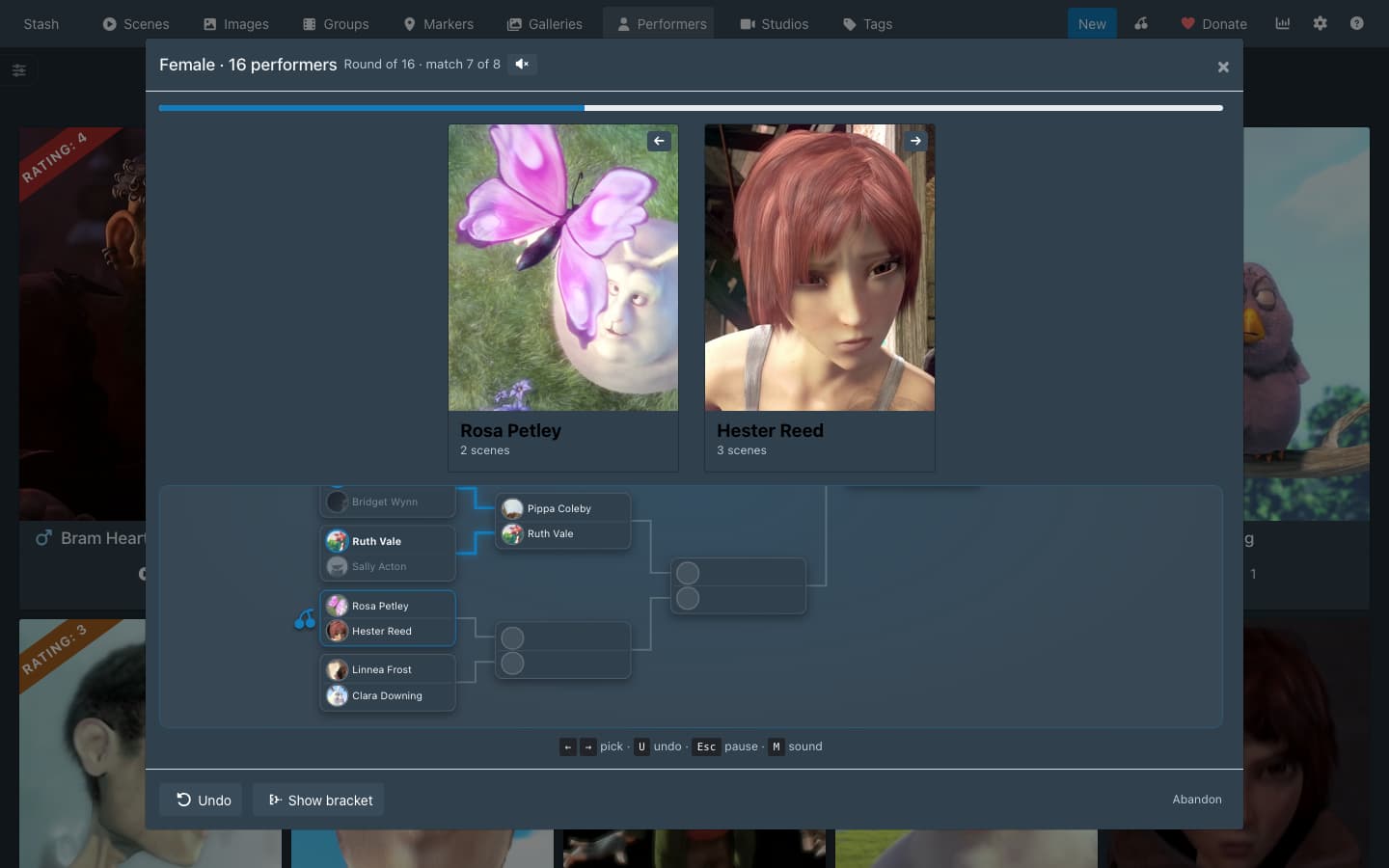
Cherry Pick 0.3.0 is out, and it makes Brackets even more fun to play! I’ve added animations and sound effects that give it a bit of a video game vibe. Don’t worry, you can disable it if it’s not your cup of tea.

To get it:

  1. Open Settings > Plugins, click Check for updates, tick Cherry Pick, click Update and refresh the page.
  2. Open Performers or Scenes and click Bracket.

If you’d rather keep the old look, turn on Brackets Classic Mode in Settings > Plugins > Cherry Pick. It plays brackets as before, two cards and a pick with no map, animation or sound, and keeps New bracket. With your device set to reduce motion, matches change without animating.


It’s tested on Stash 0.31.1 alongside the latest releases of Ascension (1.4.1), HotOrNot (1.0.0), Stash Curator (0.41.0), Xenith (3.2.0) and Restash (0.3.0).

The release notes are on GitHub.

1 Like

@abverbaerba in 0.3.0 you can now immediately start a new bracket without exiting.

1 Like

Oh wow, the update to Brackets is amazing! It looks so good, now it’s even more fun. I have to say, picking between two scenes/performers and having that decide the rating of each one is sooo much better than rating individually myself. I love it. Great work.

1 Like

The update looks cool! I like the fanfare and animations. Two requests:

Could you add an option to hide the bracket at the bottom or move it to the side so the performer images could fill the space? I’d prefer the classic version for the larger images otherwise.

Is there a way to darken the background stash window behind the popup bracket interface? The background can be a little distracting.

Thanks!