Overclock 0.2.3 is out. It fixes Cherry Pick’s bracket screens on Overclock, and 0.2.2 before it fixed Cherry Pick’s Your score:
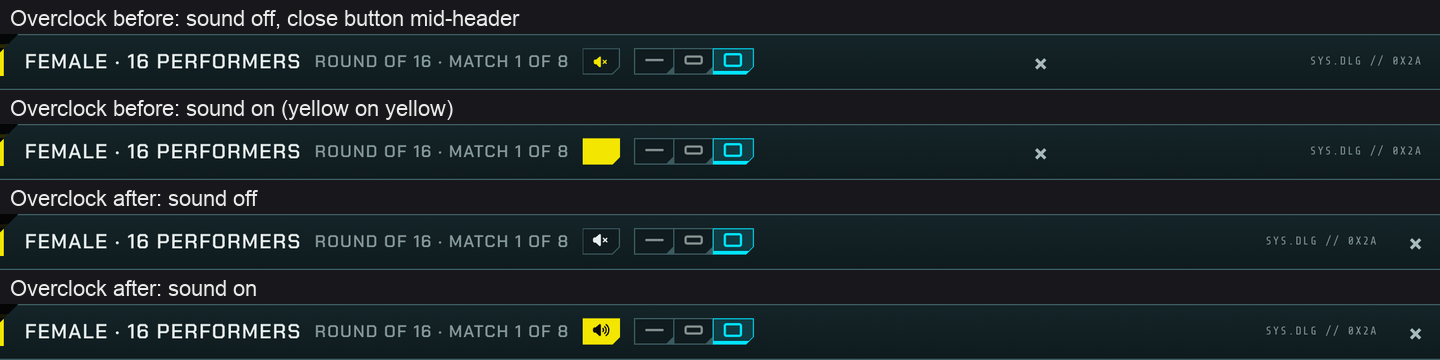
- The speaker button in a bracket’s header reads with sound on. Its icon was yellow on the yellow button.
- The close button sits at the right end of a Cherry Pick dialog’s header again. It had stood in the middle.
- On a phone, a bracket’s title fits on one line.
- While Cherry Pick asks whether to abandon a bracket, the speaker keeps its icon and the close button shows clearly on the yellow stripes.
- Your score, Cherry Pick’s guess at how you’d rate a scene you haven’t rated, reads now. It had black type on a dark background. It shows as Overclock’s rating tag left hollow, yellow type in a yellow frame.
To get it:
- Open Settings > Plugins, click Check for updates, tick Theme - Overclock (and Cherry Pick, if it has an update), click Update and refresh the page.
- Open Performers or Scenes and click Bracket, or look in the rating corner of a scene you haven’t rated.
It’s tested on Stash 0.31.1 alongside Cherry Pick 0.3.2, Insights 2.12.1 and Performers Toolkit 0.17.1. The release notes are on GitHub, for 0.2.2 and 0.2.3.