Tampermonkey script for StashDB integration with Whisparr (v3 only) and/or Stash.
Adds buttons to StashDB to download content with Whisparr. Auto-checks if scenes already exist in local Stash. Works with either service independently — configure just one or both.
Browse StashDB, buttons show:
Play - Scene exists in local Stash (Opens Stash)Add Scene - Adds Scene to Whisparr (auto-triggers search)Monitored - Already added by Whisparr, being monitored for a suitable releaseDownloading - Currently in queuePreviously Added - Scene is Unmonitored in Whisparr. We assume it was added to Whisparr but file has since been deleted in Stash. (click to re-monitor) (Requires that “Unmonitor Deleted Movies” is set)
Tampermonkey browser extension
At least one of the following
Install Tampermonkey
Add stashseer.js to Tampermonkey
If using Whisparr: Settings → Media Management → File Management → Enable Unmonitor Deleted Movies
Visit StashDB.org → Click any scene
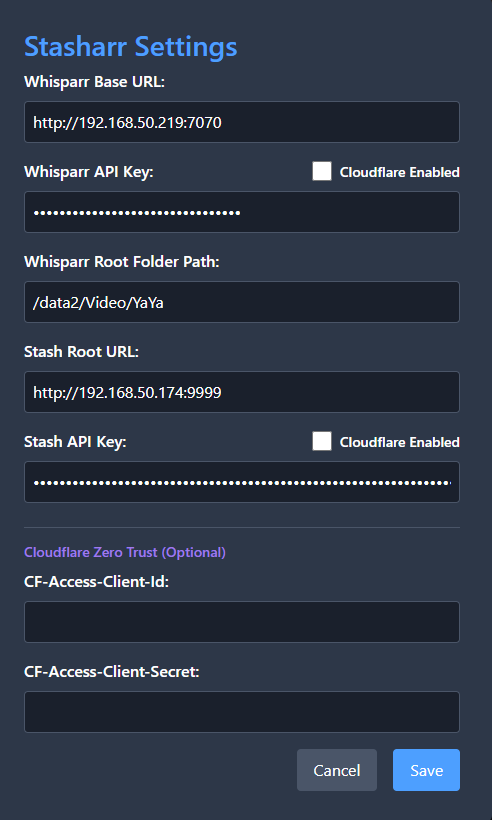
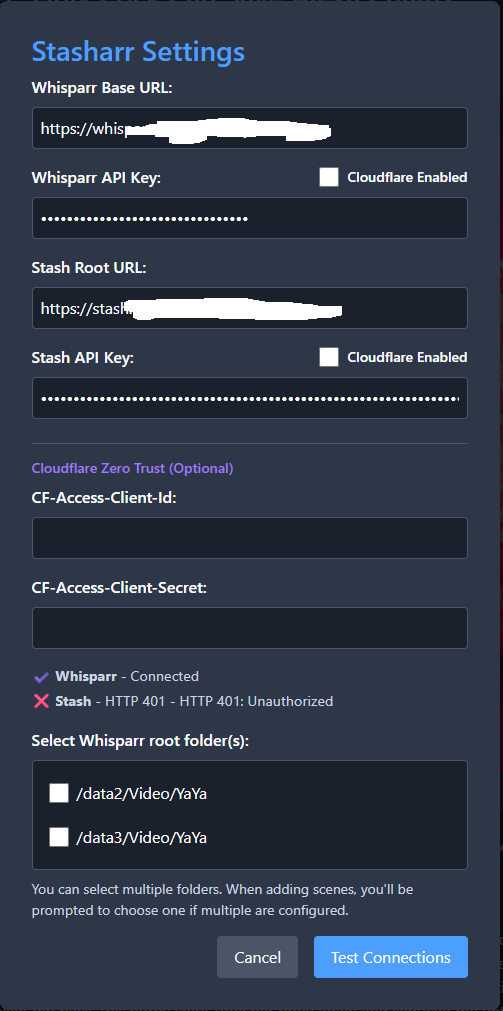
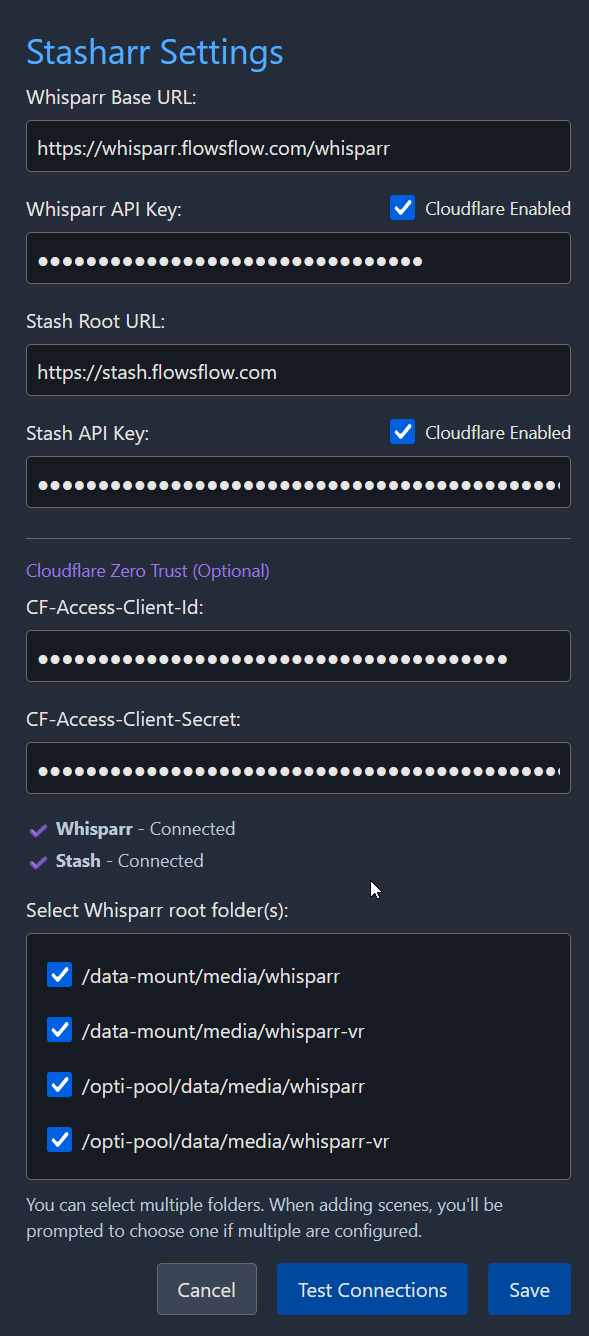
Click Settings button → Configure one or both services:
Whisparr v3 URL + API key + Root Folder(s) (if multiple root folders, you’ll be prompted to choose when adding scenes)Stash URL + API keyCloudflare Zero Trust credentials (if using):
CF-Access-Client-Id
CF-Access-Client-Secret
Enable Cloudflare for Whisparr and/or Stash as needed
If using Cloudflare Zero Trust, ensure your application settings allow stashdb.org in CORS settings
Code is AI generated
2 Likes
Thanks for this script!
It checks Stash just fine, but it’s ‘stuck’ on checking Whisparr? I could never get the original Stasharr to work either.
I’m not using a proxy, and no SSL.
In addition to the connection issues I’m having could you add a feature for multiple root folders?
Thank you.
Should be some errors outputted in the console log, check that out!
I think we can just need one root folder, that’s just where the new downloads will end up once they are done downloading form whisparr.
havign another would need another popup like, asking you to select which root folder to use for that request.
So this isn’t the media root folders then? It shows my media folders in the dropdown.
Here is my current error:
{readyState: 4, responseHeaders: 'cache-control:no-cache,no-store\r\nconnection:keep-a…ache\r\nserver:openresty\r\ntransfer-encoding:chunked', finalUrl: 'https://whisparr.frippisland.dyndns.org/api/v3/movie', status: 400, statusText: 'Bad Request', …}
(anonymous) @ userscript.html?name=stasharr.user.js&id=0aaabcc7-f2c3-4581-ba1b-d6c775f415da:22
s @ userscript.html?name=stasharr.user.js&id=0aaabcc7-f2c3-4581-ba1b-d6c775f415da:22
Promise.then
l @ userscript.html?name=stasharr.user.js&id=0aaabcc7-f2c3-4581-ba1b-d6c775f415da:22
(anonymous) @ userscript.html?name=stasharr.user.js&id=0aaabcc7-f2c3-4581-ba1b-d6c775f415da:22
ko @ userscript.html?name=stasharr.user.js&id=0aaabcc7-f2c3-4581-ba1b-d6c775f415da:22
request @ userscript.html?name=stasharr.user.js&id=0aaabcc7-f2c3-4581-ba1b-d6c775f415da:22
(anonymous) @ userscript.html?name=stasharr.user.js&id=0aaabcc7-f2c3-4581-ba1b-d6c775f415da:22
(anonymous) @ userscript.html?name=stasharr.user.js&id=0aaabcc7-f2c3-4581-ba1b-d6c775f415da:22
ua @ userscript.html?name=stasharr.user.js&id=0aaabcc7-f2c3-4581-ba1b-d6c775f415da:22
addScene @ userscript.html?name=stasharr.user.js&id=0aaabcc7-f2c3-4581-ba1b-d6c775f415da:22
(anonymous) @ userscript.html?name=stasharr.user.js&id=0aaabcc7-f2c3-4581-ba1b-d6c775f415da:22
(anonymous) @ userscript.html?name=stasharr.user.js&id=0aaabcc7-f2c3-4581-ba1b-d6c775f415da:22
ua @ userscript.html?name=stasharr.user.js&id=0aaabcc7-f2c3-4581-ba1b-d6c775f415da:22
(anonymous) @ userscript.html?name=stasharr.user.js&id=0aaabcc7-f2c3-4581-ba1b-d6c775f415da:22
Promise.then
(anonymous) @ userscript.html?name=stasharr.user.js&id=0aaabcc7-f2c3-4581-ba1b-d6c775f415da:22
(anonymous) @ userscript.html?name=stasharr.user.js&id=0aaabcc7-f2c3-4581-ba1b-d6c775f415da:22
ua @ userscript.html?name=stasharr.user.js&id=0aaabcc7-f2c3-4581-ba1b-d6c775f415da:22
lookupAndAddScene @ userscript.html?name=stasharr.user.js&id=0aaabcc7-f2c3-4581-ba1b-d6c775f415da:22
(anonymous) @ userscript.html?name=stasharr.user.js&id=0aaabcc7-f2c3-4581-ba1b-d6c775f415da:22
(anonymous) @ userscript.html?name=stasharr.user.js&id=0aaabcc7-f2c3-4581-ba1b-d6c775f415da:22
ul @ userscript.html?name=stasharr.user.js&id=0aaabcc7-f2c3-4581-ba1b-d6c775f415da:22
fl @ userscript.html?name=stasharr.user.js&id=0aaabcc7-f2c3-4581-ba1b-d6c775f415da:22
r.$$click @ userscript.html?name=stasharr.user.js&id=0aaabcc7-f2c3-4581-ba1b-d6c775f415da:22
s @ userscript.html?name=stasharr.user.js&id=0aaabcc7-f2c3-4581-ba1b-d6c775f415da:22
Ma @ userscript.html?name=stasharr.user.js&id=0aaabcc7-f2c3-4581-ba1b-d6c775f415da:22Understand this error
userscript.html?name=stasharr.user.js&id=0aaabcc7-f2c3-4581-ba1b-d6c775f415da:22 GM.xmlHttpRequest error:  Error: HTML Response error: 400: Bad Request
    at Ao.<anonymous> (userscript.html?name=stasharr.user.js&id=0aaabcc7-f2c3-4581-ba1b-d6c775f415da:22:173685)
    at Generator.next (<anonymous>)
    at s (userscript.html?name=stasharr.user.js&id=0aaabcc7-f2c3-4581-ba1b-d6c775f415da:22:172903)
(anonymous) @ userscript.html?name=stasharr.user.js&id=0aaabcc7-f2c3-4581-ba1b-d6c775f415da:22
s @ userscript.html?name=stasharr.user.js&id=0aaabcc7-f2c3-4581-ba1b-d6c775f415da:22
Promise.then
l @ userscript.html?name=stasharr.user.js&id=0aaabcc7-f2c3-4581-ba1b-d6c775f415da:22
(anonymous) @ userscript.html?name=stasharr.user.js&id=0aaabcc7-f2c3-4581-ba1b-d6c775f415da:22
ko @ userscript.html?name=stasharr.user.js&id=0aaabcc7-f2c3-4581-ba1b-d6c775f415da:22
request @ userscript.html?name=stasharr.user.js&id=0aaabcc7-f2c3-4581-ba1b-d6c775f415da:22
(anonymous) @ userscript.html?name=stasharr.user.js&id=0aaabcc7-f2c3-4581-ba1b-d6c775f415da:22
(anonymous) @ userscript.html?name=stasharr.user.js&id=0aaabcc7-f2c3-4581-ba1b-d6c775f415da:22
ua @ userscript.html?name=stasharr.user.js&id=0aaabcc7-f2c3-4581-ba1b-d6c775f415da:22
addScene @ userscript.html?name=stasharr.user.js&id=0aaabcc7-f2c3-4581-ba1b-d6c775f415da:22
(anonymous) @ userscript.html?name=stasharr.user.js&id=0aaabcc7-f2c3-4581-ba1b-d6c775f415da:22
(anonymous) @ userscript.html?name=stasharr.user.js&id=0aaabcc7-f2c3-4581-ba1b-d6c775f415da:22
ua @ userscript.html?name=stasharr.user.js&id=0aaabcc7-f2c3-4581-ba1b-d6c775f415da:22
(anonymous) @ userscript.html?name=stasharr.user.js&id=0aaabcc7-f2c3-4581-ba1b-d6c775f415da:22
Promise.then
(anonymous) @ userscript.html?name=stasharr.user.js&id=0aaabcc7-f2c3-4581-ba1b-d6c775f415da:22
(anonymous) @ userscript.html?name=stasharr.user.js&id=0aaabcc7-f2c3-4581-ba1b-d6c775f415da:22
ua @ userscript.html?name=stasharr.user.js&id=0aaabcc7-f2c3-4581-ba1b-d6c775f415da:22
lookupAndAddScene @ userscript.html?name=stasharr.user.js&id=0aaabcc7-f2c3-4581-ba1b-d6c775f415da:22
(anonymous) @ userscript.html?name=stasharr.user.js&id=0aaabcc7-f2c3-4581-ba1b-d6c775f415da:22
(anonymous) @ userscript.html?name=stasharr.user.js&id=0aaabcc7-f2c3-4581-ba1b-d6c775f415da:22
ul @ userscript.html?name=stasharr.user.js&id=0aaabcc7-f2c3-4581-ba1b-d6c775f415da:22
fl @ userscript.html?name=stasharr.user.js&id=0aaabcc7-f2c3-4581-ba1b-d6c775f415da:22
r.$$click @ userscript.html?name=stasharr.user.js&id=0aaabcc7-f2c3-4581-ba1b-d6c775f415da:22
s @ userscript.html?name=stasharr.user.js&id=0aaabcc7-f2c3-4581-ba1b-d6c775f415da:22
Ma @ userscript.html?name=stasharr.user.js&id=0aaabcc7-f2c3-4581-ba1b-d6c775f415da:22Understand this error
userscript.html?name=stasharr.user.js&id=0aaabcc7-f2c3-4581-ba1b-d6c775f415da:22 Error adding scene Error: HTML Response error: 400: Bad Request
    at Ao.<anonymous> (userscript.html?name=stasharr.user.js&id=0aaabcc7-f2c3-4581-ba1b-d6c775f415da:22:173685)
    at Generator.next (<anonymous>)
    at s (userscript.html?name=stasharr.user.js&id=0aaabcc7-f2c3-4581-ba1b-d6c775f415da:22:172903)
This is in the events in Whisparr:
Invalid request Validation failed:
I’ve added this studio but it has no scenes and there is no Teenbug folder on my ‘share’. Only the root folder: [data2/Video/YaYa]
It should be the root folder configured in whisparr.
If you have folders per studio, as long as they are under the same root path you should just set up the root path as root directory in whisparr.
Have you used whsiaprr previous to trying this script? Just wondering if there’s something up with your instance or not.
They are under different root paths as I have different servers with storage; so some studios on 1 server others on a 2nd.
I’ve been using Whisparr successfully since V1. I have concurrent V1, V2, V3 instances running.
I see
I think I’m onto something no matter what I try, I get a 401 to Stash in the scripts. I have a username / password and and API key, and can login to Stash perfectly. Any thoughts?
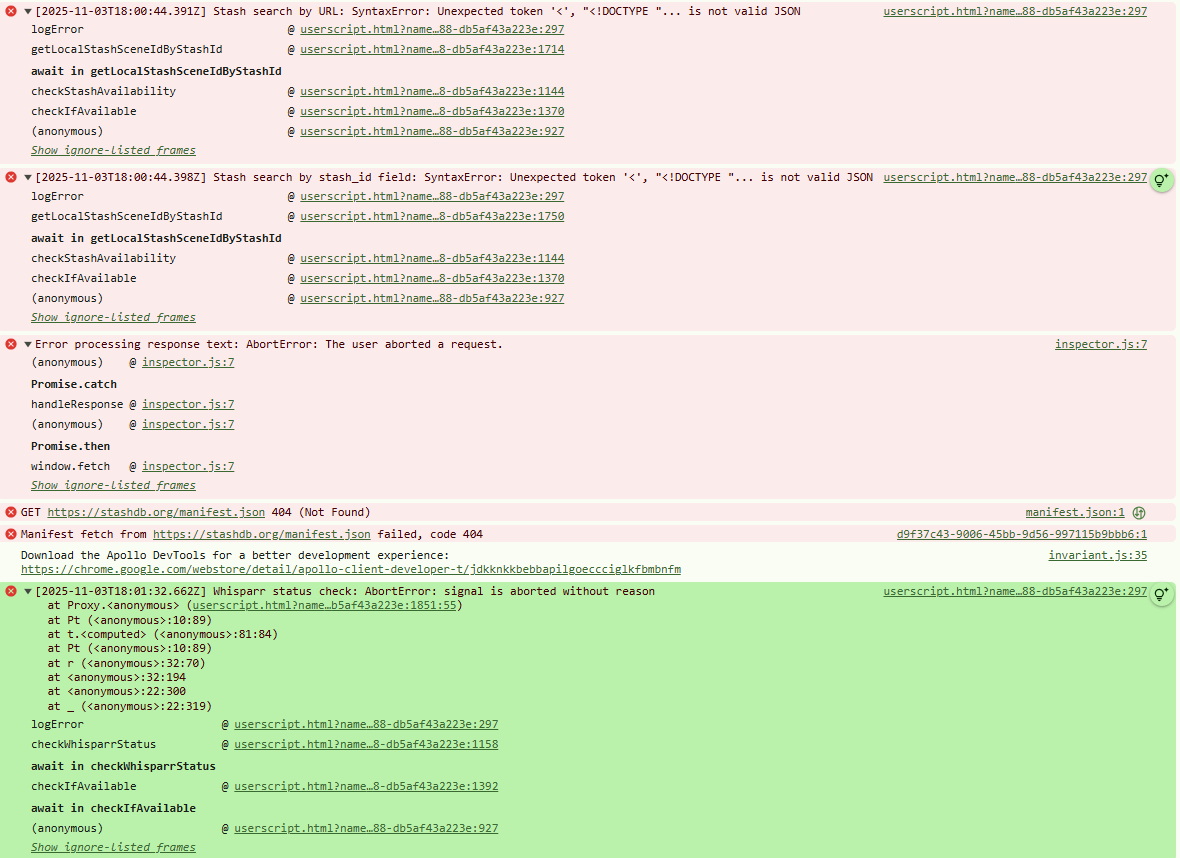
Also…this is from the developer tools in Chrome when I first load stashdb.org with you script enabled.
GET https://stashdb.org/manifest.json 404 (Not Found)https://stashdb.org/manifest.json failed, code 404
After reinstalling your script…
Hmm. Maybe try to use the graphql api with a simple curl request using your api key to see if that works?
Seems there’s an issue with the api key or URL I guess
I’m on the host machine for my Stash instance, I can access it fine in Chrome at localhost:9999, however I’m getting the following errors even though my command is correct?
curl -X POST -H "ApiKey:  *******************" -H "Content-Type: application/json" --data '{ "query": "<graphql_query>" }' localhost:9999/graphql
curl: (3) URL rejected: Port number was not a decimal number between 0 and 65535
curl: (3) URL rejected: Bad hostname
curl: (3) unmatched close brace/bracket in URL position 1:
}'
 ^
Does sound like something isn’t quite right with the Graphql endpoint indeed.
like
curl -X POST -H "ApiKey: key" -H "Content-Type: application/json" --data '{"query":"query GetSavedMarkerFilters { findSavedFilters(mode: SCENE_MARKERS) { id name } }"}' localhost:9999/graphql
should work
After all this nonsense it was the F’ing! FW or AV.
Whatever stash and whisparr is hosted on, by default its 9999 for stash and 6969 for whisparr yeah
No other ports should be needed
1 Like
Fixed an issue where it wasn’t possible to test settings before saving because it was reading form the saved state, so the script was entirely broken… oops
anime
July 12, 2026, 6:24pm
21
Can’t get it to work tried with both my ip and port and cloudflare tunneled domains. I always get Error during checking scene in Whisparr. I am able to test just fine.