What do you mean by normalised volume? Are you saying you want to speed up just the volume and not the video cause you can’t really speed up one without the other.
Or are you saying that some of your videos files are encoded so that 1x speed is too slow so you want to speed those up to “normal“ speed?
Or is it 2 seperate requests, one to change the speed of the video and one to increase and decrease the volume of the video?
Please describe what you would use the feature/features for. There are several possible ways to implement such a feature. For example I could add a video playback speed option and/or volume adjustment option to the settings menu which would change the playback speed for all videos. Or I could add that as action buttons which just affect the current video. I need to understand why you want it so that I can work out what the best option is.
As for other feature requests, why don’t you list out everything you can think of? I can’t promise I’d do them all but I will consider them and if other people also mentioned that they would like them then I’ll be more likely to work on them.
My apologies!
For the video speed – the ability to adjust the speed of the video, not just only the volume. Basically playing a YouTube video at 2x speed. Example: This plugin already is helpful for categorizing/going through various videos, but the ability of increasing speed would well, increase that workflow.
For volume, just a simple slider really to keep what I mean short.
Example: There are times where I may be using the plugin while listening to things whether it may be music or a podcast or something, and so I’d still like to hear the audio coming from the videos in the plugin but just not at full volume.
That’s all I have on the top of my head as of right now. Let me know if you need more information on what I’m trying to convey.
Nothing to apologise for thanks for that, that helps a lot.
It sounds like both playback speed and volume reduction is something you might want to toggle on and off between sessions but would want to persist between video to video. So it probably makes most sense to do as an action button. I’ll add those to my todo list
@varryent I decided this was more fun than what I probably should have been doing today so I’ve just pushed a new release (v2.10.0) that has full volume control and playback rate controls
Under Settings > UI > Action Buttons there should now be an edit button next to the volume control. If you click on that you can enable “full volume control”. Which means you’ll see a volume slider when you click on the volume action button.
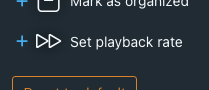
Also under Settings > UI > Action Buttons there should now be a playback rate button you can add:
Really digging this plugin, keep up the good work. A lot of my collection is vintage, and the CRT TV filter actually compliments them really well - I just wish there was as option to disable the intermittent flashing/skewing effect with the filter.
That’s very interesting to hear. I added the CRT filter both as bit of a joke/fun nod to the plugin name as well because it was a fun technical challenge. I’ve since had a bunch of ideas to improve it but because I assumed no one actually used it other than to turn on briefly, have a laugh, then turn off, I’ve not really been able to justify to myself spending more time on it. But this gives me the motivation to make those improvements!
I’m glad you found it more fun!!! And yes it does exactly what I need. Thank you so much for bringing an already brilliant plugin back to life with many enhancements!
For my streaming situation actually seems like an upgrade in picture quality for lower res videos since I’m using Nvidia RTX video upscaling on a 4k display (works well for 720p+ but seems to make low res videos look smudged and doughy and the filter is a nice buffer to prevent it).
Anyways I was curious if I could make something work for it and ended up figuring out some code for a tamper-monkey script that targets and applies a scanline-type filter to 480p video and below. Unfortunately Doesn’t seem to jive with your plugin and requires some refreshing here and there, but a cool little feature to have for my use case at least.
Sorry to reply to a post you’ve now deleted but I’d written a draft response and gotten distracted before posting it so I figured I may as well post it even if you’re now less interested in the original feature requests.
adjustable jump amounts
Customizing the jump time is a bit tricky because it’s not just a constant variable. It tries to be a bit smart about it and use different amounts in different situations a constant amount would often give poor results.
If you have a bunch of videos that are 5 seconds long then jumping by 10% increments is going to be annoyingly short so in that situation you’d want it to be much higher. But if you have a 2 hour video then say a 30% jump time will jump over 30 min which is likely too long. Also if you have a video with a bunch of markers on a video then it would be annoying if jumping took you to close to the start of the maker but just a little bit after it.
To try and improve this a little there’s a bunch of logic pick the jump time based on the situation but it’s never gonna be perfect because for the exact same situation you might want it to jump different amounts depending on what you’re trying to achieve. If you have a really long video and you wanna quickly skip towards the end then the default jump amount will likely be slower than you want. But if you’re trying find the specific point some short event happens then likely it will feel like the jumps are too big.
My aim with the jumping was to have it take it’s best guess at a reasonable jump amount for the situation and if the user wants bigger or smaller jumps for a video they can use the click and drag feature to skip forwards/backwards by whatever amount the user wants (you can also do this with the keyboard by the way, hold down left or right then press up or down to increase or decrease the amount it skips by).
Sorting so that every performer it played at least once
This one tricky because stash’s api doesn’t support anything like that. We can fetch all scenes then sort them ourselves but fetching the info for every scene before we can sort and play any of them will be very slow. I can have an idea how we could implement that in a somewhat generic way though so I can have a play around and see if the performance would be manageable.
I accidentally meant to just remove the second idea, cause I was thinking maybe it’s not so much of a TV feature but moreso just a regular stash app filtering thing.
As for the audio, yeah I was going to assume such thing was going to occur. I didn’t actually know about the keyboard shortcut with holding left/right and going up and down. The shortcut keyboards would be helpful though in general to make it more aligned with the stash app too! But definitely not a priority I’d say at all
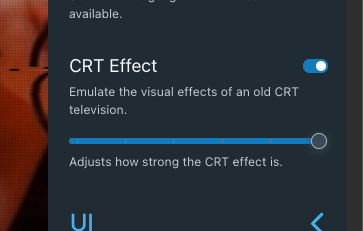
Very interesting use case! Sounds like you’ve got a workflow setup now this is probably not going to be super relevant for you but I wanted to update the CRT filter effect anyway so I’ve just pushed an update (version 2.11.1) that allows you to set the strength of the effect:
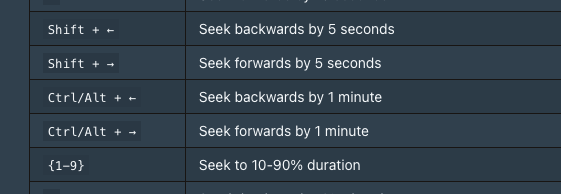
Yeah it that keyboard shortcut is currently not discoverable at all unfortunately. It’s on the todo list to add some info to the help section + add a bunch of shorts for things like marking a scene as organised and things like that.
Thank you for this amazing plugin!
One of my use cases would be quickly rating scenes and Stash TV could be a great way to do it.
I wish there was a way to rate scenes without many clicks.
for example now if ratings are set to decimal, you have to click on the start and then click on the field and type a number. a slider would be much more handy.
just a suggestion
That’s a good idea. I’m currently just using the same component for rating that stash shows on a scene’s details page so such a change would be made there and then both stash and stash tv would benefit. But I don’t think it should be too difficult for me to add a custom component for that in stash tv.
 thanks for that, that helps a lot.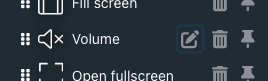
 A lot of my collection is vintage, and the CRT TV filter actually compliments them really well - I just wish there was as option to disable the intermittent flashing/skewing effect with the filter.