|
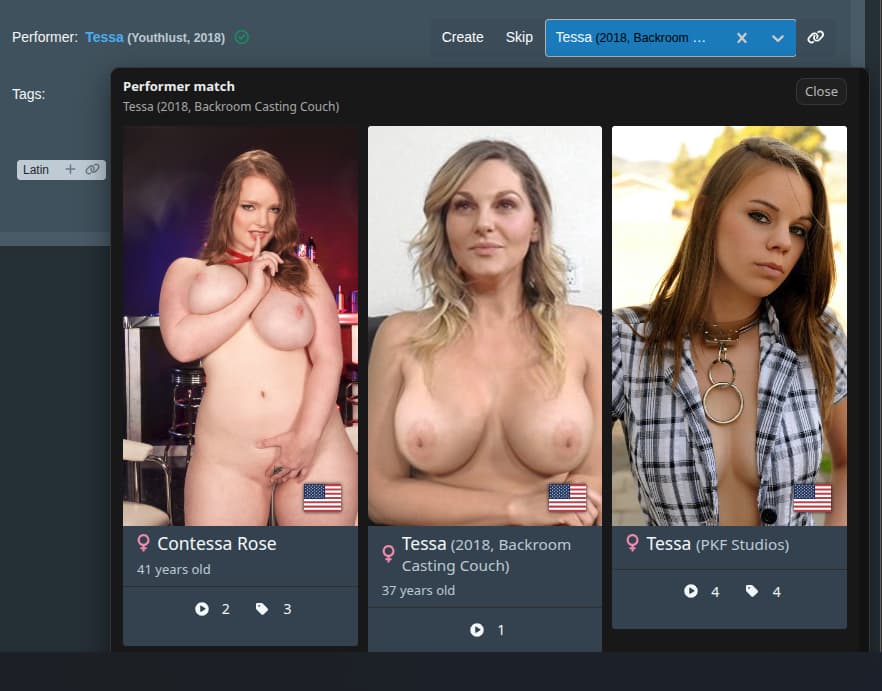
Summary | Shows the potential matches of performers. |
 |
Repository | https://github.com/Stash-KennyG/TamperScripts/blob/main/Stash-PerformerMatchPopOver.js |
Performer Match Hover Overlay (Tampermonkey userscript)
File: Stash-PerformerMatchPopOver.js
Target: Stash scene tagging UI performer selector at *://localhost:9999/scenes*
Author: KennyG
What this script does
- Adds a hover overlay for the performer dropdown on the scene tagging page:
- When you hover the performer select, after a short delay an overlay appears near the control.
- The overlay shows matching performers from your Stash instance using the same styling as native performer cards (image, name, disambiguation, country, age, counts, gender icon, etc.).
- Uses Stash’s GraphQL API to search for potential performer matches based on the currently selected performer name.
- Displays quick‑access actions:
- Performer cards are clickable (and middle‑clickable) to open the full performer page in a new tab.
- Count buttons show scene/group/tag counts and O‑counter, matching Stash’s UI patterns.
Installation
- Install Tampermonkey (or a compatible userscript manager) in your browser.
- Create a new userscript and paste the contents of
Stash-PerformerMatchPopOver.js, or install it directly from this repository’s raw file URL. - Ensure the
@matchline in the header matches your Stash URL. For a default local setup this script uses:*://localhost:9999/scenes*- You can generalize it (e.g.
*://*/scenes*) if you run Stash on a different host.
Notes
- The script is read‑only: it only performs GraphQL queries and DOM rendering, never modifying data in Stash or StashBox.
- If you change your Stash base URL, update the
@matchpattern accordingly before publishing or sharing the script.