 |
Summary | Live word-level diff overlay for the Details/Synopsis field in Stash scrape result modals. |
 |
Repository | https://github.com/rchrdcho/StashPlugins/tree/master/plugins/ScrapeDiff |
 |
Source URL | https://rchrdcho.github.io/StashPlugins/main/index.yml |
 |
Install | How to install a plugin? |
ScrapeDiff
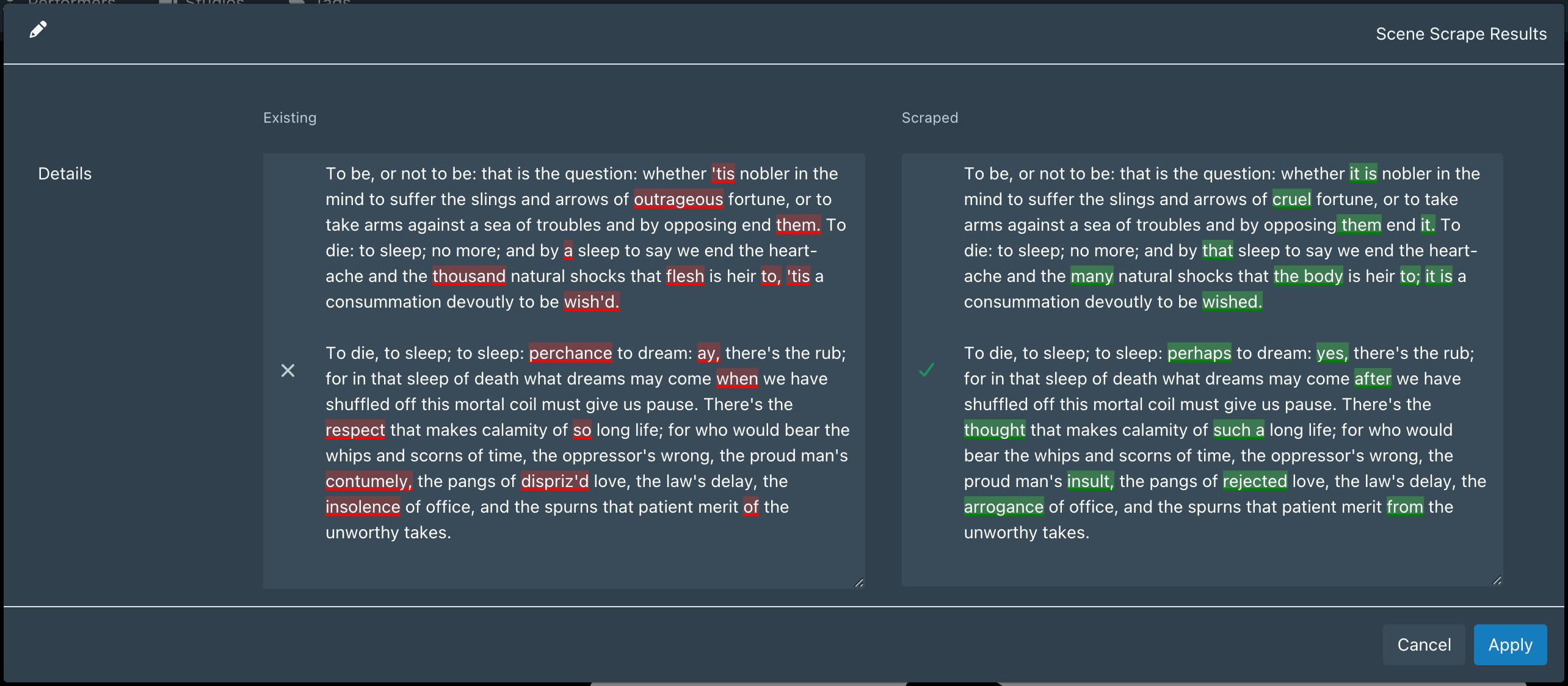
Renders a live word-level diff overlay on the Details/Synopsis field in Stash’s scrape result modals, making it immediately clear what changed between your existing data and the scraped result.
Features
- Word-level diff with red (removed) and green (added) highlights
- Targets the Details/Synopsis field across Scene, Gallery, Performer, and Group scrape modals — the one field long enough to actually need a diff
- Synchronized height resize — drag either textarea and the other follows
- Scroll-synced overlays
- Debounced live update as you edit the scraped field
- No external dependencies, no build step
Installation
- Download or clone this repository and copy the
ScrapeDifffolder into your Stash plugins directory (default:~/.stash/plugins/) - Go to Settings → Plugins and click Reload Plugins
- Enable ScrapeDiff
Usage
Open any scrape result modal. The Details or Synopsis field will automatically display a diff between the existing value and the scraped value.
No configuration required.
Notes
- Skips rendering when the existing field is empty (new data, nothing to diff against)
- Cleans up all event listeners and observers when the modal closes