|

Summary | The Performer Page now supports a column of mini galleries that use your tags. These act as themed supporting images directly on the performer page that you can customize. |
 |
Repository | https://github.com/RollainKraus/stash-plugins/tree/main/plugins/PerformerTagBasedSupportingImages |
 |
Source URL | https://rollainkraus.github.io/stash-plugins/main/index.yml |
 |
Install | How to install a plugin? |
Features
-

NEW - Added a customizable preview panel to view slot images from the performer tab. Supports advancing through images and slideshows If slots have multiple images
-
NEW - Added a quick tag menu to images within the performer page to make adding/removing images from the slots much easier (still requires refreshing the performer page to update the slots)
-
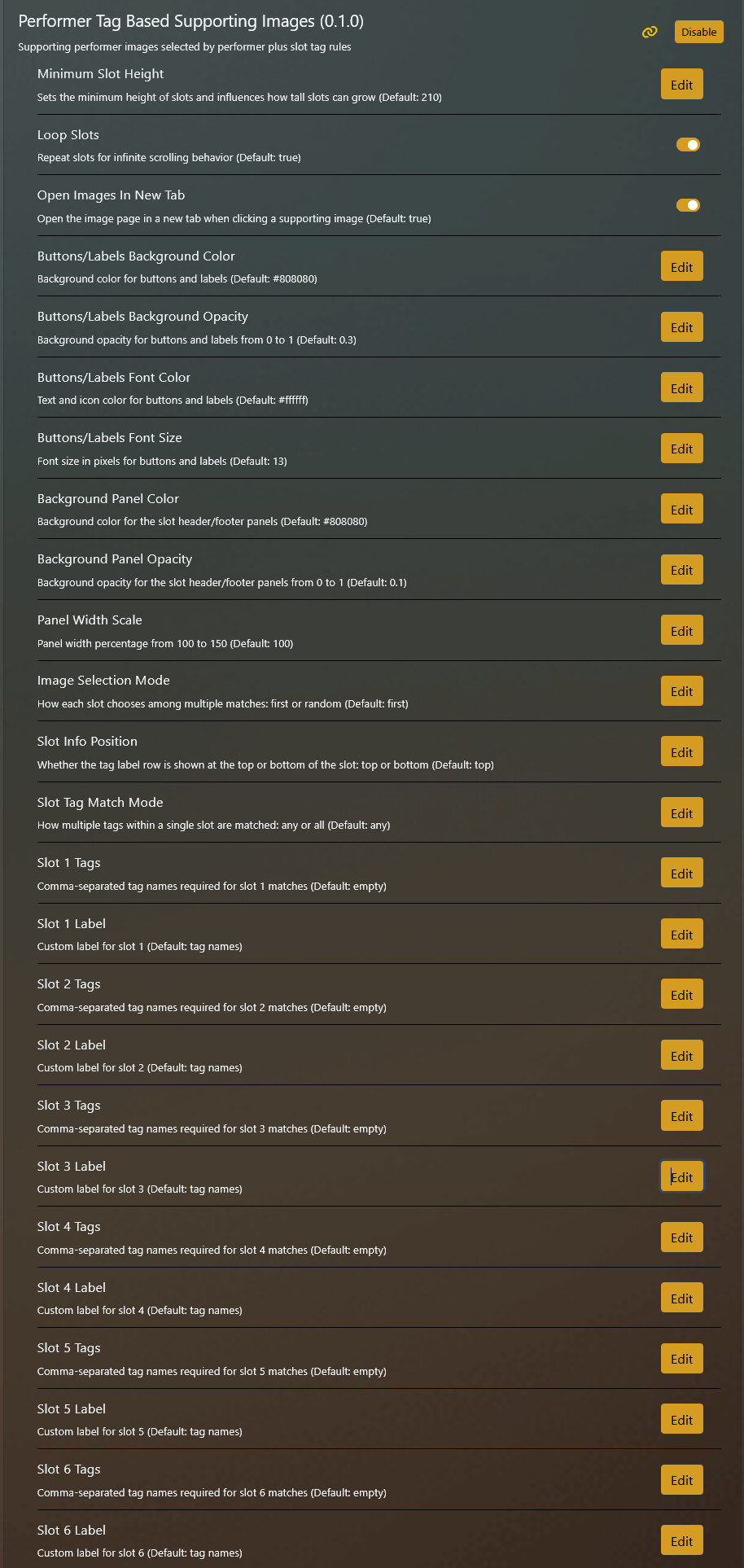
Tag performer images and choose which tags are displayed per slot, supports multiple tags and descendant tags
-
Up to 6 slots
-
Clicking on the slot label will filter images using that slot’s tags
-
Clicking on the image will open the image in a new tab
-
Slots support multiple images and cropping for each image
-
Aspect ratio of slot is determined by the initial image, but can be manually changed by cropping any image (NEW - aspect ratios can be ‘locked’ and new images can auto adjust to the slot’s current aspect ratio)
- if a slot has multiple images, they will inherit the latest cropped aspect ratio
-
Width of the supporting images column can be increased
-
Lots of customization including color, opacity, font, and sizing for buttons/labels and background
- Can change if the label appears as a header or as part of the footer, as well as custom label names per slot
-
The panel can loop as you scroll, best kept enabled if you have multiple slots active
-
If multiple images are assigned to a slot, the image display can be set to ‘first’ (based on the image name), or ‘random’
Intended to work alongside PerformerTagsOverhaul, but works as its own standalone plugin and with some other performer page plugins/themes but untested outside of my own stash setting
How To Use
** The panel will not show up unless you have set up the slots and have images that fit the criteria
-
Find images you want to display in the supporting images panel
-
Insure they are assigned to the performer
-
Add tags - for example: based on outfit, clothed, nude or different features
-
In the plugin settings, add one or more tags to a slot and optionally change the label of that slot
-
They should appear in the performer page in their own column on the right
-
Crop the images to isolate the specific feature you want to highlight or to just better fit the image in the panel
Installation
-
Available Plugins >> Add Source
-
Source Name: RollainKraus
Source URL: https://rollainkraus.github.io/stash-plugins/main/index.yml -
Click Checkbox >> Install
-
Reload Plugins
Screenshots
Made with AI - sharing in case it comes in handy for someone else or maybe inspires some different ideas.