 |
Summary | nfoSceneParser — auto-fill scene metadata from NFO / filename patterns (JAV-focused fork). |
 |
Repository | https://github.com/k6cc/nfoSceneParser-jav |
 |
Source URL | https://k6cc.github.io/stash-plugins/plugins/main/index.yml |
 |
Install | How to install a plugin? |
Hi stashers,
First off — huge thanks to the original nfoSceneParser plugin and its contributors in the stashapp/CommunityScripts repo. It’s a brilliant piece of work that auto-fills scene data (studio, performers, title, date, tags, …) from .nfo sidecar files or regex-based filename patterns on scan — saving you from “starting from zero” on a fresh library. The upstream is still maintained in the official CommunityScripts repo, and the original Discourse thread is here.
If your library uses standard NFO files (KODI movie template) and standard filename conventions, go with the upstream version — it’s the canonical one and will keep getting community updates.
This post is for users whose libraries have JAV-style naming and packaging conventions (番号 prefixes, multi-CD parts like IDBD-287-cd1, folder.nfo for series, separate front/back covers, etc.) — I’ve been maintaining a fork that adds the extra handling those cases need, currently at v1.6.1:
Conflict warning: this fork cannot be installed alongside the upstream
nfoSceneParser— same plugin id. Uninstall the original first.
What this fork adds
- Multi-episode NFO lookup — for split files like
IDBD-287-cd1.avi, looks up the same-name NFO first, then strips the-cd1suffix, then falls back to the first sibling’s NFO, thenmovie.nfoin the same directory. folder.nfosupport — afolder.nfoin a directory applies its studio/performers/director to all scenes in that folder; per-scene NFO overrides it.- Movie (影片) auto-creation — creates Stash
Movieentries from<set><name>,<series>,<set>direct text, or filename prefix when sibling files exist. “First come, first served” — the first file processed names the Movie, siblings just attach. - Movie front/back cover search (v1.6.0) — independent front/back cover lookup for Movies:
{basename}-poster.jpg/folder.jpgfor front,{basename}-fanart.jpg/-landscape.jpg/-thumb.jpg/landscape.jpg/backdrop.jpgfor back. Backward-compatible with oldcover_image/other_imagefields. - Episode suffix recognition — suffix regex
(?i)([-._ ])(\d*[a-z\u4e00-\u9fff]+\d*|[a-z\u4e00-\u9fff]+\d+)$handlescd1,4k,uc,-破解, etc. Pure-numeric suffixes (like002inSNIS-002) are NOT treated as episode suffixes, so番号 stays intact. - Scene title suffixing — when a file has siblings, the suffix is appended to the title:
一日之計 4k,三省吾身 CD1. Standalone files keep the NFO title unchanged. - Movie name normalization — NFKC (full-width → half-width) + tilde unification (
〜→~) + lowercase + strip spaces, so"S1 GIRLS COLLECTION"matches"S1GIRLSCOLLECTION","僕と○○の甘~い性活"matches"僕と○○の甘〜い性活","IDBD-287"matches"IDBD-287". <series>/<set>/<rating>direct text — these tags are recognized as direct text in addition to their nested<name>/<rating>child form.- Cover image priority — scene-level:
{filename}-fanart>-landscape>-thumb>-poster>-cover>{filename}. Folder-level fallback. NFO<thumb>URLs downloaded withaspect="landscape"first, thenaspect="poster", then any<thumb>. - URL /
<website>tags — NFO spec doesn’t define<url>, but this fork recognizes it (and<website>) and writes them to the scene’s URLs. - XML tolerance — auto-escapes unescaped
&, replaces with space, strips backticks around URLs, catches CDATA nesting errors. - Reload mode — tag scenes with a configurable marker tag (
_NFO_RELOADby default), then run the “Reload tagged scenes” task to re-merge NFO/regex data into existing scenes (single-value fields overwrite, multi-value fields append). Marker tag is auto-removed after reload. - Per-directory
nfoSceneParser.jsonregex config — drop a JSON file anywhere in your library tree; it applies to that directory and below. Deepest config wins. No plugin reload needed. - Auto date detection — if no
dategroup in regex, the plugin tries to detect a date in the filename automatically. - Alias search with Levenshtein — performer/studio/tag aliases are searched; tag matching uses Levenshtein distance (tolerance 2). Single-name performers have alias matching disabled by default (with a whitelist override) to avoid false positives.
config.pyknobs —dry_mode,skip_organized,set_organized_nfo+ conditional fields,blacklist(per-field),blacklisted_tags,create_missing_*toggles,search_*_aliasestoggles,single_name_whitelist.
Full field mapping (Stash field ↔ NFO tag) and config reference: README.md (Chinese) + NFO字段对照表.md.
Prerequisites
Python backend plugin (not pure JS). Requires:
| Component | Required | Note |
|---|---|---|
| Python 3.x |  |
Plugin executor (exec: python) |
| requests | |
Calls Stash GraphQL API |
| Stash | |
Provides GraphQL endpoint |
Docker: Stash’s official image ships Python + requests, no extra steps.
Windows / macOS bare metal: install Python 3.x (winget install Python.Python.3.12 / brew install python@3.12), then pip install requests.
Install
Option 1: Add plugin source (recommended)
In Stash → Settings → Plugins → Available Plugins → Add Source, add:
https://k6cc.github.io/stash-plugins/plugins/main/index.yml
Then install nfoSceneParser from the list.
This is a unified plugin source — also includes Binge, sceneTranslate, sceneGallerySync, studioMerge, studioSearch, etc. Install together if you like.
After install: Reload plugins (Settings → Plugins → Reload), then scan some new files — the plugin triggers on Scene.Create.Post.
Option 2: Download Release
- Go to Releases
- Download the latest
nfoSceneParser-vX.Y.Z.zip - Unzip into your Stash plugins directory (files go directly in the
nfoSceneParserfolder, no nesting):- Windows:
%USERPROFILE%\.stash\plugins\nfoSceneParser\ - Linux/macOS:
~/.stash/plugins\nfoSceneParser\
- Windows:
- Stash → Settings → Plugins → Reload plugins
Option 3: From source
git clone https://github.com/k6cc/nfoSceneParser-jav.git nfoSceneParser
# copy the nfoSceneParser dir into ~/.stash/plugins/ (or %USERPROFILE%\.stash\plugins\)
# then: Stash → Settings → Plugins → Reload plugins
How it works
On every new scene creation (usually during scan), the plugin:
- Looks for a matching
.nfofile (same-name → stripped-suffix → sibling first-episode →movie.nfo→folder.nfo) and parses it. - If no NFO found, falls back to regex patterns from the nearest
nfoSceneParser.jsonin the directory tree. - If neither matches: does nothing.
NFO follows the KODI “movie template” spec (https://kodi.wiki/view/NFO_files/Movies). Regex uses Python re syntax — https://regex101.com/ is a great tool for writing/testing.
Screenshots
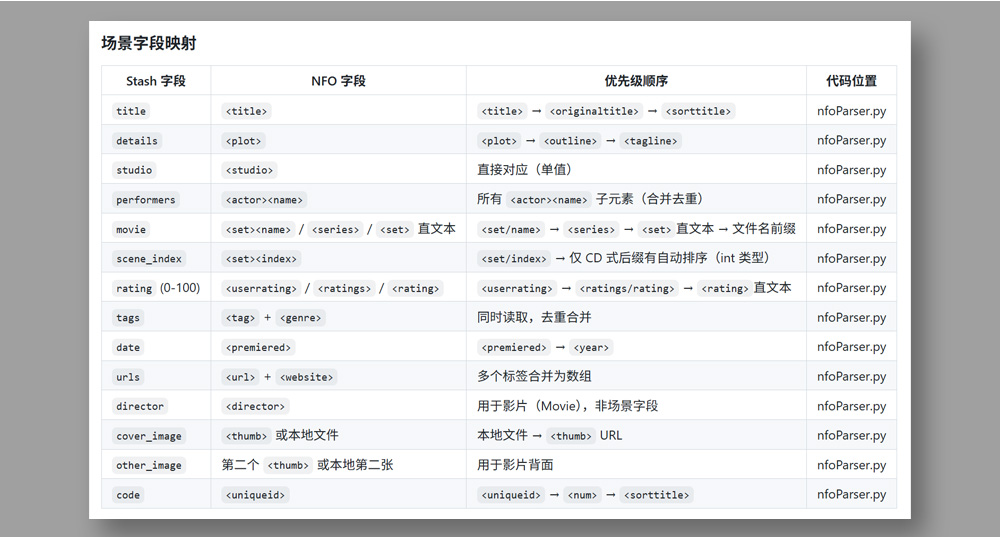
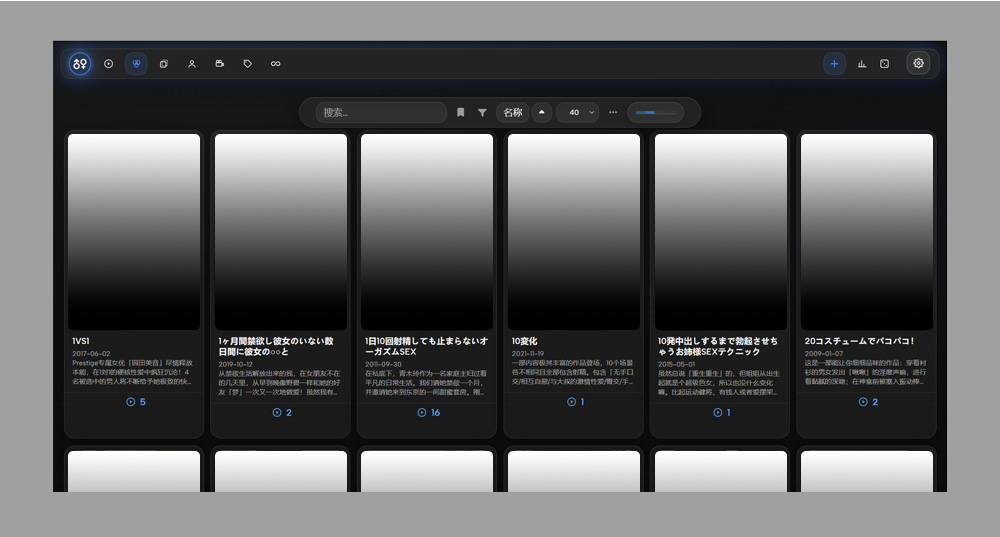
Tech stack
Python 3 + requests + xml.etree.ElementTree (with custom XML tolerance). Talks to Stash via GraphQL (/graphql, same-origin cookie auth). Plugin hooks: Scene.Create.Post. Tasks: “Reload tagged scenes”. License: same as upstream CommunityScripts (MIT).
Again — full credit to the original nfoSceneParser contributors and the stashapp community. This fork only exists because the original plugin built a solid foundation worth extending for JAV-specific packaging. If your library uses standard NFO + standard filenames, the upstream version is the right choice.
Feedback / bug reports / PRs welcome. If you hit edge cases with multi-CD JAV series, weird番号 formats, or front/back cover mismatches, let me know — v1.6.1’s Movie cover search + normalization should cover most of them.
AI Development Statement
From project setup, fault debugging and architecture refactoring to the writing and polishing of all Markdown‑formatted documents, artificial intelligence runs through the entire development workflow of this project, and the whole project is developed with the help of AI.