 |
Summary | Replaces the scene detail poster with a contact-sheet mosaic of the whole video, built from the scene’s sprite. |
 |
Repository | https://github.com/stashapp/CommunityScripts/tree/main/plugins/MosaicPoster |
 |
Source URL | https://stashapp.github.io/CommunityScripts/stable/index.yml |
 |
Install | How to install a plugin? |
Mosaic Poster
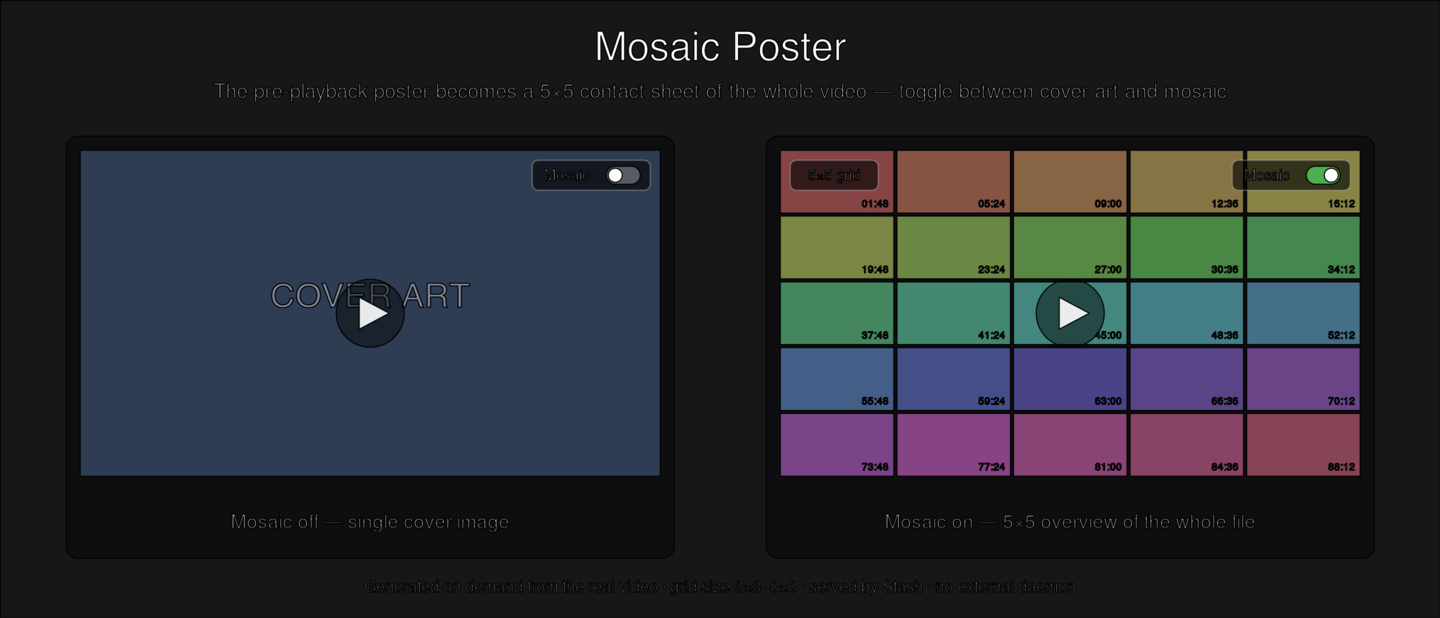
A Stash UI plugin that replaces the pre-playback poster on the scene detail page (/scenes/{id}) with a contact sheet — a whole-video overview sampled evenly across the file. A button at the top-right of the poster toggles cover art ⇄ mosaic, and a button at the top-left cycles the grid size (3×3 up to 8×8). List and card cover art is left untouched.
Whether the mosaic shows by default, and the grid size, are global plugin settings (shared across devices). The cover/mosaic button overrides the default for that scene only (remembered per scene in the browser); the grid button changes the global size.
Why
The default poster is a single cover image. For a lot of libraries you want to see what is actually in the file before playing it. Mosaic Poster gives you an N×N overview, built instantly from Stash’s existing scene sprite (no extra generation), without changing any core Stash behaviour.
How it works
By default the sheet is built entirely in the browser from Stash’s existing scene sprite — the sprite image + WebVTT that Stash already generates for the seekbar hover preview. The plugin reads the VTT for each thumbnail’s timestamp and region and splices the frames into an N×N grid on a canvas. No generation, no ffmpeg, no extra storage — and it appears instantly. Tap-to-seek uses each thumbnail’s real timestamp from the VTT.
If a scene has no sprite (Generate → Sprites hasn’t been run) the mosaic isn’t shown for it (the cover art stays), unless the optional hi-res upgrade is on.
High-res upgrade (optional, off by default)
Sprite thumbnails are low-res, so on a large / hi-DPI display the sheet can look soft. Enable High-res upgrade to render a higher-resolution sheet from the real video with ffmpeg and swap it in once ready:
- The frontend shows the sprite sheet instantly, then calls the backend (
runPluginOperation,mode: generate,n: <grid>). - The backend reads ffmpeg/ffprobe and the generated-files path from Stash’s own configuration (any OS), samples N×N frames, tiles them into a JPEG, and writes it to
generated/<oshash>_<N>x<N>.jpgin the plugin directory. - Stash serves that folder statically (via
ui.assets); the frontend swaps the hi-res sheet in over the sprite. Each grid size is cached independently, and a sheet is generated only for scenes you actually open.
This is the only mode that runs ffmpeg or writes to disk, and it is off by default — out of the box the plugin adds no generation overhead. No standalone daemon, no fixed port, no OS-specific service.
Requirements
- Stash v0.31.0+.
- Scene sprites generated (Generate → Sprites) for the scenes you want a mosaic on — this is what the default (sprite) mode builds from.
- Only if you enable the optional High-res upgrade:
python3 onPATH(standard library only) and ffmpeg/ffprobe (Stash’s bundled binaries are used automatically, or your configured paths).
Install
- Copy this folder into your Stash
plugins/directory (or install from a plugin source that includes it). - Settings → Plugins → Reload plugins.
- Open any scene — the poster now shows the mosaic.
Settings
- Show mosaic by default — when enabled (default), scenes open showing the mosaic; disable to open with cover art. This is the global default; the cover/mosaic button on a scene’s poster overrides it for that scene only.
- Tap a cell to seek — when enabled (default), clicking a mosaic cell jumps playback to that point in the video; disable to make clicking play from the start instead.
- Mosaic grid size (3-8) — frames per side (N for an N×N sheet), 3–8, default 5. This is the same value as the grid button on the poster; changing either one keeps both in sync (reload the scene tab to pick up a change made from the Settings page).
- High-res upgrade — off by default. When on, the instant sprite sheet is upgraded to a higher-resolution sheet generated from the video with ffmpeg (see above). This is the only setting that runs ffmpeg / writes to disk.
- Cache limit (files) — only applies to the High-res upgrade. Maximum number of generated sheets to keep; excess is removed least-recently-viewed first (LRU). ~0.3MB each; default 250 (~75MB). 0 = unlimited. Generated sheets are disposable — a pruned one is simply regenerated next time that scene is opened.
Tasks
- Backfill mosaics — generate every missing sheet across the whole library (mounted files only).
- Prune mosaic cache — shrink the cache down to the configured limit.
Localization
The on-poster button/tooltip strings follow Stash’s UI language and ship with translations for every language Stash supports (English is the default fallback for any unset locale). Non-English strings are best-effort — corrections from native speakers are welcome; add or edit an entry in the STRINGS table in MosaicPoster.js (keyed by lower-cased language code, e.g. de or zh-tw). Plugin Settings labels are static and remain in English (a Stash limitation).
Notes
- With the High-res upgrade enabled, generated sheets live in
generated/inside the plugin directory; they are a disposable cache, regenerated on demand. - Core Stash config is never modified.