Suppose one has a folder with many (hundreds) of sub-folders, but one such sub-folder has many more files than all the rest. Is there a way to do a selective scan of that one very large sub-folder (yes), and then do a selective scan of the entire folder minus the large sub-folder (idk)? I don’t see an option to do that in the UI. Perhaps there is a CLI command or something like that?
Settings > Library > Exclusions
Just add /sub-folder/ as a pattern. If the effect is supposed to be temporary, remove the exclusion after scanning.
1 Like
For some reason, this is not working. I think maybe it worked once, but I just saw my Stashapp scanning a folder that I had saved to the library exclusion. I saw that it wasn’t working the other day, so I thought maybe I put the slashes in wrong. I put the files that I wanted to be excluded from a scan inside a folder named “abcdefg”, and I set the following as exclusions: ‘/abcdefg’, ‘/abcdefg/’, ‘abcdefg/’, and ‘abcdefg’. Despite all those exclusions, I just saw my Stashapp scanning files within that subfolder.
Hmm, if you’re on Windows, maybe try \\abcdefg just to be sure. Not sure how paths get formatted in the background.
You need to cancel the slashes as kanaza said. I’m on linux and I do \/folder\/ which works fine.
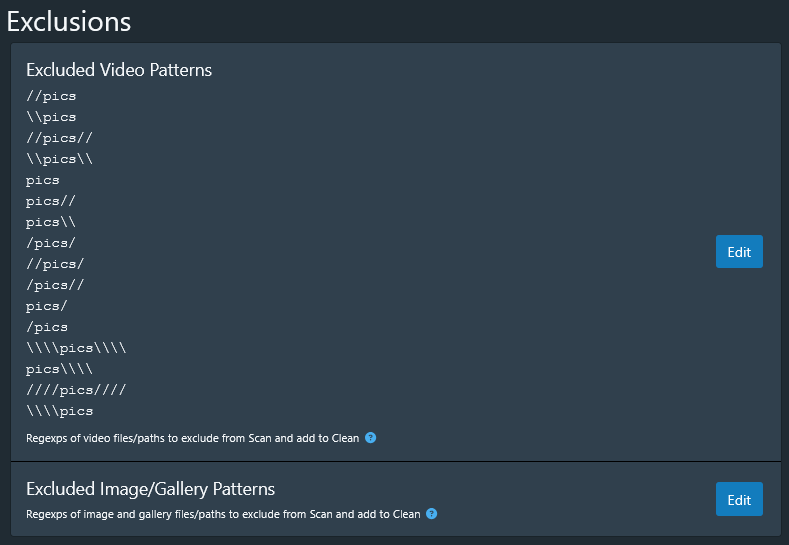
\\pics\\ is what you want. You need to add it to “Excluded Image/Gallery Patterns” section at the bottom of your screenshot. That’s assuming pics folder has images in it.
@Citadel3112 Make your life easier and use a regex tester going forward, such as https://regex101.com
Regular expression –> \\pics\\
Test strings → For each line add a full path that you want to test for matches