 |
Summary | Find date in path or filename and add it to the gallery. |
 |
Repository | https://github.com/stashapp/CommunityScripts/tree/main/plugins/DateParser |
 |
Source URL | https://stashapp.github.io/CommunityScripts/stable/index.yml |
 |
Install | How to install a plugin? |
Did anyone get this working? My folders contain the date YYYY-MM-DD but it doesn’t seem to work.
What error do you get ? You need to install a python lib for this to work. Did you do so ?
I have PythonDepManager installed, looks like I am getting the proper response from the plugin in the logs the output is correctly identifying the number of galleries that need there date set but the date is not actually being applied to any of my galleries.

My Galleries are formatted as such [performer or scene]/Gallery title YYYY-MM-DD/imagesXX.jpg I have been playing around with other formats.
It looks the issue is seemingly with the following lines in the script lines 67 & 68 updateObject = {"id": gallery.get("id"), "date": acceptableDate} stash.update_gallery(updateObject)
Could be something else I have overlooked, any input is much appreciated!
Due to multiple reports that plugin is not working added broken tag.
date_parser_fixed.py (3.0 KB)
For anyone interested I have fixed this and the fixed file is available above!
Seems the problem was in the regex I am not great at regex so now your date must be in one of the following formats:
YYYY-MM-DD, YYYY/MM/DD, YYYY.MM.DD, YYYY_MM_DD
I made the addition of dropping your date from the folder and making that string the date (only if your galleries are formatted as such dir/Galleries/gallery folder YYYY-MM-DD this will add the date and make ‘gallery folder’ your title.
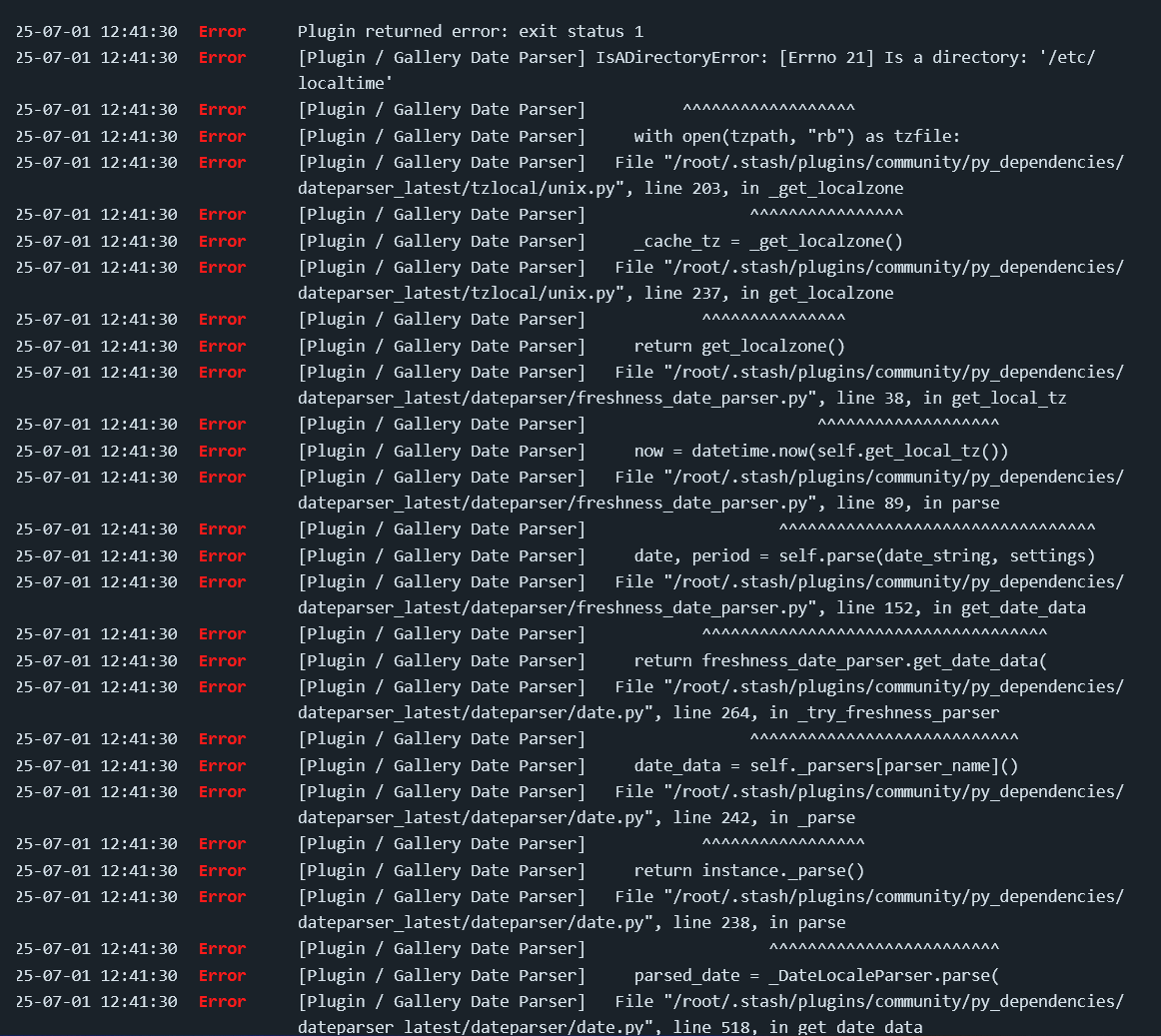
Just dropping in this file right into the plugin folder works with stash-s6 but with my standard stash image I get the following error from doing that. If there’s any tips on resolving this that would be great, might just be that I need to make a PR?
Please don’t PR a fix that reduce the number of matchable dates. I took forever making that regex and plugin and I’ve been using it for years. A proper explanation of the issue would have helped me fixing it. I’ll test it again today. But marking it as broken without proper details isn’t helping
The regex string is seemingly where the problem is, the pattern would not identify any matches and exit the script despite valid matches being present.
When I ran the example paths through this tool no matches or groups are identified. I simplified the regex pattern until I got the results the script expected, which resulted in the following.
r"(\d{4})[-./_](0?[1-9]|1[012])[-./_](0?[1-9]|[12][0-9]|3[01])$"
Could you send me the path of your gallery, the OS you use, and stash version ?
I just created a gallery with the name you said and it works for me. The date is detected.
The regex i do matches a lot of thing. I suspect this might simply be due to the fact i made it on windows and maybe your path is on linux and uses \ instead of /
I am on linux in docker with an smb share mounted with the sample path as the following, latest version of the main docker image. I tested my replacement with s6 and it worked great.
/data_6/performerorscene/Galleries/gallery title YYYY-MM-DD
I found the issue. The date is expected to not be at the end of the path. Let me try to fix it
Gotcha, would you be willing to add my addition for adding a title that has the date dropped?
Can you do me a favour and try to add a * at the end of the original regex and tell me if that fix the issue for you. I think it does. After the \D
r"\D(\d{4}|\d{1,2})[\._\- /\\](\d{1,2}|[a-zA-Z]{3,}\.*)[\._\- /\\](\d{4}|\d{1,2})\D*"
Yes i can also do the part you mentioned. I though i did already. Weird
1 Like
Yeah looks like it works on my stash-s6 instance, great thanks!
Ok thanks. I will update the plugin and also make the title be the folder name minus the date
Great! Much appreciated! If there’s anything I can do to help let me know!
1 Like
Done in
1 Like
Hi, i don’t know if I’m missing something, but how do I trigger the plugin to run and scan my galleries?
From setting> Tasks at the bottom