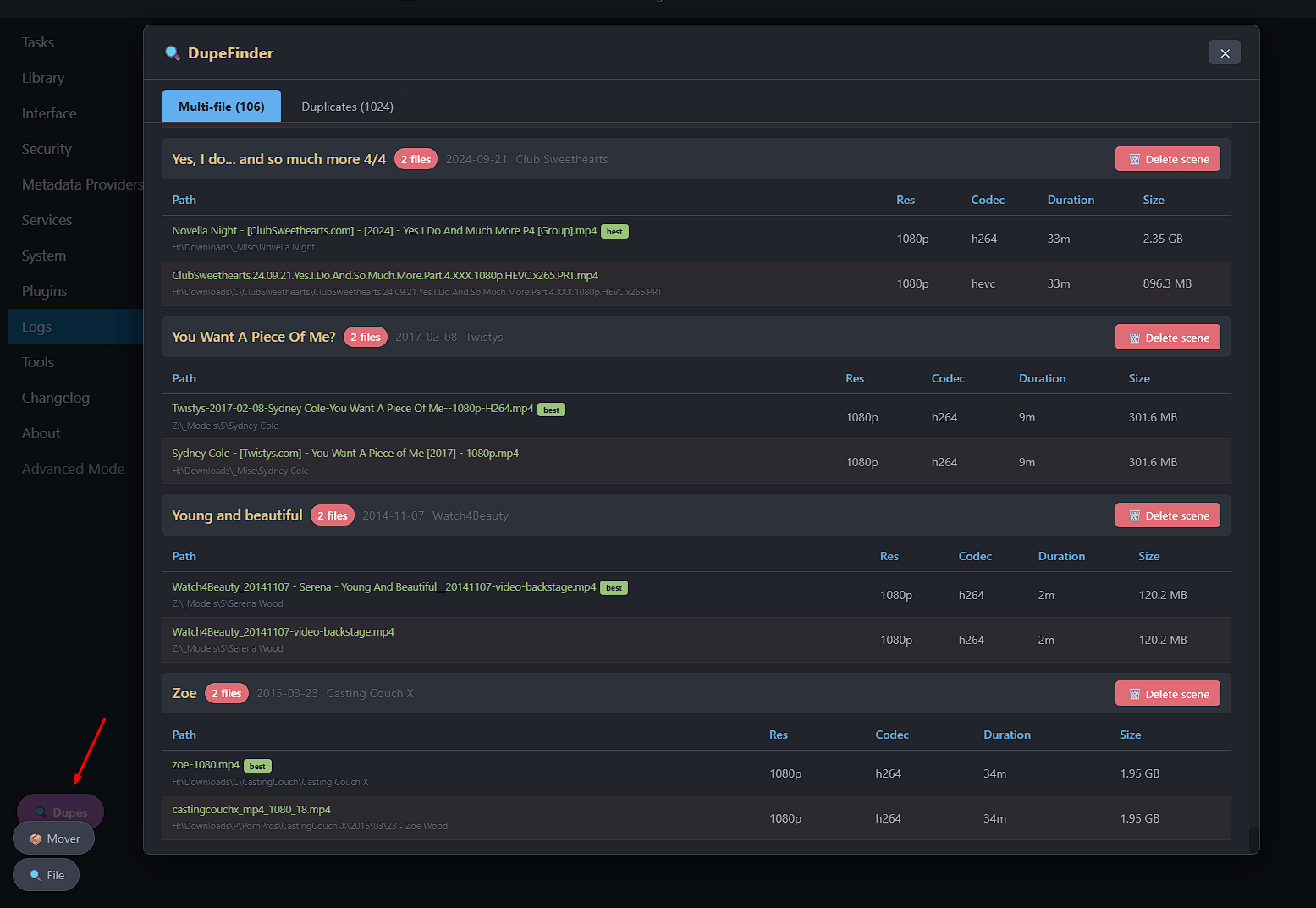
A Stash plugin that finds duplicate scenes and multi-file scenes in your library, and lets you merge or delete them directly from a floating modal — no page navigation required.
Features
Duplicate detection — finds scenes sharing the same title + date + studio combination
Multi-file scene detection — finds scenes that have more than one file attached
Smart “keep” suggestion — automatically recommends the best scene to keep based on resolution → file size → codec ranking
Merge duplicates — merges metadata from all scenes in a group into the best one in a single click
Delete scenes — delete individual scenes (and their files from disk) directly from the results
Floating button — accessible from anywhere in Stash via a persistent Dupes button
No Python required — pure JavaScript, client-side only
Installation
Use the UI to add the source or simply copy DupeFinder folder to your plugin directory. Reload plugins and then use F5 or ctrl-shft+r to refresh your browser.
I was looking for exactly this, I knew the built in dupe checker only checks for phash closeness but it helps to check videos with the same metadata and manually compare. Even if they have different phash it could be a cataloging error so thanks for making this!
I’m looking for this too. It shows which one is “best” and has the other(s) highlighted in red, so intuitively I expected the delete button to delete the red highlighted files from the scene. I guess we have to click into each scene listed there one by one and then delete the extra files from there?


 Dupes button