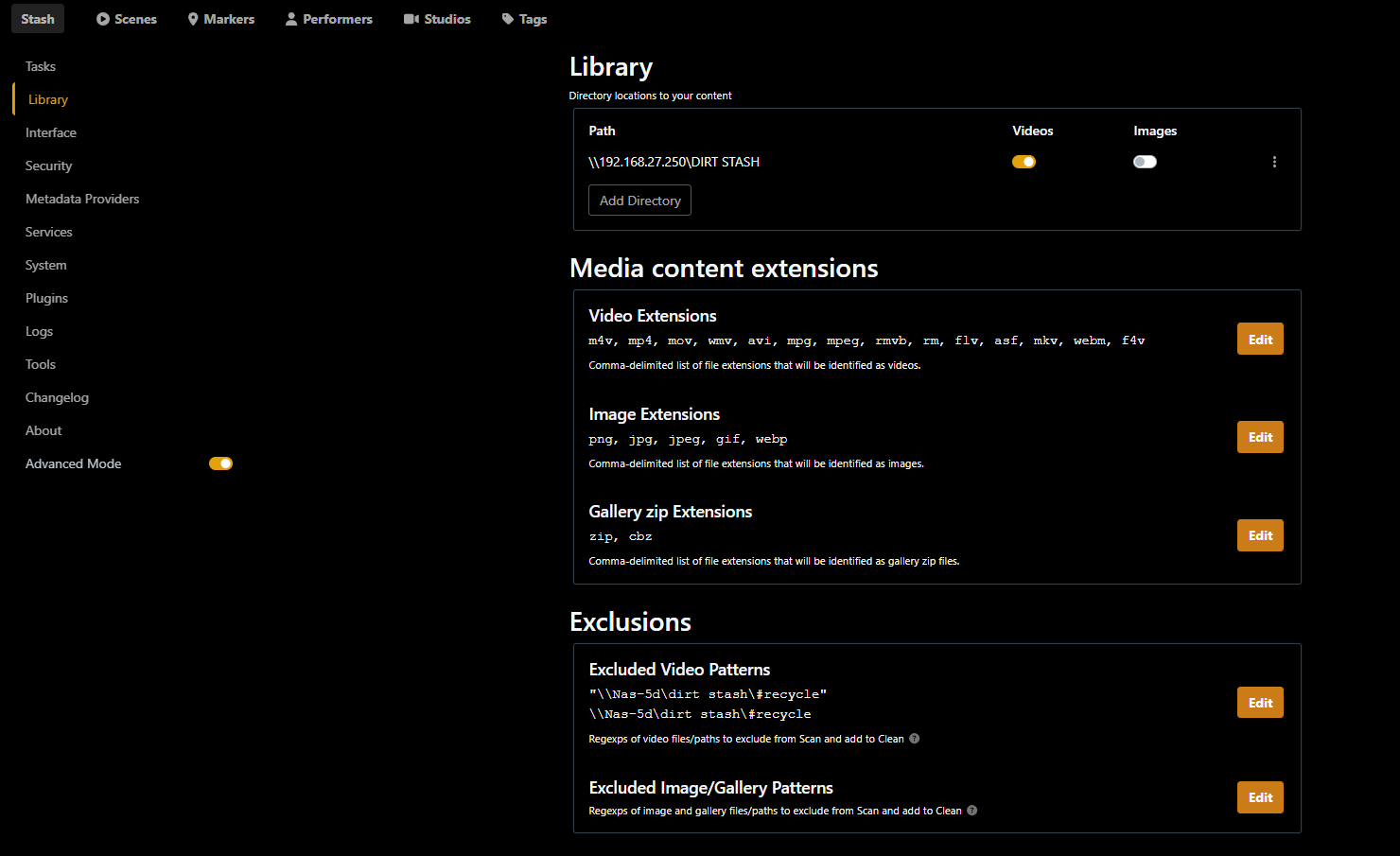
I’m not sure its actually hung bur I’m still sitting here at Scanning walking tree… after a day and a half.
Scenes Data Size for reference is 1-40 of 5,908 (4M 2W 4D - 16.8 TiB)
Transitioned from one synology to another. Added the the new network share to library and initiated a scan but nothing seems to be happening. The log isnt screaming anything either that i can see anyways.. shows one warning
2025-09-09 07:02:57
Warning
read transaction error on fetch screenshot: blob for checksum a7f273e97ede9357311e384a8764111a does not exist
I’ve tried filtering scenes by path and it doesn’t look like anything is showing in the new path. I’ve changed paths before but that was probably 10Tb ago and it wasn’t a big deal but this seems different and waaay longer time wise assuming its still working in the background.
Windows 11
running Stash standard
version v0.28.1
Network shares are confirmed accessible from pc
any suggestions or advice would be greatly appreciated. Jet let me know if you need any info to further assist.
Thanks
I’d kill the scan if you haven’t already, bump the Log Level up to Debug or Trace in Settings -> System -> Logging, then try scanning again and checking the logs again.
My gut feeling is that this is a file system level issue, rather than something specific to stash, but there’s not a lot of info to go on. I vaguely recall hearing about a similar issue before, but I don’t recall if there was any resolution to it.
Thanks for the reply!
I suspect the same really but I can’t figure out the issue. Its like Stash doesn’t know there’s a new path.
Here’s the output of that…
Old Path was \NAS-5D\DIRT STASH
New path is \192.168.27.250\DIRT STASH
Log Level

Trace
2025-09-10 07:06:32
Info
scanning 1 paths
2025-09-10 07:04:52
Info
Version v0.28.1 (cc6917f2) is already the latest released
2025-09-10 07:04:52
Debug
Github API request: https://api.github.com/repos/stashapp/stash/tags?per_page=10&page=1
2025-09-10 07:04:52
Debug
Github API request: https://api.github.com/repos/stashapp/stash/releases/latest
2025-09-10 07:04:52
Info
stash is running at http://localhost:9999/
2025-09-10 07:04:52
Info
stash is listening on 0.0.0.0:9999
2025-09-10 07:04:52
Info
stash version: v0.28.1 (cc6917f2) - Official Build - 2025-03-19 22:57:41
2025-09-10 07:04:52
Debug
Serving embedded UI
2025-09-10 07:04:52
Info
[InitHWSupport] Supported HW codecs [2]:
	H264 Intel Quick Sync Video (QSV) - h264_qsv
	H264 Intel Quick Sync Video (QSV) Compatibility profile - h264_qsv
2025-09-10 07:04:52
Debug
[InitHWSupport] Codec {H264 VideoToolbox h264_videotoolbox} not supported. Error output:
Unrecognized option 'realtime'.
Error splitting the argument list: Option not found
2025-09-10 07:04:52
Debug
[InitHWSupport] Codec {VP9 VAAPI vp9_vaapi} not supported. Error output:
[AVHWDeviceContext @ 00000211f492edc0] Failed to initialise VAAPI connection: -1 (unknown libva error).
Device creation failed: -5.
Failed to set value '/dev/dri/renderD128' for option 'vaapi_device': I/O error
Error parsing global options: I/O error
2025-09-10 07:04:51
Debug
[InitHWSupport] Codec {VP9 Intel Quick Sync Video (QSV) vp9_qsv} not supported. Error output:
[vp9_qsv @ 0000019e178ffe80] Selected ratecontrol mode is unsupported
[vp9_qsv @ 0000019e178ffe80] Low power mode is unsupported
[vp9_qsv @ 0000019e178ffe80] Current frame rate is unsupported
[vp9_qsv @ 0000019e178ffe80] Current picture structure is unsupported
[vp9_qsv @ 0000019e178ffe80] Current resolution is unsupported
[vp9_qsv @ 0000019e178ffe80] Current pixel format is unsupported
[vp9_qsv @ 0000019e178ffe80] some encoding parameters are not supported by the QSV runtime. Please double check the input parameters.
[vost#0:0/vp9_qsv @ 0000019e178ffac0] Error while opening encoder - maybe incorrect parameters such as bit_rate, rate, width or height.
[vf#0:0 @ 0000019e17901000] Error sending frames to consumers: Function not implemented
[vf#0:0 @ 0000019e17901000] Task finished with error code: -40 (Function not implemented)
[vf#0:0 @ 0000019e17901000] Terminating thread with return code -40 (Function not implemented)
[vost#0:0/vp9_qsv @ 0000019e178ffac0] Could not open encoder before EOF
[vost#0:0/vp9_qsv @ 0000019e178ffac0] Task finished with error code: -22 (Invalid argument)
[vost#0:0/vp9_qsv @ 0000019e178ffac0] Terminating thread with return code -22 (Invalid argument)
[out#0/null @ 0000019e178fcfc0] Nothing was written into output file, because at least one of its streams received no packets.
2025-09-10 07:04:51
Debug
[InitHWSupport] Codec {H264 V4L2M2M h264_v4l2m2m} not supported. Error output:
[vost#0:0 @ 000001d7ff259d40] Unknown encoder 'h264_v4l2m2m'
[vost#0:0 @ 000001d7ff259d40] Error selecting an encoder
Error opening output file -.
Error opening output files: Encoder not found
2025-09-10 07:04:51
Debug
[InitHWSupport] Codec {H264 VAAPI h264_vaapi} not supported. Error output:
[AVHWDeviceContext @ 00000195da0aedc0] Failed to initialise VAAPI connection: -1 (unknown libva error).
Device creation failed: -5.
Failed to set value '/dev/dri/renderD128' for option 'vaapi_device': I/O error
Error parsing global options: I/O error
2025-09-10 07:04:50
Debug
[InitHWSupport] Codec {H264 NVENC h264_nvenc} not supported. Error output:
[AVHWDeviceContext @ 000001d7749a6480] Cannot load nvcuda.dll
[AVHWDeviceContext @ 000001d7749a6480] Could not dynamically load CUDA
[AVFilterGraph @ 000001d774a35d80] Error initializing filters
[vost#0:0/h264_nvenc @ 000001d774a1a100] Error initializing a simple filtergraph
Error opening output file -.
Error opening output files: Operation not permitted
2025-09-10 07:04:50
Debug
[InitHWSupport] Codec {H264 NVENC HQ profile h264_nvenc} not supported. Error output:
Please use -profile:a or -profile:v, -profile is ambiguous
    Last message repeated 1 times
[AVHWDeviceContext @ 000001be29dd75c0] Cannot load nvcuda.dll
[AVHWDeviceContext @ 000001be29dd75c0] Could not dynamically load CUDA
[AVFilterGraph @ 000001be29e66cc0] Error initializing filters
[vost#0:0/h264_nvenc @ 000001be2b762b00] Error initializing a simple filtergraph
Error opening output file -.
Error opening output files: Operation not permitted
2025-09-10 07:04:50
Debug
FFProbe version 7.0.2 detected
2025-09-10 07:04:50
Debug
FFMpeg version 7.0.2 detected
2025-09-10 07:04:50
Debug
using ffprobe: C:\Stash App\ffprobe.exe
2025-09-10 07:04:50
Debug
using ffmpeg: C:\Stash App\ffmpeg.exe
2025-09-10 07:04:50
Debug
started SSDP on Ethernet
2025-09-10 07:04:50
Warning
could not create temporary directory: mkdir \\NAS-5D\DIRT STASH\STASH DATA\tmp: The network path was not found.
2025-09-10 07:04:50
Warning
could not empty downloads directory: open \\NAS-5D\DIRT STASH\STASH DATA\download_stage: The network path was not found.
2025-09-10 07:04:50
Debug
HTTP srv on[::]:1338
2025-09-10 07:04:50
Info
Starting DLNA [::]:1338
2025-09-10 07:04:47
Debug
Reading scraper configs from C:\Stash App\scrapers
2025-09-10 07:04:47
Debug
Reading plugin configs from C:\Stash App\plugins
2025-09-10 07:04:47
Warning
could not create interactive heatmaps directory: mkdir \\NAS-5D\DIRT STASH\STASH DATA\interactive_heatmaps: The network path was not found.
2025-09-10 07:04:47
Warning
could not create downloads directory: mkdir \\NAS-5D\DIRT STASH\STASH DATA\download_stage: The network path was not found.
2025-09-10 07:04:47
Warning
could not create transcodes directory: mkdir \\NAS-5D\DIRT STASH\STASH DATA\transcodes: The network path was not found.
That log doesn’t indicate much at all unfortunately. My guess is that it’s hanging on one of the file system calls. We don’t have detailed enough trace logging to determine what that is.
There are a couple of issues that have similar symptoms:
There’s a couple of troubleshooting steps that you could try that might shed some more light.
I think the safest initial thing to try is to create a new stash system, separate to your existing one, using the same library paths and try scanning from that system to see if the result is the same. If that doesn’t make any difference, you could try to do a Selective Scan... in a sub-folder of your library directory. You could try this with your existing system, though I would back up your database first just in case. I’m just not 100% what happens when selectively scanning in a sub-directory, where the upper directory hasn’t been scanned. It’s likely fine, but better safe than sorry.