Stash is running on Synology. Stash itself and generated data on an SSD
Videos on a HDD
I have a question since some videos lag in the browser, and some don’t. I assume it is a codec issue.
Most of my Videos are H. 264 HVEC and H. 265 HVEC; some are H. 264 Libx. And Libx doesn’t seem to lag.
Can this be the issue? So, which codec should I use for stash? Is also H.265 Libx fine?
Yeah, HEVC/H265 is not widely supported by browsers (see compatibility list). From what I understand it’s mostly due to crazy licensing fees (per user) that companies don’t want to pay.
I had the same issue (and with other video codecs as well such as WM2/WMV3 for some very old scene files). The only solution I found and did was to convert to AV1, which is becoming more and more popular each year. I also found its compression rate to be excellent compared to H265 and H264, especially for scenes with a static camera shot. All you have to keep in mind is:
- Make sure that your client can play AV1, otherwise stick to H264. If it’s fairly new (RTX 3000s iirc) it should be fine, but older card can’t even play this codec.
- If we’re talking about hundreds of scene files, don’t even try to CPU convert, it will take ages. My GPU could not HW convert to AV1, so I went with an Intel Arc A310 which is relatively dirt cheap given the current GPU prices. With FileFlows I was able to convert 6Gb H265 files in just a couple of minutes per files.
- Don’t batch convert everything in one go. Try first with a single scene without deleting the original video file. Compare side-by-side the result with tools like video-compare, try with different speed/convert quality. It took me at least 20 tests before commiting for the rest of my library.
Thanks for your answer. Yeah, I thought about av1 as well, but the problem is your end hardware has to support it otherwise Synology will try to do the work and will end up badly.
H264 LibX seems to be the safe haven atm. Very sad
Yes, I believe that’s because you have transcoding enabled in your settings. If you disable it that will prevent those video files from playing on incompatible devices, but at least it will not pound the CPU of your NAS 
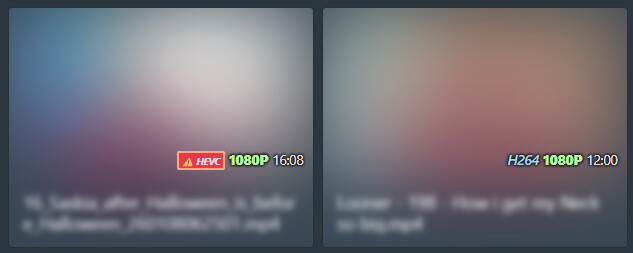
While I still had some scenes to convert left in my library, what I did was adding this CSS snippet to show me a warning on the scene list items:
/* Danger label on videos card with bad video codec */

.overlay-codec.codec-HEVC, .overlay-codec.codec-WMV3 {
  color: #ffffff !important;
  background-color: #dc3545 !important;
  padding: 0.05rem 0.2rem !important;
  border-radius: 0.1rem !important;
  font-size: 0.7rem !important;
  font-weight: bold !important;
  border: 2px solid #ffa07a !important;
  text-shadow: none !important;
}

.overlay-codec.codec-HEVC::before, .overlay-codec.codec-WMV3::before {
  content: "⚠️" !important;
  font-size: 0.7rem !important;
  margin-right: 0.1rem !important;
  text-shadow: none !important;
}
It looks like this:
It’s a bit of a crappy CSS hack, but it does the job.
You can also create filters (blacklist or whitelist) with the filter Video Codec > matches regex > ^(wmv.*|hevc)$ .
Thi way you can eitther highlight scenes that needs to be converted, or avoid playing scene that will break transcoding.