|
Summary | Calculates performer ratings from category-based tags. |
 |
Repository | https://github.com/ordureconnoisseur/plugins/tree/main/plugins/advancedPerformerRating |
 |
Source URL | https://ordureconnoisseur.github.io/plugins/main/index.yml |
 |
Install | How to install a plugin? |
Advanced Performer Rating
A Stash plugin that adds a multi-category rating system for performers. Rate each performer across several criteria (Face, Technique, etc.), grouped into weighted buckets, and Stash’s overall performer rating is calculated and updated automatically.
Everything is configured through a dedicated settings panel — no plugin tasks, no manual tag creation. Rename criteria, add custom ones, tweak weights, and add/remove groups all in one place.
Credits
Inspired by the Advanced Rating System plugin on the Stash community forums, which introduced the concept of using tags for multi-category ratings.
Requirements
- Stash v0.27+
- Python 3.x
- stashapp-tools (bundled in
vendor/; auto-installed via pip when available)
Installation
- In Stash go to Settings → Plugins → Add Source and enter:
https://ordureconnoisseur.github.io/plugins/main/index.yml - Find Advanced Performer Rating in the plugin browser and click Install.
- Open Settings → Plugins → Advanced Performer Rating and click Save in the panel — this seeds the default config and creates the rating tags for you.
Usage
Click the ★+ button on any performer’s page to open the rating modal. The button shows a count badge when the performer has criteria still unrated — yellow if the performer is partially rated (e.g. you’ve added a new criterion since they were last rated), grey when fully unrated. No badge means every criterion is rated.
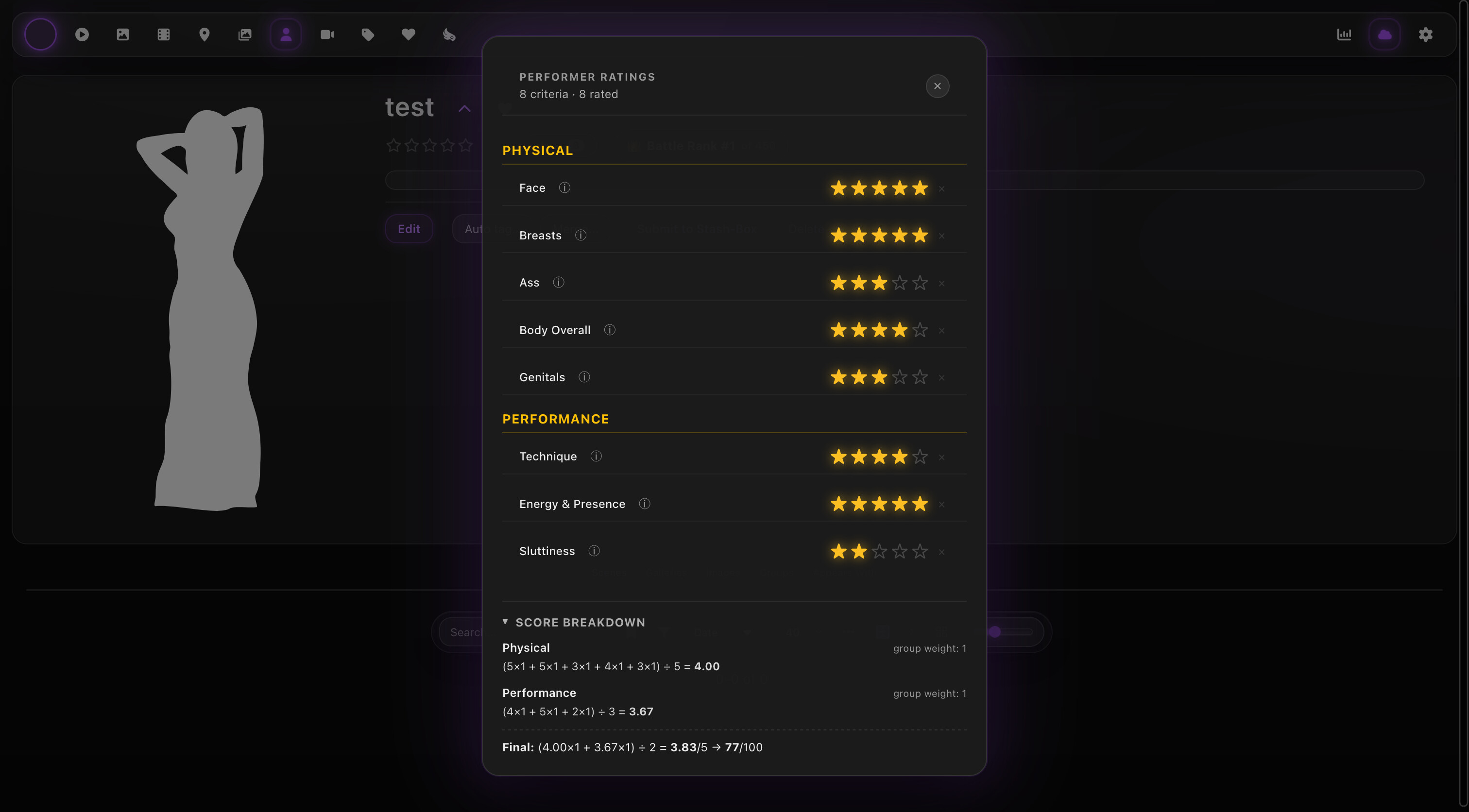
The modal renders each criterion grouped by its configured group, with a bold header per group. Rate each category using the 1–5 star selectors. Hover over the ⓘ icon next to a category name to see its description. Unrated criteria are highlighted with a small “unrated” pill so you can see at a glance which ones still need a score.
As you click stars, the corresponding category tag (Face ★: 4, etc.) is applied to the performer and Stash’s overall rating is recalculated automatically via the Performer.Update.Post hook.
Click Score breakdown at the bottom of the modal to expand a panel that shows exactly how the rating is being calculated: per-group weighted average, then the final weighted mean across groups, and the rating100 result after precision snapping. The collapsed/expanded state is remembered across sessions.
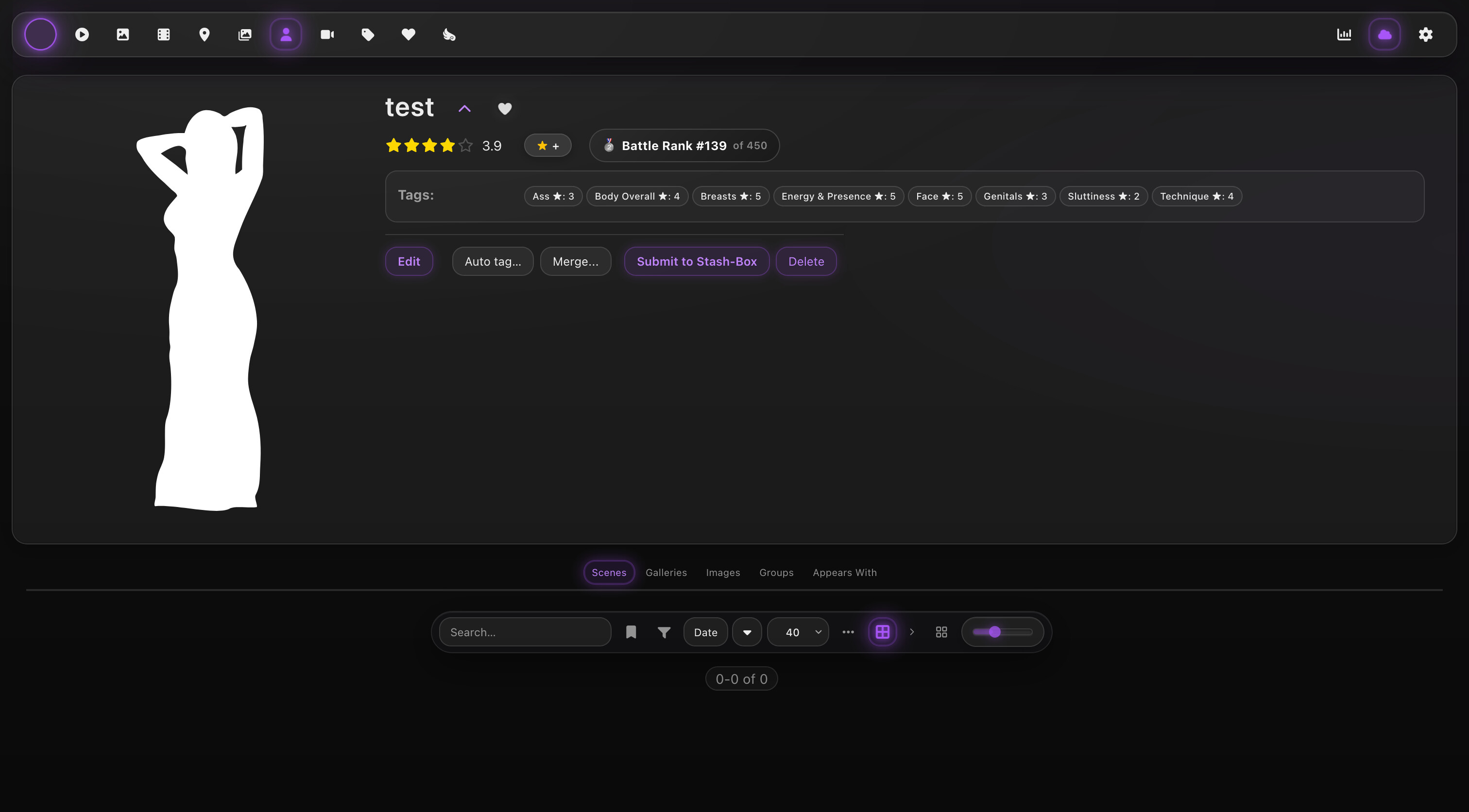
The rating is visible directly on the performer page alongside the category tags that were assigned.
Configuration
Open Settings → Plugins → Advanced Performer Rating to access the settings panel. The panel replaces Stash’s native plugin-settings UI (which can’t reliably render dropdowns or persist non-boolean values) with a fully interactive React component.
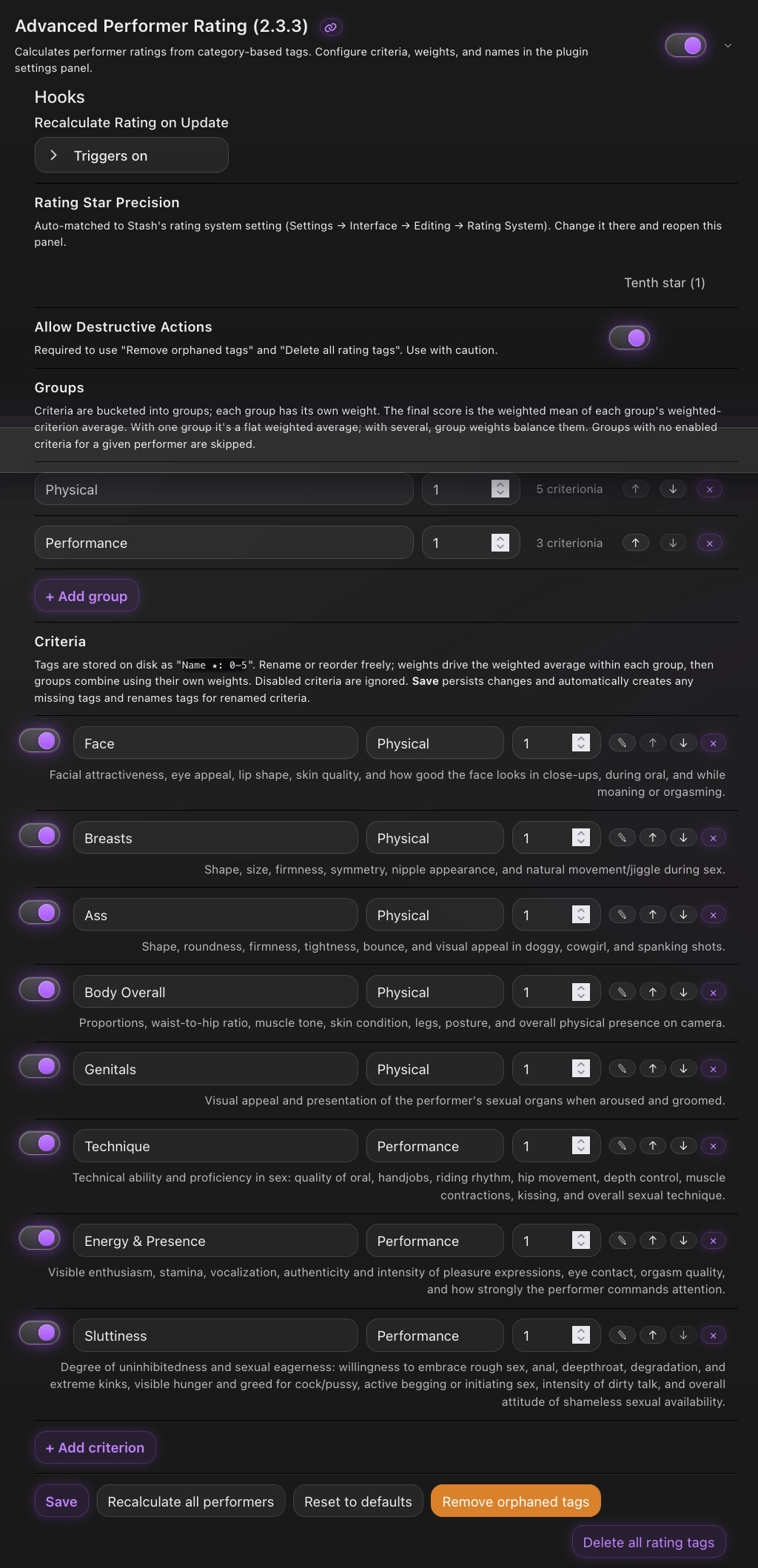
General
- Rating Star Precision — auto-matched from Stash’s own rating-system setting (Settings → Interface → Editing → Rating System).
FULL = 20,HALF = 10,QUARTER = 5,TENTH = 1,DECIMAL = 1. The panel polls every few seconds so the displayed value tracks Stash’s setting without reopening the panel. - Allow Destructive Actions — gates the orange “Remove orphaned tags” and red “Delete all rating tags” buttons. Off by default.
Groups
Criteria are bucketed into groups, and the final rating is a weighted mean of each group’s average.
- Name — display label. Renaming a group doesn’t touch any tags (tags are per-criterion, not per-group).
- Weight — how much this group counts in the final score relative to others.
- Reorder / Delete — at least one group must exist. Deleting a group reassigns its criteria to another group.
Defaults seed Physical and Performance with equal weight.
Criteria
Each criterion is a rateable category that produces a tag prefix <Name> ★ with children <Name> ★: 0 … <Name> ★: 5.
| Field | Meaning |
|---|---|
| Toggle | Enabled / disabled. Disabled criteria are ignored by the rating math and hidden from the modal. |
| Name | Display name. Used as the tag prefix (a ★ is automatically appended in the tag name). |
| Group | Which group this criterion contributes to. Populated from the configured group list. |
| Weight | How much this criterion counts within its group. |
| ✎ | Edit the description shown as a tooltip in the rating modal. Clear it to hide the tooltip; Reset to default restores the bundled wording (only available for the eight default criteria). |
| ↑ ↓ | Reorder. |
| × | Remove the criterion from this configuration. Tags stay on disk — use Remove orphaned tags to clean up. |
+ Add criterion appends a new custom criterion with a generated slug id.
Actions
- Save — persists configuration AND automatically creates any missing tags for new criteria AND renames tags for any criterion you renamed. One click handles every workflow.
- Recalculate all performers — walks every performer in Stash and updates their
rating100based on the current configuration. Useful after changing weights or group settings. - Reset to defaults — restores the bundled 2 groups + 8 criteria.
- Remove orphaned tags — scans Stash for criterion tags whose criterion was renamed or removed and deletes them with their
0–5children. Requires Allow Destructive Actions. - Delete all rating tags — destroys the parent tag plus every configured criterion’s tags. Requires Allow Destructive Actions.
How It Works
Each criterion produces a tag prefix like Face ★, with six child tags Face ★: 0 through Face ★: 5 organised under a single Advanced Performer Rating parent tag.
When a performer is updated, the Performer.Update.Post hook fires the Python script. It:
- Reads the plugin’s configuration from Stash’s plugin-config store.
- Builds the criteria/groups model.
- Scans the performer’s tags for any matching
<prefix>: <0–5>. - Computes a weighted average per group, then a weighted mean across groups.
- Snaps the result to Stash’s configured rating precision and updates
rating100.
Rating Calculation
For each group g with at least one matching tag:
group_avg(g) = Σ(score × criterion_weight) / Σ(criterion_weight)
Final rating:
final_avg = Σ(group_avg(g) × group_weight(g)) / Σ(group_weight(g))   over groups with hits
rating100 = round(final_avg × 20, snapped to precision)
- One group → flat weighted average across all enabled criteria.
- Two groups with equal weight → original plugin behaviour: Physical and Performance carry equal weight regardless of how many criteria are in each.
- Three or more groups → weighted mean of their averages.
- Groups with no tag matches are skipped; if no groups have any hits, the rating is not updated.
Where settings are saved
Plugin configuration (groups, criteria, weights, descriptions, the destructive-actions toggle) is persisted via Stash’s configurePlugin GraphQL mutation, which writes to Stash’s main config.yml under plugins.advancedPerformerRating.* (~/.stash/config.yml on Linux/Mac, %USERPROFILE%\.stash\config.yml on Windows).
| Scenario | Plugin config | Rating tags | Performer ratings |
|---|---|---|---|
| Uninstall + reinstall plugin |  (it’s in config.yml, not the plugin folder) (it’s in config.yml, not the plugin folder) |
(DB) |
(DB) |
| Database backup / restore | (not in DB) |
Restored |
Restored |
| Wipe DB only | |
 — re-run Save in the panel — re-run Save in the panel |
|
Restore older config.yml |
 reverts to that backup reverts to that backup |
untouched |
untouched |
| Stash factory reset | |
|
|
For a backup of just the criteria/group setup, the file to keep is config.yml. Tags live in the DB, so a DB backup plus a config.yml copy together cover both halves.
License
AGPL v3.