If I have time, I’d be happy to take a look.
Haven’t tried the updated plugin yet; but thank you for working on the plugin. Much appreciated.
@kroeberd I tried the exclude method, and it works perfectly. Thank you for the fix.
1 Like
Thanks for taking on this plugin. It’s customizability is unparalleled and (once you understand it) incredibly powerful.
Few things:
- BUG - required field(s) [‘$oshash’] are empty - The latest update seems to break the $oshash token. It’s getting trapped in the required field error, but has been generated.
- REQUEST - Have option to for filename to convert ratings from 1-100 to 1-5 (like stars). I had customized the old .py to simply /20 for the number, but it would be great to see it as an config option so someone like me doesn’t have to manually edit the file after each update.
- REQUEST - Token for folder based on first letter of $performer or $studio. This way you could have alphabetized subfolders so large collections could be more organized.
Cheers!
1 Like
Thanks a lot for the great plugin and the work that went into it.
I have a small recommendation based on an issue I ran into with a larger library. Some findScenes GraphQL requests can take longer than the current 20 second timeout. This can cause the plugin to fail with a read timeout, even though Stash completes the request shortly after.
In the callGraphQL() function, changing this:
timeout=20
to this:
timeout=(5, 60)
fixed the issue for me.
This keeps connection failures fast, but gives larger GraphQL queries enough time to complete.
1 Like
@kroeberd I’ve configured performer_sortGender but it doesn’t seems to work. I see nothing for that in the actual plugin code (f4bio’s repo version 2.6.2), only a sort_by_gender function in the tests.
Has anyone had problems with prevent_title_performer when set to True? It still adds the performer even when it appears in the title of the scene. This is the template I use: “($date_format){$performer - }$title[$height]”
I get the following error when I do a scan:
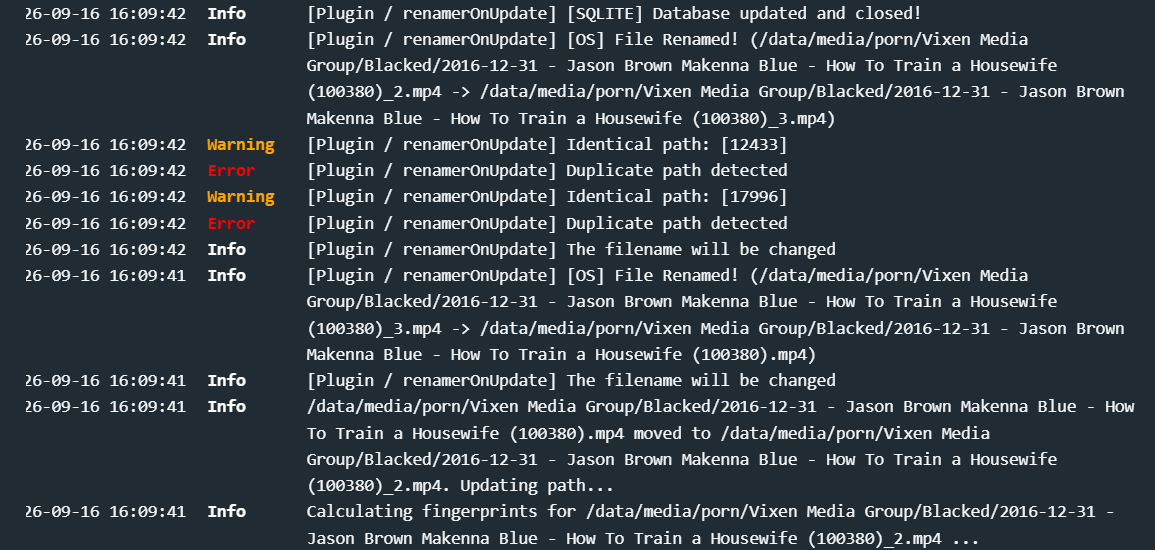
I seem to be getting duplicates created by the plugin. Has anyone encountered this? Any solutions to this?
Hiya - I’m using an old version of Stash and plugins so this may be obsolete, but this is from my experience, I’ve rewritten parts of this for my own experience.
Check the File Info for the scene to see if there are multiple files. If so, renamerOnUpdate will rename the file for each file that exists as scenes are grouped under one Stash entry.
If only 1, there is a possibility of the same scene existing multiple times in your library but with different size files or resolutions. If there are multiple scenes, by the looks of the template, there isn’t enough tags/data to ensure it is unique.
I use resolution and bit rate tags in my files to ensure that 2 1080p files with different bit rates are named uniquely. Same if I have a 4k and a 1080p file.
The Template I use:
{$date -} $title - $performer $height $video_codec $bitrate [$tags] $rating
e.g:
2015-10-07 - License to Thrill Busty Blonde Doll Meets the Fake Cop - Brooklyn Blue 404p H264 1.15.mp4
If I didn’t use height/video codec/bitrate/rating and had two files, as different scenes, say a 4k and 1080p they would be both named:
2015-10-07 - License to Thrill Busty Blonde Doll Meets the Fake Cop - Brooklyn Blue.mp4
So duplicate numbering would need to be used.
Can see you are using something in your template as (100380) - depends on what this is if it determines uniqueness of a file - if not, then it is feasible to have duplicate filenames.
Don’t know if that helps or points you in a direction to go, and apologies if I am rambling, it is 3am here and I should be in bed!
Hope you manage to figure it out.