One thing i found, is that airplay does not seem to work with your player.
It just crashes out, stash normal player works fine though.
Not sure you if you wanna prioritize that or not, but thought i’d let you know.
One thing i found, is that airplay does not seem to work with your player.
It just crashes out, stash normal player works fine though.
Not sure you if you wanna prioritize that or not, but thought i’d let you know.
Yes, exactly. So to prevents users from seeing hundreds of performers, studios, etc., that have no content available. Another thing is that the filters are operating like “Has all of…” instead of “Has any of…” for groups and other conditions.
Having the reset button only in the detail page sounds good.
Working on adding Markers and the Reels view for 1.4.0
I don’t have an Apple device but I looked at how Stash does it and I think it should be working now hopefully. Do you mind trying 1.3.1 and seeing if it’s better?
Both of your requests are in 1.3.1!
Nice, sadly is not working on my instance. It still shows entities with 0 content. The issue might be that from the section page, all entities show their associated content count as it’s on stash, even though they might have 0 available to this user. Once you open the detail page of the entity, there is 0 content available, but the statistics show the stash admin values instead of 0. I’m running it with docker-compose.
About the filtering. Could there be a toggle for each condition? To select if a condition is “sufficient” or just “necessary.” If left in the “necessary” status, a condition like “included in group A” would behave like it is now. But when turned to “sufficient,” it wouldn’t matter if the content doesn’t satisfy the rest of the condition.
I could be much better about adding documentation, but figure I’ll circle back on that once I get some more feature requests introduced. Are you testing as an Admin user? I’m assuming not since you’re talking about Restrictions, but Admins will continue to see -everything-. All other user roles should get the “if it doesn’t have any content, don’t show it” treatment. However, the logic is complicated because it has to recurse over itself (e.g. if I have a Performer who is in no Scenes, but is in a Group that contains Scenes, that Performer shoud still show). Additionally, for Tags and Groups which can have parent/children relationship, I have to trace the “tree” and “trim the branches”. So I’m sure there’s still a bug in there somewhere, but I think I’ll need you to be more specific about what it is you’re trying to filter on and what’s showing up that shouldn’t be. Feel free to DM me and change the names to protect the innocent 
I have an installation on Linux Docker, but I get this cache error and it doesn’t load any data. Is there anything I need to check?
[2025-11-01T13:25:57.405Z] [INFO] TranscodingManager initialized {"tmpDir":"/app/data"}
[2025-11-01T13:25:57.407Z] [INFO] Checking for orphaned FFmpeg processes
[2025-11-01T13:25:57.410Z] [DEBUG] No orphaned FFmpeg processes found
[2025-11-01T13:25:57.411Z] [INFO] Cleaning up old transcoding sessions {"segmentsDir":"/app/data/segments"}
[2025-11-01T13:25:57.411Z] [INFO] Found old sessions to clean up {"count":0}
[2025-11-01T13:25:57.411Z] [INFO] Cleanup complete {"deleted":0,"failed":0}
[dotenv@17.2.3] injecting env (0) from .env -- tip: ⚙️  suppress all logs with { quiet: true }
[2025-11-01T13:25:57.452Z] [INFO] Starting Peek server
[2025-11-01T13:25:57.452Z] [INFO] Environment check {"STASH_URL":"http://192.168.1.205/graphql","STASH_API_KEY_exists":true}
[2025-11-01T13:25:57.453Z] [INFO] Initializing database
[2025-11-01T13:25:57.453Z] [INFO] Generating Prisma client
[2025-11-01T13:25:59.458Z] [INFO] Initializing database schema
[2025-11-01T13:26:01.386Z] [INFO] Database initialization complete
[2025-11-01T13:26:01.404Z] [INFO] PathMapper loaded from database {"count":1,"mappings":[{"stash":"/share/System/PELICULAS","peek":"/app/media"}]}
[2025-11-01T13:26:01.410Z] [INFO] Server started - accepting connections during cache load
[2025-11-01T13:26:01.410Z] [INFO] Initializing Stash cache...
[2025-11-01T13:26:01.410Z] [INFO] Initializing Stash cache...
Initializing Stash - STASH_URL: http://192.168.1.205/graphql
Initializing Stash - STASH_API_KEY exists: true
[2025-11-01T13:26:01.435Z] [INFO] Server is running {"url":"http://localhost:8000","transcodingSystem":"session-based"}
[2025-11-01T13:26:04.534Z] [ERROR] Cache refresh failed {"error":"fetch failed"}
[2025-11-01T13:26:04.534Z] [ERROR] Failed to initialize Stash cache {"error":"fetch failed"}
[2025-11-01T13:26:04.534Z] [WARN] Server will continue without cache - performance may be degraded
When do I run this command? What would be the expected result?
root@stashapp-browser:/app# curl http://192.168.1.205/graphql
{"errors":[{"message":"no operation provided","extensions":{"code":"GRAPHQL_VALIDATION_FAILED"}}],"data":null}
The necessary environment variables look correct to me.
thanks!
It may be me, but doesn’t your stash URL need a port?
In my case, no, because I have it directly on an exclusive IP address through port 80
Try this curl command inside your Docker:
curl -X POST http://192.168.1.205/graphql \
  -H "Content-Type: application/json" \
  -H "ApiKey: your-api-key-12345" \
  -d '{
    "query": "query FindTags { findTags(filter: { per_page: 1 }) { count tags { id name } } }"
  }'
and see if it returns data. It’s definitely saying it can’t reach your Stash server but I’m not sure why. Is Stash installed on the same machine? How do you have your networking configured so that Stash is running on port 80? I should be able to get you up and running once I have that extra bit of info
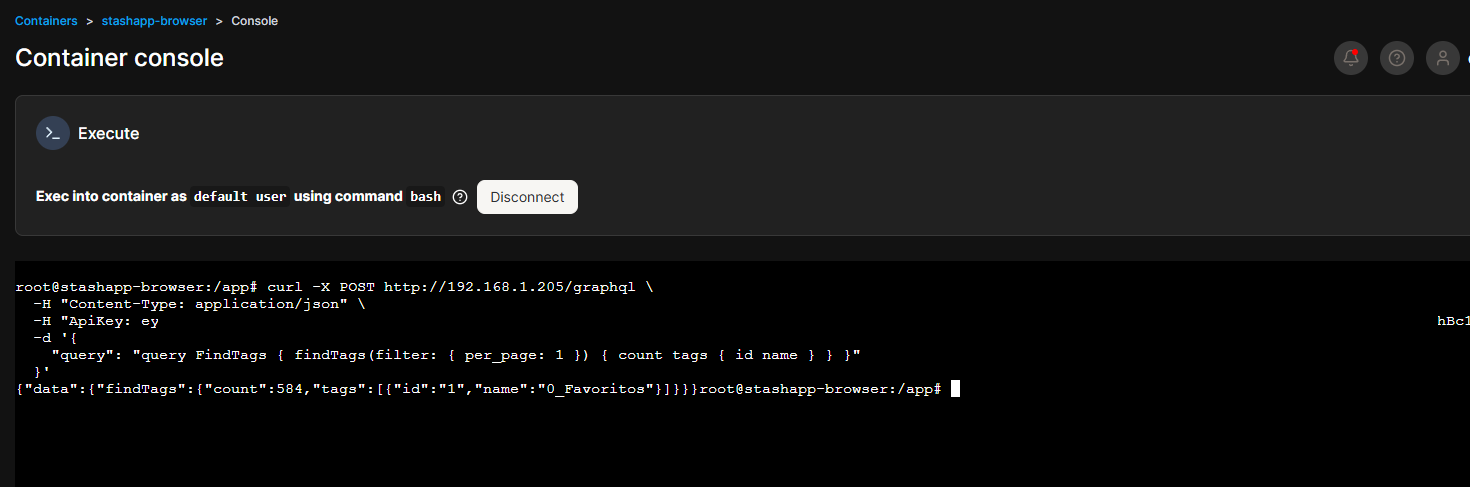
It does seem to respond.
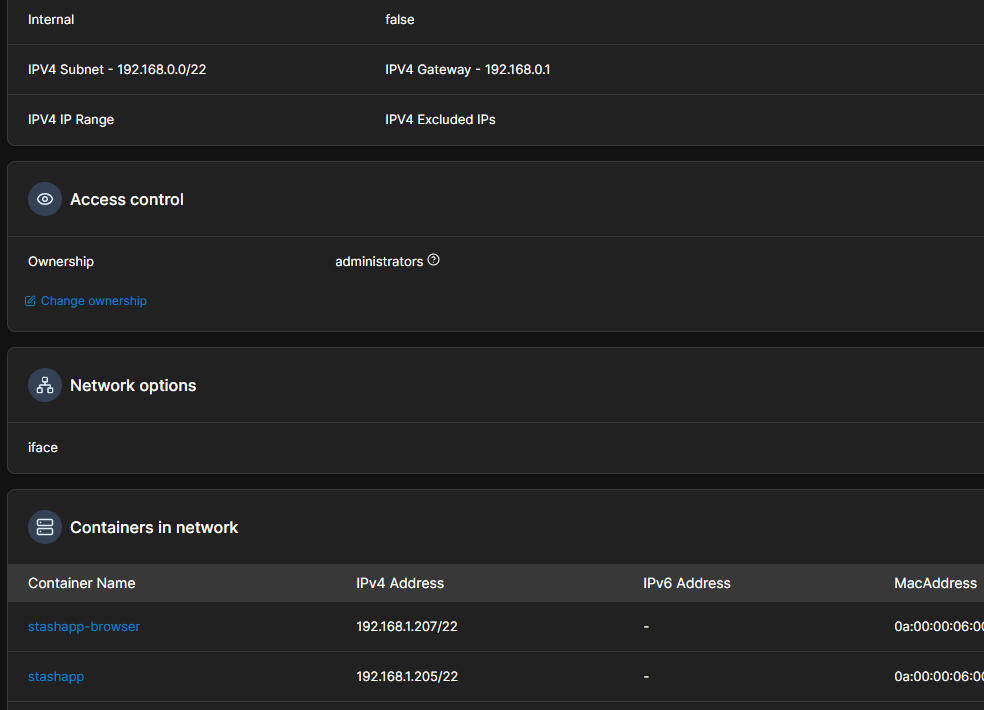
It is the same machine, but with an external network connection (both stash and stash browser have their own internal IP).
root@stashapp-browser:/app# curl -X POST http://192.168.1.205/graphql \
  -H "Content-Type: application/json" \
  -H "ApiKey: eyJhb----------Ex0" \
  -d '{
    "query": "query FindTags { findTags(filter: { per_page: 1 }) { count tags { id name } } }"
  }'

{"data":{"findTags":{"count":583,"tags":[{"id":"1","name":"0_Favoritos"}]}}}
I have created a network that takes IP addresses from my local network (DHCP with IP reservation via MAC).
However, given that graphql does return data, I would discard a connection failure since there is a connection between the two dockers.
The environment variables also appear to be correct.
I agree, Peek’s Docker container is certainly capable of reaching it. Very interesting, gotta say I’ve been looking at this for a bit now and I’m fairly stumped. What I’ll do is add additional logging at the very least so that we can maybe get some better clues!
Sorry I don’t have a better answer for you, but I’ve been releasing versions frequently so if you bare with me, we’ll get it fixed up
Sorry for the delay. I’m working on batching up the next proper release, but in the meantime, here’s a beta version with some improved logging @shoxtnbcn
docker pull carrotwaxr/peek-stash-browser:1.3.2-beta.1
Thank you for your efforts in resolving this.
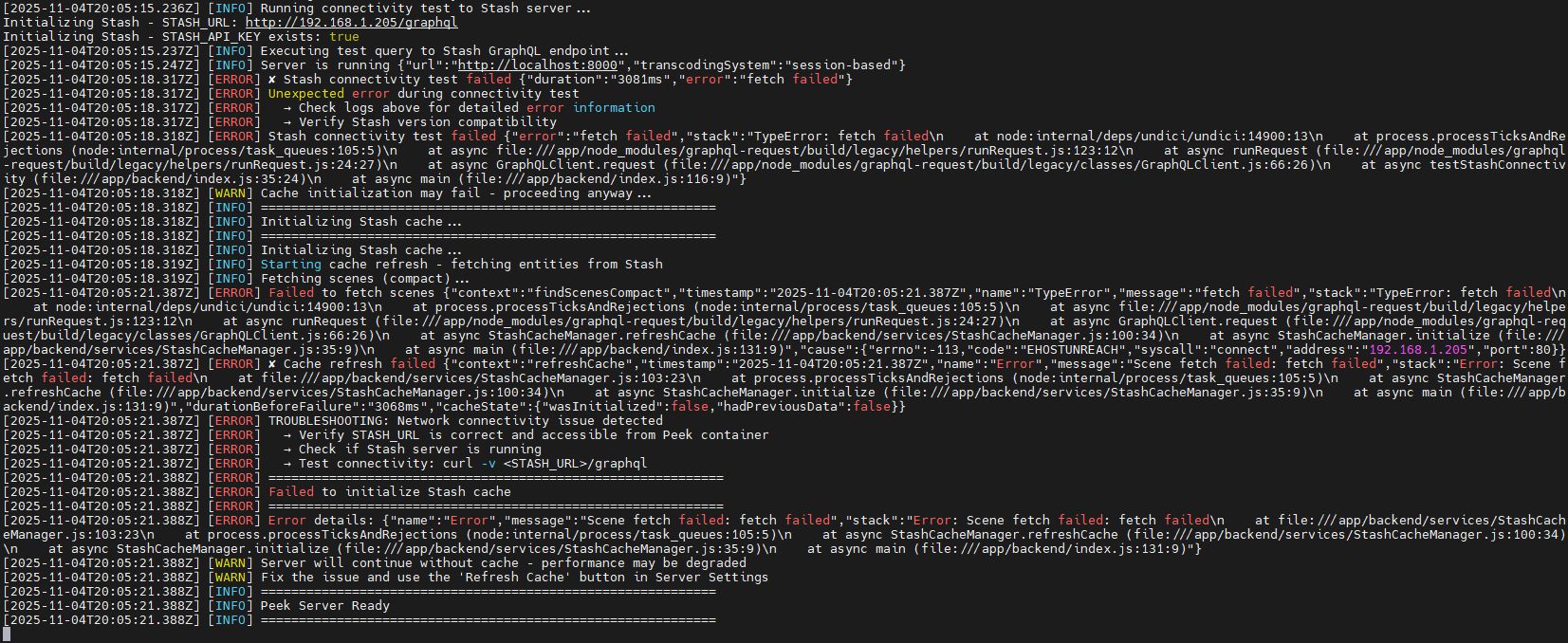
I just tested it and everything points to a connectivity issue, but when I access the console (from Portainer), it does respond.
The only thing I can think of is that when you launch the call, for some reason your container does not yet have the IP assigned (I assign them by fixed DHCP) and after a few seconds, yes, and when I launch the query a few seconds later, there is already connectivity.
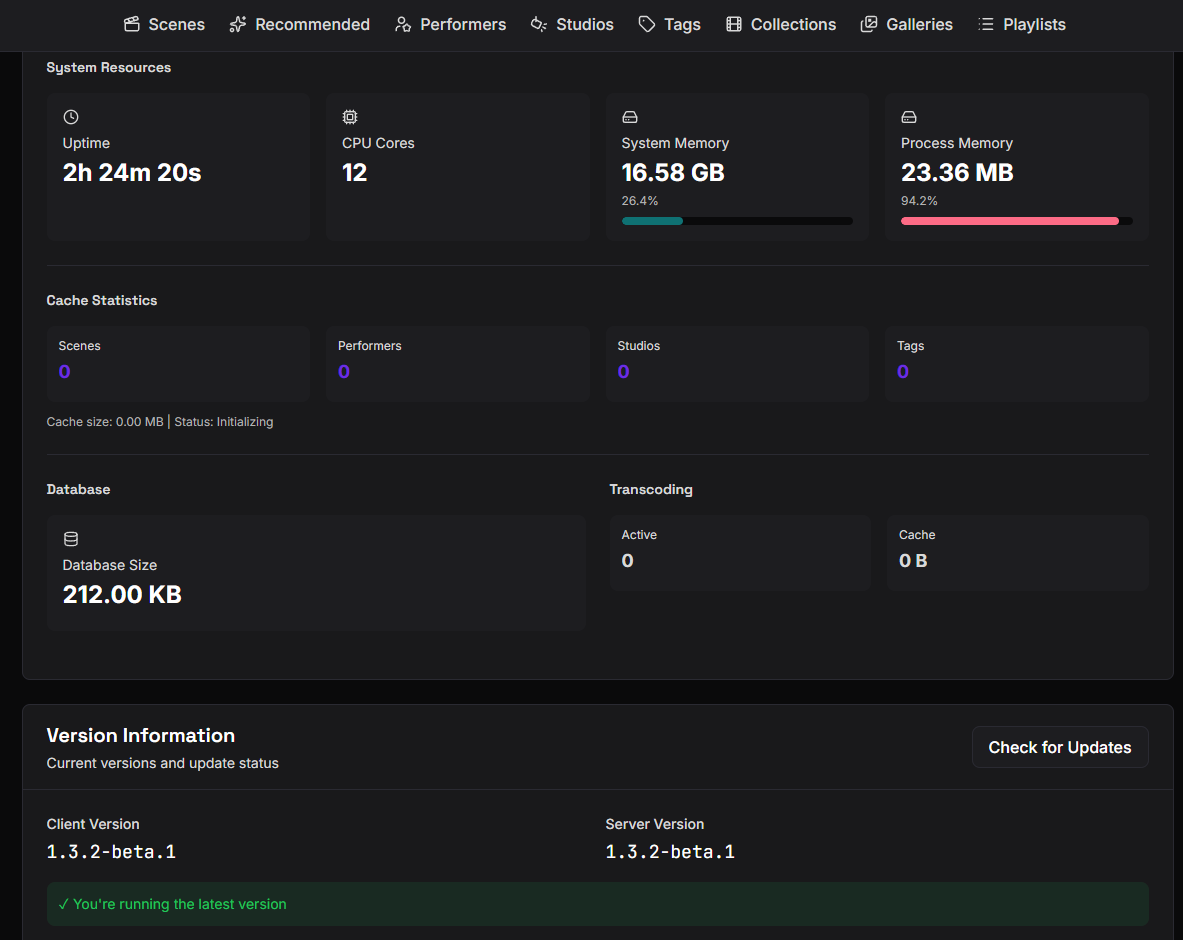
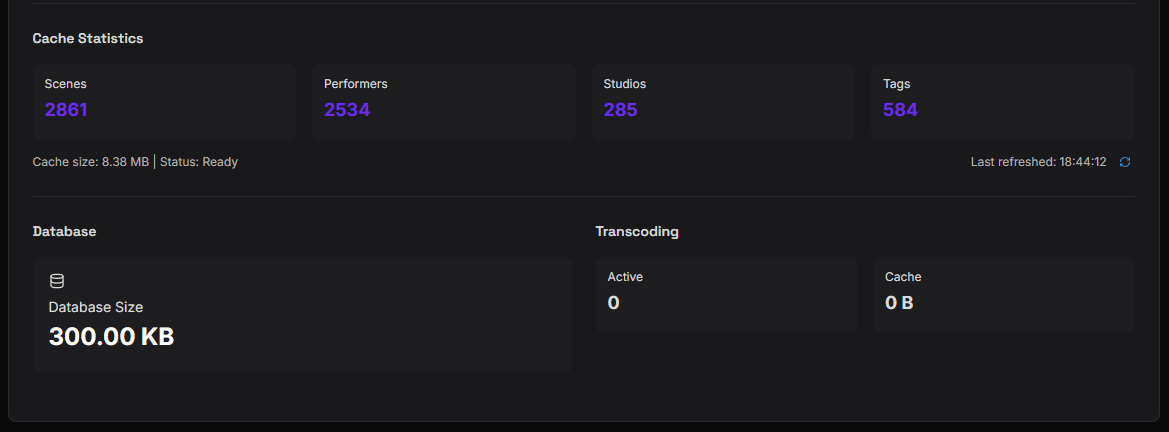
Interesting. There should be also now be a tiny blue refresh button on the Server Settings page, in the Cache Statistics section. I wonder, after everything is started up, does pressing that produce different results? And when you first load up the server even though the cache doesn’t load, does the First Time Setup wizard detect your content at the paths correctly?
Also just to eliminate possibilities, what version of Stash are you running?
I don’t see the button you’re talking about.  I have entered incognito mode in the browser, but it still does not appear.
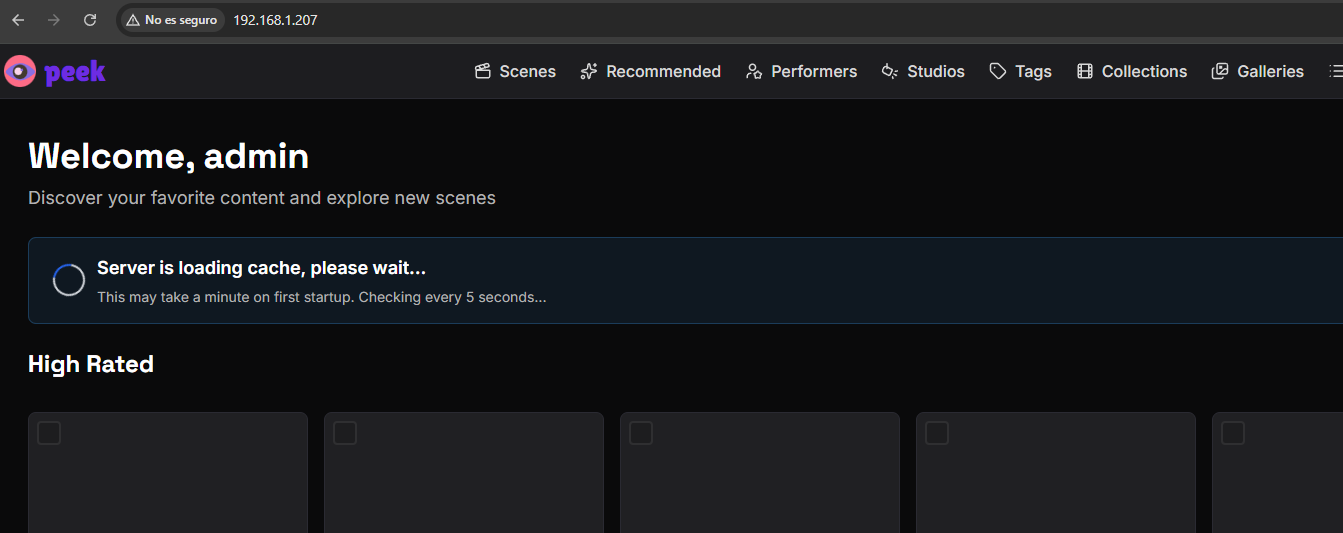
Even so, the system stays on ‘loading’ and does nothing else. Yes, it picks up the routes fine.
I am using the latest version.
v0.29.1
Build hash:869cbd49
Bah okay. The button isn’t appearing because the Stash hasn’t loaded. Fail. I’m about to push a new version in the next hour or so that has some retry logic baked in because I think I know what the issue is and you’re right, it’s just a race condition where your IP assignment hasn’t taken place yet when it tries to fetch it the first time.
It finally worked with the latest version! Thank you very much! 
Everything indicates that the network is not available as soon as the container starts up. On the third attempt, it connected and recovered all the data.
[2025-11-05T17:43:56.863Z] [ERROR] TROUBLESHOOTING: Network connectivity issue detected
[2025-11-05T17:43:56.863Z] [ERROR]   → Verify STASH_URL is correct and accessible from Peek container
[2025-11-05T17:43:56.863Z] [ERROR]   → Check if Stash server is running
[2025-11-05T17:43:56.863Z] [ERROR]   → Test connectivity: curl -v <STASH_URL>/graphql
[2025-11-05T17:43:56.863Z] [ERROR] ============================================================
[2025-11-05T17:43:56.863Z] [ERROR] ✗ Failed to initialize Stash cache (attempt 2/5)
[2025-11-05T17:43:56.863Z] [ERROR] ============================================================
[2025-11-05T17:43:56.863Z] [ERROR] Error details: {"name":"Error","message":"Scene fetch failed: fetch failed","stack":"Error: Scene fetch failed: fetch failed\n    at file:///app/backend/services/StashCacheManager.js:105:23\n    at process.processTicksAndRejections (node:internal/process/task_queues:105:5)\n    at async StashCacheManager.refreshCache (file:///app/backend/services/StashCacheManager.js:102:34)\n    at async StashCacheManager.initialize (file:///app/backend/services/StashCacheManager.js:37:9)\n    at async initializeCacheWithRetry (file:///app/backend/initializers/cache.js:99:13)\n    at async initializeCache (file:///app/backend/initializers/cache.js:153:5)"}
[2025-11-05T17:43:56.863Z] [WARN] Retrying in 10 seconds... (3 attempts remaining)
[2025-11-05T17:44:06.866Z] [INFO] ============================================================
[2025-11-05T17:44:06.866Z] [INFO] Initializing Stash cache (attempt 3/5)...
[2025-11-05T17:44:06.866Z] [INFO] ============================================================
[2025-11-05T17:44:06.866Z] [INFO] Initializing Stash cache...
[2025-11-05T17:44:06.866Z] [INFO] Starting cache refresh - fetching entities from Stash
[2025-11-05T17:44:06.866Z] [INFO] Fetching scenes (compact)...
[2025-11-05T17:44:09.720Z] [INFO] Scenes fetched in 2854ms (2861 scenes)
[2025-11-05T17:44:09.720Z] [INFO] Fetching performers...
[2025-11-05T17:44:11.150Z] [INFO] Performers fetched in 1430ms (2534 performers)
[2025-11-05T17:44:11.150Z] [INFO] Fetching studios...
[2025-11-05T17:44:11.602Z] [INFO] Studios fetched in 452ms (285 studios)
[2025-11-05T17:44:11.602Z] [INFO] Fetching tags...
[2025-11-05T17:44:11.941Z] [INFO] Tags fetched in 339ms (584 tags)
[2025-11-05T17:44:11.941Z] [INFO] Fetching galleries...
[2025-11-05T17:44:11.960Z] [INFO] Galleries fetched in 18ms (0 galleries)
[2025-11-05T17:44:11.960Z] [INFO] Fetching groups...
[2025-11-05T17:44:12.106Z] [INFO] Groups fetched in 146ms (242 groups)
[2025-11-05T17:44:12.249Z] [INFO] Invalidated all cache {"deletedCount":0}
[2025-11-05T17:44:12.254Z] [INFO] Invalidated all filtered entity caches due to Stash cache refresh
[2025-11-05T17:44:12.255Z] [INFO] ✓ Cache refreshed successfully {"duration":"5388ms","counts":{"scenes":2861,"performers":2534,"studios":285,"tags":584,"galleries":0,"groups":242},"totalEntities":6506}
[2025-11-05T17:44:12.255Z] [INFO] StashCacheManager initialized successfully
[2025-11-05T17:44:12.255Z] [INFO] ============================================================
[2025-11-05T17:44:12.255Z] [INFO] ✓ Stash cache initialized successfully
[2025-11-05T17:44:12.255Z] [INFO] ============================================================
[2025-11-05T17:44:12.255Z] [INFO] ============================================================
[2025-11-05T17:44:12.255Z] [INFO] Peek Server Ready
[2025-11-05T17:44:12.255Z] [INFO] ============================================================
Great, thank you for helping me make the app better! I hope you enjoy, and be sure to let me know if you discover any other issues